
Drawing Register Software UK: Keep Every Trade on the Current Revision
A drawing register is only useful if the sheet on every phone matches it. This guide covers what drawing register software should do for a UK builder, how a reissue should reach site, and what to check before you choose one.

- Author
- William Charlesworth-Jones
- Category
- Construction Software
- Published
- Reading time
- 11 min read
Most builders do not lose money because a drawing was wrong. They lose it because the drawing was right, it was reissued, and somebody on site was still holding the one before. Drawing control is the job of making sure that does not happen, and drawing register software is how a builder does it without a document controller.
What Is a Drawing Register?
A drawing register is the list of every drawing issued on a job. On a traditional job it is a spreadsheet or a printed sheet in the cabin with one row per drawing:
- Drawing number, such as 2317-A-110
- Title, such as Ground Floor Plan
- Discipline, such as architectural, structural or mechanical
- Current revision, as printed on the title block (Rev C, P2, C1)
- Date of issue and the reason for it
- Status, such as preliminary, for construction or superseded
- Who it was issued to
The register answers one question: which revision of this sheet should we be building from? It only answers it correctly if every copy of every sheet in use on site matches it.
Why Spreadsheet Registers Fail on Site
A spreadsheet register records what was issued. It does not control what people actually have in their hands. The common gaps are:
- The register and the sheet live in different places. The spreadsheet is on the office computer, and the drawings are in an email, a shared drive, a printed set in the cabin and a WhatsApp group.
- Old copies never go away. A PDF saved to a phone or forwarded to a subcontractor stays there after the reissue. Nothing marks it as superseded.
- Nobody knows who has the new one. The register says Rev D was issued on Tuesday. It does not say whether the bricklayer has opened it.
- Nobody knows what changed. A reissue without a revision cloud means somebody has to compare two sheets by eye, and often nobody does.
- Tasks keep the old issue. A task or a snag that had Rev C attached still has Rev C after Rev D arrives.
Each of these ends the same way: work built to a superseded drawing, then taken down and done again. Our guide to reducing rework covers the wider causes and costs.
What Should Drawing Register Software Do?
For a UK builder, drawing register software should do more than store PDFs with a version number. Look for these things.
- Revisions named as the title block names them. A revision should read Rev E or P2 everywhere, not v5. If the software reads the drawing number and revision out of the filename when you upload, so much the better.
- Superseded, not deleted. A new revision becomes current and the old one is kept and marked superseded, with its date and revision notes, so the history is there if there is ever a dispute.
- The current issue on every phone, with or without signal. A sheet opened once should open again in a basement or a rural site with no signal.
- A record of who has opened which revision. The point of a register is to know who has the current issue. The software should record when each person opens each revision and show you who has not.
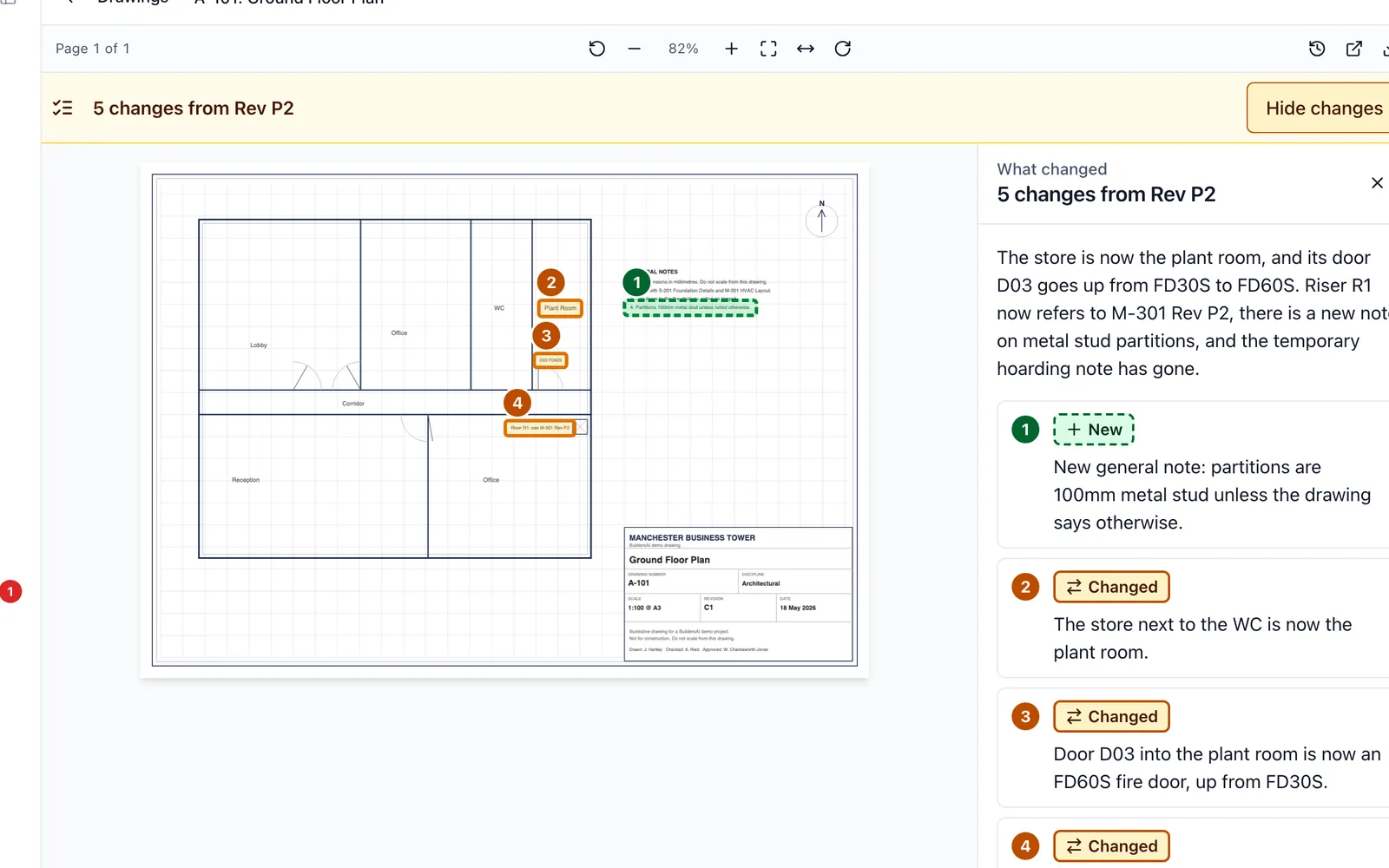
- What changed between revisions. Comparing two sheets by eye is slow and unreliable. The software should list what is new, changed or removed, and mark it on the sheet.
- Tasks that know when their drawing has been reissued. A task with Rev C attached should say that Rev D is now current.
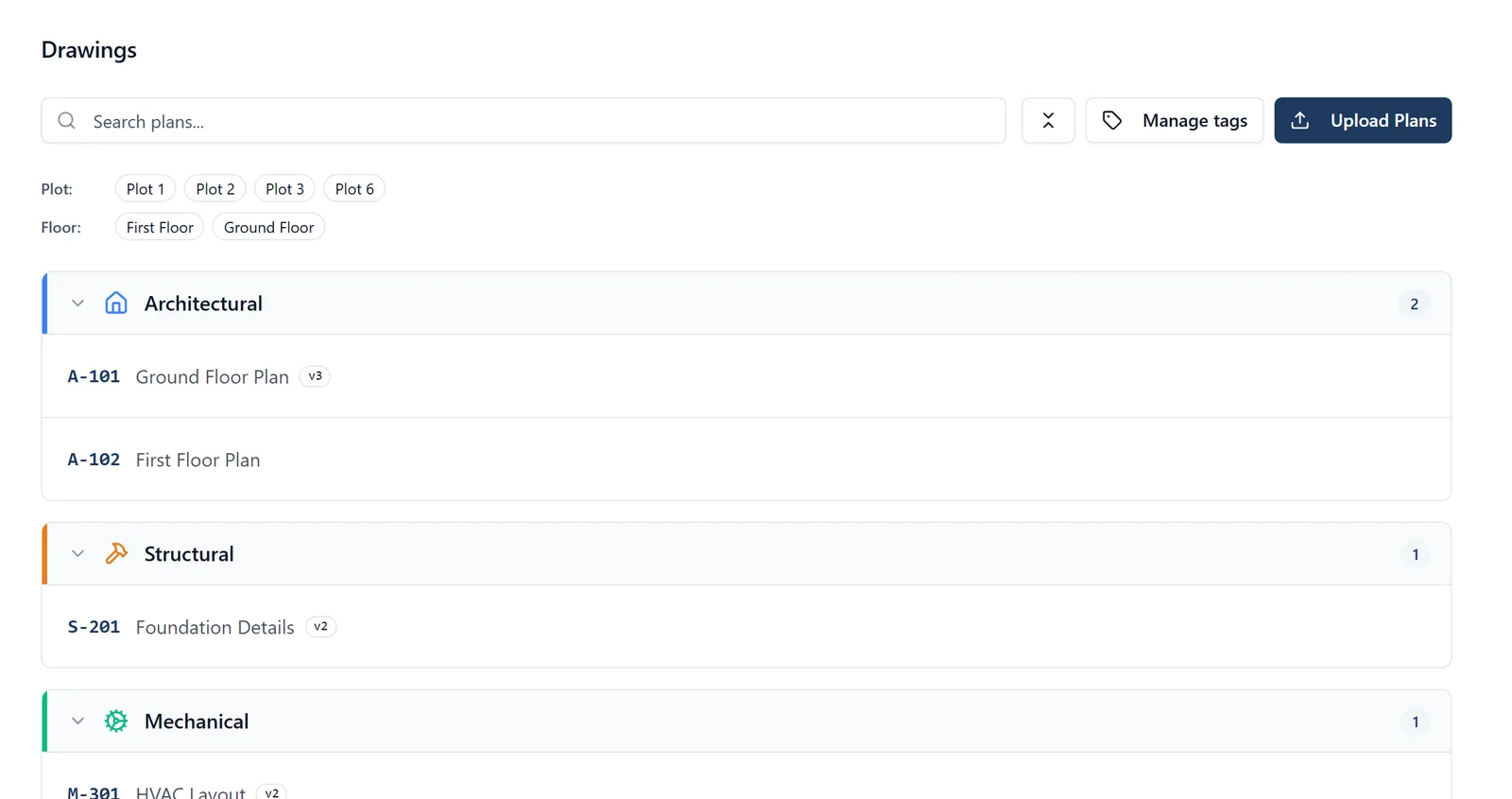
- Filtering for large sets. Headers for the kind of drawing and tags for the plot, floor or phase, so a site manager can get from 40 sheets to the 6 for one plot.
- DWG files without CAD. Engineers and architects often send DWGs. The site should be able to open them without a CAD licence.
- Each trade gets only its drawings. A groundworker does not need the electrical layouts. Sending a trade its own set, and its own reissues, keeps the noise down.
- Markup that stays with its revision. A note drawn on Rev C should stay on Rev C, because the wall it circles may have moved on Rev D.
How Should a Reissued Drawing Reach Site?
Here is the sequence a reissue should follow, using a ground floor plan going from Rev P2 to Rev C1 as the example.
- The architect sends Rev C1. The office uploads it as a new revision of the existing drawing number, not as a new drawing. Rev P2 is marked superseded.
- The right people are told. Everyone on the job, or only the trades the sheet matters to, gets one notification.
- The changes are listed. The new sheet is compared with Rev P2 and the changes are marked on it, so nobody has to hunt for them.
- Affected work is flagged. The tasks that still have Rev P2 attached are listed with the people on them.
- Firms pricing the work get the new issue. If the drawing is in a package with subcontractors who are pricing or building from it, they are sent Rev C1 and nobody else is.
- The office checks who has opened it. A day later, the register shows who has opened Rev C1 and who has not, and the site manager rings the ones who have not.
With a spreadsheet register, steps 3, 4 and 6 depend on somebody remembering to do them. Drawing register software should do them as a result of the upload.
How Do You Control Drawings Sent to Subcontractors?
Subcontractors are where drawing control usually breaks. They get a set of PDFs by email at tender stage, price from them, then build from the same files months later.
Good practice is to send each firm a defined package (the drawings and documents that trade needs, and nothing else) and to send them each reissue of a drawing in that package as it happens. You then know which issue each firm holds, which is the question that matters when their work does not match the current sheet.
Our guide to subcontractor management software covers the rest of a subcontractor’s paperwork: insurance, RAMS, inductions and invoices.
How the Drawing Register Works in BuildersAI
BuildersAI is the all-in-one site management app for UK builders. The drawing register is one part of each job, alongside tasks, the programme, photos and the job’s costs.
- For: Revisions by their title block names. A revision is shown as Rev E, Rev P2 or Rev C1 everywhere: the register, the revision history, the viewer, tasks and SiteBot’s answers. On upload in a browser, the drawing number, title, discipline and revision are read from the filename for you to check, so “2317-A-110-B Ground floor plan.pdf” is drawing 2317-A-110 at Rev B.
- For: Superseded, never deleted. A new revision becomes current and the older ones are kept in Revision History with their upload dates and revision notes.
- For: On every phone, offline. A drawing opened once on the phone is saved there and opens again without signal. See works offline.
- For: Who has opened which revision. Opening a drawing is recorded against the revision opened, including on a phone with no signal, where the record waits and goes up later. Admins see on the Drawing Awareness panel of the project dashboard how many people have opened the issue in force and who has not. It records that a sheet was opened, not that it was read or understood.
- For: What changed between revisions. When a drawing is reissued, the words on the new sheet are compared with the last issue and each change is listed as new, changed or removed and boxed on the sheet. The drawn lines are compared too, and each place the drawing looks different is marked, with before and after pictures. See what changed on a reissued drawing.
- For: Who the reissue affects. Under the changes, the tasks that still have an earlier revision attached are listed with which revision each has and the people on them.
- For: Headers and tags. Drawings sit under headers (the eleven standard disciplines, or your own such as Surveys), and carry tags such as Plot 12 or Ground Floor that filter the list in a browser and on the phone. See drawing headers and drawing tags.
- For: DWG and DXF without CAD. A DWG uploaded to the register is turned into a PDF of each sheet at its own paper size, usually within a minute, and the original file is kept for anybody who needs it in CAD. See DWG and DXF drawings.
- For: Tender packages. Narrow the register to a trade, make a package of its drawings and documents, and send it to the firms you choose. Each firm gets its own link with no account needed, and when a drawing in the package is reissued, BuildersAI asks whether to send the new issue to those firms and nobody else. The package shows which issue each firm has. Packages are made in a browser, from Mail (see the Mail help page).
- For: Markup, measuring and printing. Mark up a drawing on the phone or in a browser, and the markup stays on the revision it was drawn on. In a browser, set a sheet’s scale and measure lengths and areas, or print part of a sheet on A4 or A3 at a true scale. See measuring drawings and printing drawings.
- For: Search inside the sheets. Search the words printed on the drawings, not only their numbers and titles, on the phone and in a browser.
Snags can be pinned to the spot on a drawing (see snag pins), and a task can have a drawing attached so that it shows when its issue has been replaced. If you still keep snags on paper, our free snagging list template is a starting point.
What it does not do
So that you know before you try it:
- It is for looking at drawings, not drawing them. You cannot edit a DWG, switch its layers on and off, or view a 3D model. IFC files are stored, not viewed.
- The comparison is a guide, not a certainty. A place marked as looking different may be a line drawn a little heavier, and a change can be missed. The lines are not compared on a scan, a schedule or a set of more than 20 pages, and the app says so each time. It never says a drawing is unchanged. Always check the drawing itself.
- A photograph of a sheet is stored but not read, so it is not searched or compared. Issue it as a PDF as well.
- Search matches words, so search for what is written on the sheet (“foundation detail”) rather than asking it a question.
- Adding and changing drawings is for project admins. Everybody on the job can view, search and filter.
The steps are on the drawings help page and the drawing changes help page.
Drawing Register Software or Document Management?
A drawing register is one part of document management. Specifications, schedules, contracts and RAMS need version control too, but they are revised less often and do not usually need a revision letter, a comparison or a record of who has opened each issue. In BuildersAI those live in Files, where a revised document is uploaded as a new version of the old one and older versions are marked superseded. Our earlier guide to construction document management covers the wider subject, including naming conventions.
What to Check Before You Choose
Run a trial on a live job rather than a demo set. Upload a real drawing set, then reissue one sheet and check:
- Did the revision come through with the name on its title block?
- Is the old revision marked superseded and still in the history?
- Does the new revision open on a phone with flight mode on, once it has been opened before?
- Can you see who on the job has opened the new revision?
- Does it tell you what changed, and which tasks still have the old one?
- Can you send one trade its drawings without sending them everything?
- What does it cost for your whole team, including the site manager, the office and the trades? Per-user pricing grows every time you add a person.
BuildersAI pricing is flat by team size, with no per-user fees: Starter is £149 a month for up to 10 people, Professional is £299 a month for 11 to 50, and Business is £599 a month for 51 to 100, all plus VAT. Every plan has every feature, and every plan starts with a 14-day free trial. See the pricing page.
FAQ
What is drawing register software?
Software that keeps the list of every drawing on a job with its current revision, marks older revisions as superseded, and gives everybody on the job the current issue. Good drawing register software also records who has opened each revision and shows what changed between issues.
What does superseded mean on a construction drawing?
A superseded drawing is a revision that has been replaced by a later one. It should be kept for the record but not built from. Drawing register software keeps superseded revisions in the drawing’s history and makes the current revision the one that opens.
How do I know which revision my subcontractors have?
Send drawings from the register rather than by email. In BuildersAI a tender package records which issue of each drawing each firm has been sent and whether they have downloaded it, and asks whether to send a reissue to the firms on that package.
Can I open DWG drawings on site without CAD?
In BuildersAI, yes. A DWG or DXF uploaded to the register is turned into a PDF of each sheet, which opens on the phone and in a browser. The original DWG is kept for anybody who needs it in CAD.
Does BuildersAI tell me what changed on a reissued drawing?
Yes. It compares the words on the new sheet with the previous revision and lists what is new, changed or removed, boxes each change on the sheet, and marks places where the drawn lines look different. It is a guide: always check the drawing itself.
How much does drawing register software cost?
BuildersAI is £149 a month plus VAT for up to 10 people, £299 for 11 to 50 and £599 for 51 to 100, with no per-user fees and a 14-day free trial. The drawing register is included in every plan.
BuildersAI
See a Reissue Reach Site
See a drawing reissued, its changes marked and the people still on the old revision listed, on a 30-minute demo.
14-day free trial. Every feature. No card.
Written by
William Charlesworth-Jones
Founder, BuildersAI
William grew up in a family that builds houses for a living and has been around construction sites for as long as he can remember. He has seen first hand that eight-figure sites are often run on WhatsApp and spreadsheets, and started BuildersAI to cut the invisible costs that take chunks of margin across a site. His aim is for BuildersAI to be the all-in-one site management platform built in the UK, for UK sites.
LinkedIn