
Price enquiries
Ask several merchants for a price at once, compare the quotes side by side and place the order.
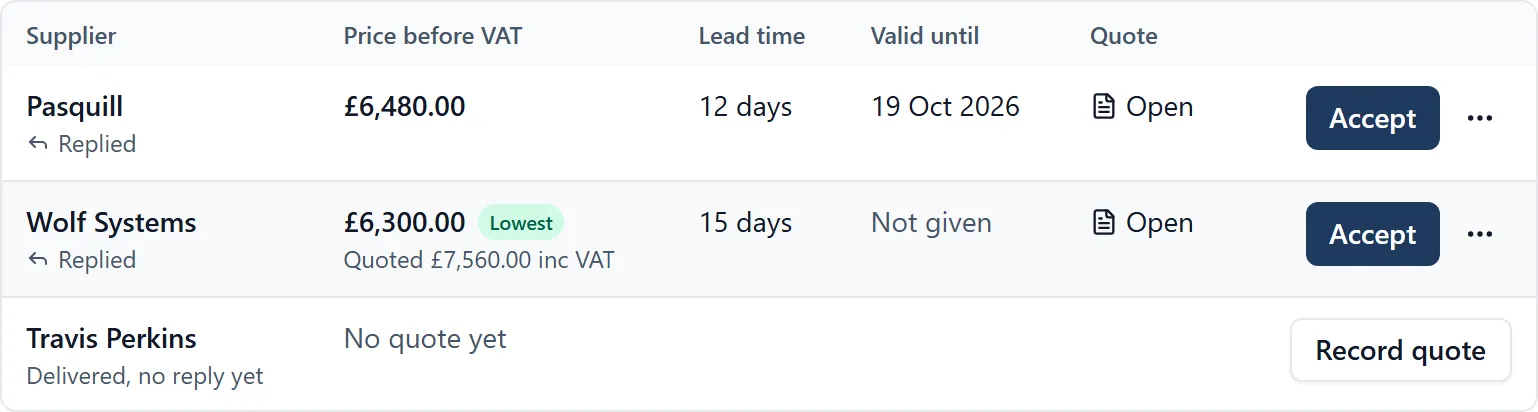
Getting three prices usually means three emails, three replies in three inboxes and a sum on the back of a delivery note. An enquiry asks them all at once and keeps the answers in one table on the job.
What it does
- Say what needs pricing, pick the suppliers from your directory or type their addresses, and send
- Each supplier gets their own email and their own conversation, so nobody sees who else you asked
- The message comes filled in asking for the price, the lead time and how long the price holds
- Replies come back to the enquiry, and a quote they attach is filed on the job
- Record each price as they gave it, with or without VAT, and a price given over the phone too
- Every supplier is a row: whether they replied, their price, the lead time and how long it is valid
- Prices are compared before VAT, and the lowest is marked once there are two
- Accept a quote and the order is written for you to check, then sent to that supplier only
- Tick a box to tell the others they were not chosen, in a note that never mentions the price
- Tick another to add the delivery to the Programme, with the supplier and your order reference on it
Why it matters on site
The lowest price is not always the one to take, which is why the lead time and the date the price holds until sit beside it. Afterwards the enquiry says who it was ordered from, at what price, when and by whom, so nobody has to remember.
Who sees it
An enquiry an administrator raises is for administrators only, with every reply, quote and file that comes back, until they open it to members. One a member raises is seen by members and administrators. Followers do not see Mail at all.
Prices are typed in by a person: BuildersAI does not read them out of a quote document or number purchase orders. When the invoice arrives, it goes on the job’s Cost Tracker with a cost code. It is a browser job.
Which plan
This is included in every plan, from £149 a month. Plans differ by how many people they seat, not by what the software does. See pricing.
How to use it
The manual page for this is in the Help Centre, and it is the same guide SiteBot reads inside the app. Read the guide.