See who is on each site, what is done, the latest photos and whose cards are in date, from your phone.
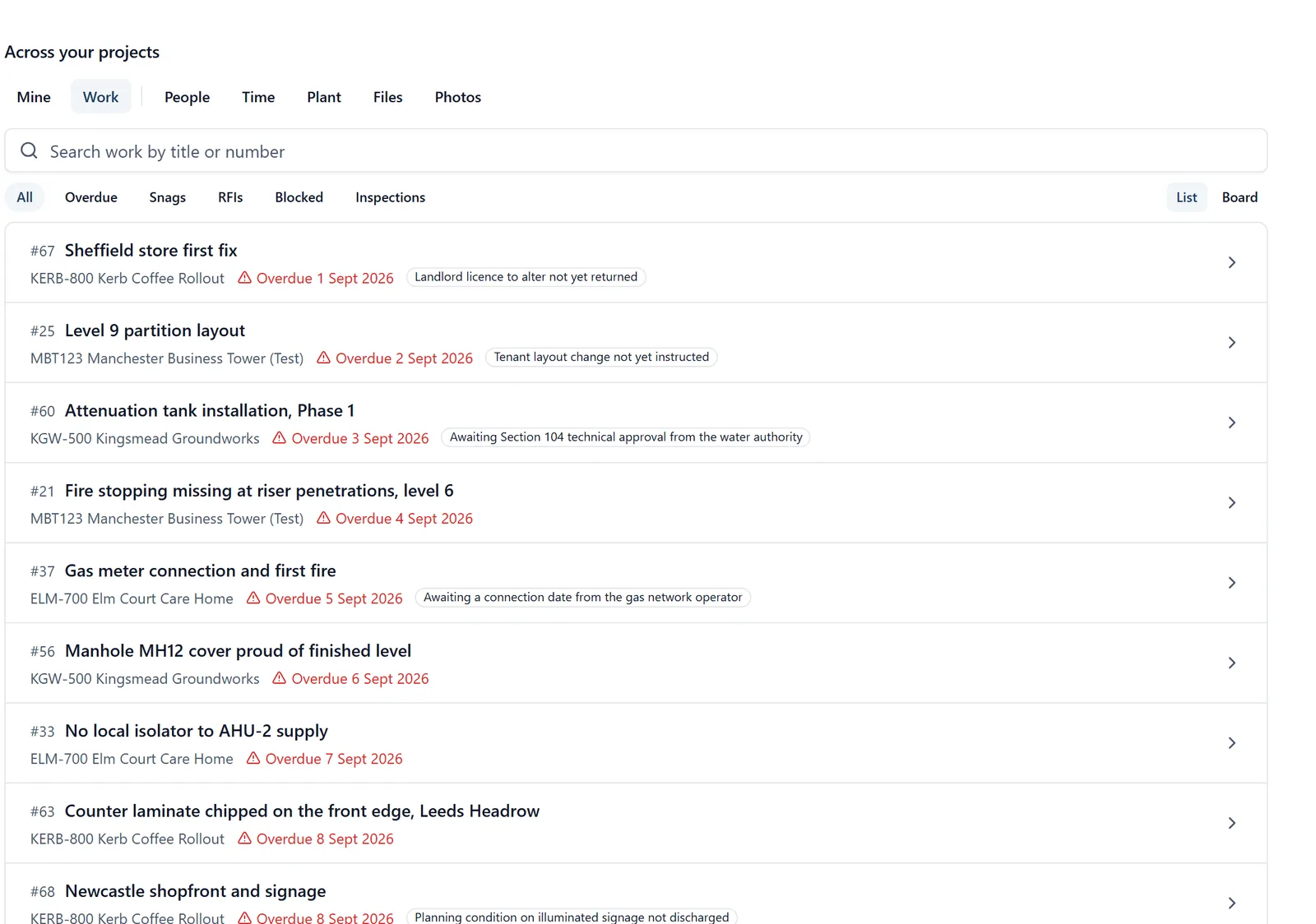
One view of every live site: who is there, what is done and the latest photos, on your phone or computer. Site managers, trades and the office work from the same drawings, tasks and photos.
No visibility without visiting
Five sites. You find out what is happening by ringing round or driving out.
One view shows attendance, task completion and the latest photos from every site, on your phone or in the browser.
Drawings out of date on site
A revised drawing goes by email and may not reach the trades. Weeks later, it is built to the old one.
Upload a drawing once. Every phone on every site has the latest revision, and the revision history is kept for you.
No attendance record
A subcontractor invoices for 40 days on site. You have no way to verify it. You pay it or dispute it and damage the relationship.
Everyone checks in and out on their phone, so there is a dated record of who was on site and for how long to check an invoice against. A missed check-out is flagged for correction rather than guessed, and every correction is logged.
Compliance stored in people's pockets
CSCS cards and training certifications are in wallets, on personal phones, and in spreadsheets that are months out of date. An HSE visit could be a problem.
Every person's certifications, CSCS cards, and training records are in the app with expiry alerts.
Rework disputes with no evidence
A trade says the work was done correctly. You have no photos. You either pay for the rework or dispute it. Both options cost money and time.
Trades take a photo when a task is done, with the time and place on it. Disputes are settled with evidence, not arguments.
Every live job in one view: work, people, time, plant, files and photos.
Attendance tracking
Everyone checks in and out on their phone, so you can see who is on each site, when they arrived, and how long they stayed. No sign-in sheets, no calling round, and each check-in records how far from the site it was made.
Drawing distribution
Upload a revised drawing and every phone on site has it. No email chains, no outdated versions in circulation.
Site photos
Every photo has the time and place on it and sits on its task.
Compliance and certifications
CSCS cards, training records, and expiry alerts for every person across your portfolio. One place, always current.
Task management
Assign work to any person on any site. Track completion without ringing anyone.
Works with no signal
The phone app works in basements, on rural plots and anywhere coverage is poor, and catches up when signal returns.
One download per plot: drawings at their current revision, inspections, snags, photos and documents, with an index to print. A copy of the record, not a warranty.
The quote, every supplier invoice with its cost code, and what the client has paid on each job, and whether you are ahead of the client or behind. Admins only.
Extra work priced and signed by the client on their phone before it starts, then added to the job’s total.
Who is on which site each day across your portfolio, planned a week at a time and sent to each person’s phone.
Each person reads the site rules and signs on their own phone, the site manager countersigns, and you can see who has not done theirs.
BuildersAI shows every site in one place: who is on it, what is done and the photos, with each site's cards and their expiry dates on its register. It replaces the WhatsApp groups, paper drawings and compliance spreadsheets, and the phone app works with no signal. We set your first job up from your own documents, so you are running in a day.
| Plan | Team | Price |
|---|---|---|
| Starter | Up to 10 users | £149/month + VAT |
| Professional | 11 to 50 users | £299/month + VAT |
| Business | 51 to 100 users | £599/month + VAT |
No per-user fees. Unlimited sites on every plan. Built for UK construction: CSCS cards, RAMS and UK terms. The phone app works with no signal. Every plan starts with a 14-day free trial.
FAQ 07
Property developers managing multiple construction sites typically use a combination of tools: WhatsApp for communication, email for drawings, spreadsheets for compliance records, and phone calls for progress updates. BuildersAI puts all of these in one app, with every live site in one view.
Construction site management software with a multi-site dashboard allows property developers to see attendance, task progress and photos across all their sites as the work is recorded. Each person checks in and out on their phone, so the dashboard shows who is on each site and when. Task completion is logged by the team on site and visible as soon as the phone syncs. Photo logs give visual evidence of progress at each stage without a site visit.
Not knowing who is on site, not finding the latest drawing, disputes at invoice time with no photos, CSCS cards in people's wallets, and work handed out by word of mouth with no record.
Most established construction software platforms, including Procore, Fieldwire and Buildertrend, were built in the United States. BuildersAI is built specifically for UK property developers and construction teams, with CSCS cards and other UK cards and their expiry dates, RAMS, site inductions and UK construction terms.
Costs vary significantly. Procore publishes no prices: it quotes an annual fee based on the products you take and your annual turnover. Platforms designed for UK SME developers and builders publish their prices. BuildersAI: Starter £149/month + VAT for up to 10 users. Professional £299/month + VAT for 11 to 50 users. Business £599/month + VAT for 51 to 100 users. No per-user fees. For teams above 100 users, contact us for a tailored quote. A developer managing ten sites with fifteen team members pays one flat fee, £299 a month + VAT on Professional.
Yes, if it is built for it. Sites often have no signal in basements and on rural jobs. The BuildersAI phone app works with no signal and catches up when signal returns. The web app needs a connection.
BuildersAI is construction site management software built for UK builders and property developers. It gives developers one view across all their sites: who is on site, what tasks have been completed and what photos have been taken, with each site's cards and their expiry dates on its register. Starter £149/month + VAT for up to 10 users. Professional £299/month + VAT for 11 to 50 users. Business £599/month + VAT for 51 to 100 users. No per-user fees. For teams above 100 users, contact us for a tailored quote. No implementation project required.
Get started
A 14-day free trial with every feature, no card and no contract. We set your first job up from your own documents, so you are running in a day.
