
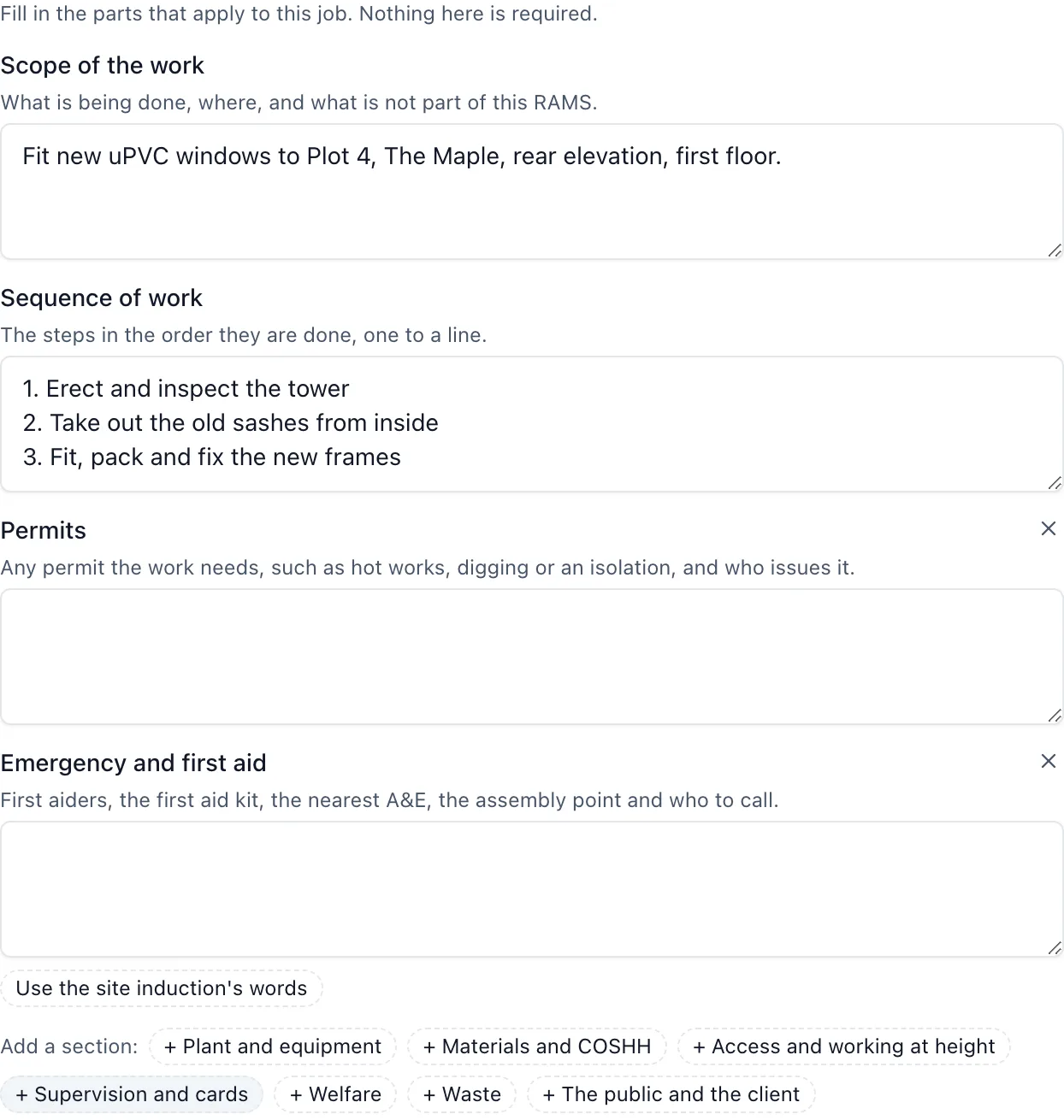
A RAMS’s method statement is written in short sections instead of one long box. Each section asks one question, such as what the work is, the order it is done in, or what happens in an emergency. Nothing is required. Fill in the sections that apply to the job and leave the rest.
Who can do what:
- Admins and members of a job write a job’s RAMS, and its method statement, as before
- The company’s owners and admins write the sections into the company’s RAMS library and the company’s RAMS form
Writing the method statement
- Open the job and go to RAMS, then start a new RAMS, or open a draft and edit it
- Under Method statement, three sections are open: Scope of the work, Sequence of work and Emergency and first aid. Write a few lines in each that applies. Each one has a line under its heading saying what belongs there
- To add another part, press its button under the sections, such as + Permits or + Welfare
- Anything that does not fit a section goes in Anything else, at the foot
- Save the RAMS, then sign it as usual
The sections are:
- Scope of the work: what is being done, where, and what is not part of this RAMS
- Sequence of work: the steps in the order they are done, one to a line
- Plant and equipment: machines, power tools and lifting gear, and who is trained to use them
- Materials and COSHH: what is used or made, how it is stored, and any COSHH assessments
- Access and working at height: ladders, towers, scaffold and edge protection
- Permits: any permit the work needs, such as hot works, digging or an isolation, and who issues it
- Supervision and cards: who supervises, and the cards or training the work needs
- Welfare: toilets, drinking water, somewhere to eat and to dry off
- Emergency and first aid: first aiders, the first aid kit, the nearest A&E, the assembly point and who to call
- Waste: what waste is made, where it is kept and how it leaves site
- The public and the client: keeping neighbours, the public and the client safe, and telling them what is happening
To take a section off, empty it and press the cross beside its heading.
Using the site induction’s words
If the job has a site induction slideshow that has been published, Emergency and first aid and Welfare (once you have added it) offer Use the site induction’s words, when the slideshow has something to say about them. Pressing it copies what the induction says about first aid, fire and emergency, or welfare into the section, under anything already written there. Check it says what this work needs: the induction is about the whole site. Once its words are in the box, the button goes.
Nothing is copied unless you press the button.
How the RAMS reads
The RAMS shows each section you wrote under its heading, on screen and on the printed copy. Sections left empty do not appear.
A method statement written before sections existed, or written only in Anything else, reads exactly as it always did, with no heading added.
Once the RAMS is signed, its method statement is fixed with the rest of it, as before. To change it, revise the RAMS.
Your company’s sections
Owners and admins can write the sections once for the whole company:
- In the RAMS library (on All projects), a company RAMS that is filled in has the same sections. A job’s RAMS started from it, or issued to the job, starts with them
- Under Form defaults in the RAMS library, the standard method statement can be written in sections too. A new RAMS on a job with no method statement of its own starts with them
A job’s own standard method statement (its RAMS template) is still one box. A new RAMS on that job starts with it in Anything else.
On the phone
The RAMS form in the app has the same sections, the same buttons to add one, and Use the site induction’s words. It works with no signal, like the rest of the form.
If something will not save
- “A section of the method statement is too long”: keep each section to 4,000 characters or fewer. Anything else is the exception: it can hold up to the whole method statement’s 10,000, so a long method statement written before sections still saves
- “The method statement is too long”: the whole method statement, with the headings of the sections you used, has to be 10,000 characters or fewer. The count appears under the sections when you get close
- “A RAMS cannot be changed once it has been signed”: revise the RAMS instead