
Subcontractor Management Software UK: Firms, Insurance, RAMS and Invoices in One Place
Subcontractor management software keeps each firm's insurance, people, RAMS, drawings and invoices in one place. This guide covers what it should do for a UK builder, how a firm moves through a job, and what to check before you choose.

- Author
- William Charlesworth-Jones
- Category
- Construction Software
- Published
- Reading time
- 10 min read
Most builders manage subcontractors from four places: insurance certificates in an email folder, RAMS in a lever arch file in the cabin, drawings sent by WhatsApp, and invoices in the accounts package. Each works on its own. The trouble starts when you need an answer that crosses them, such as whether the roofer starting on Monday has current insurance, a signed RAMS and the latest roof plan.
This guide covers the software side. For the wider job of coordinating trades on site (programme, communication, sign-offs and keeping good firms coming back), see our guide to subcontractor management in the UK.
What Is Subcontractor Management Software?
Subcontractor management software is a system for keeping, in one place, everything a builder needs to know about the firms working for it and the work they do on each job. For a UK builder that usually means:
- The firm: its trade, its people and its contact details
- Its documents: insurances, accreditations such as CHAS, SafeContractor or Constructionline, its standard RAMS, each with an expiry date
- Its people on site: inductions, CSCS and other cards, and signatures on the RAMS
- Its information: the drawings and documents it is pricing or building from
- Its work: tasks, inspections and stage sign-offs
- Its money: the agreed price, its invoices, CIS deductions and the reverse charge
Some products for large main contractors add pre-qualification questionnaires and supply chain portals. A builder with 5 to 100 people rarely needs those. What it needs is to know, before a firm starts, that the paperwork is in date, and afterwards, that the invoice matches what was agreed.
What Should It Do?
Keep each firm’s documents with their expiry dates
Each document should carry the date it runs out, and the software should warn you in time to chase a new one. A firm with one document out of date should stand out on the list. A broker’s certificate covering several insurances on one page should be stored once with a date for each insurance.
Let the firm send documents without an account
Asking a subcontractor to sign up for your software so they can upload a certificate is how a system gets ignored. The firm should get a link by email, upload each document, say what it is and when it runs out, and be done. You then check it before it counts.
Get RAMS signed by the people doing the work
A subcontractor’s RAMS should be read and signed by their operatives on the job, not just filed. It should be possible to brief one RAMS to everyone from a firm at once, and to pick up people who join the firm later.
Induct their people and record their cards
Each operative should do the site induction on their own phone on the first morning, with their emergency contact and their skills card, and the site manager should countersign it. Cards should carry their expiry dates.
Send each firm only its drawings
A firm pricing or building the work should get the drawings and documents for its trade, and every reissue of those drawings, without being sent the whole set. You should be able to see which issue each firm holds. Our guide to drawing register software covers this in detail.
Record their work, and who signed it off
Inspections and stages should be signed by the person who did the work, with a photo, and then signed off or sent back by the site. A main contractor or client following the job should be able to raise snags against it.
Hold their invoices to the agreed price, with CIS
The agreed price should go on a purchase order the firm approves. Each invoice should be put against the order and refused if it goes over what is left. CIS should be worked out on the labour, and the reverse charge applied where the firm charges no VAT. Our guide to construction purchase orders covers committed costs and matching invoices to orders.
Show each firm only its own work
A subcontractor on your job should see its own tasks and drawings, not your prices, your other trades’ invoices or your client’s figures.
How a Subcontractor Moves Through a Job
Here is a firm’s path through a job, using an electrical subcontractor as the example.
- Before they are appointed. You send the firm a tender package with the electrical drawings and the specification. They download the drawings from their own link and send a price. You record it and compare it with the others.
- Their paperwork. You ask the firm for its public liability, employers’ liability and standard RAMS from a link. They upload them, you accept them, and each document’s expiry date is recorded.
- Their order. You raise a purchase order for the agreed price, and the firm approves it from the email.
- Their RAMS. You attach their RAMS to the job and brief it to everyone from the firm. Each operative signs it on their phone.
- Their first morning. Each operative does the site induction on their phone, gives an emergency contact and their card, and says who they work for. The site manager countersigns.
- Their work. First fix is signed by the electrician with a photo and signed off by the site manager. Snags are pinned to the drawing.
- Their invoices. Each invoice is put against the order, CIS is worked out on the labour, and it goes to your accounts.
- A month later. Their public liability runs out. You are emailed a month before, a week before and on the day, and you ask for the new certificate from the same list.
How Subcontractor Management Works in BuildersAI
BuildersAI is the all-in-one site management app for UK builders. Subcontractors are handled across several parts of it, which share the same people and the same jobs.
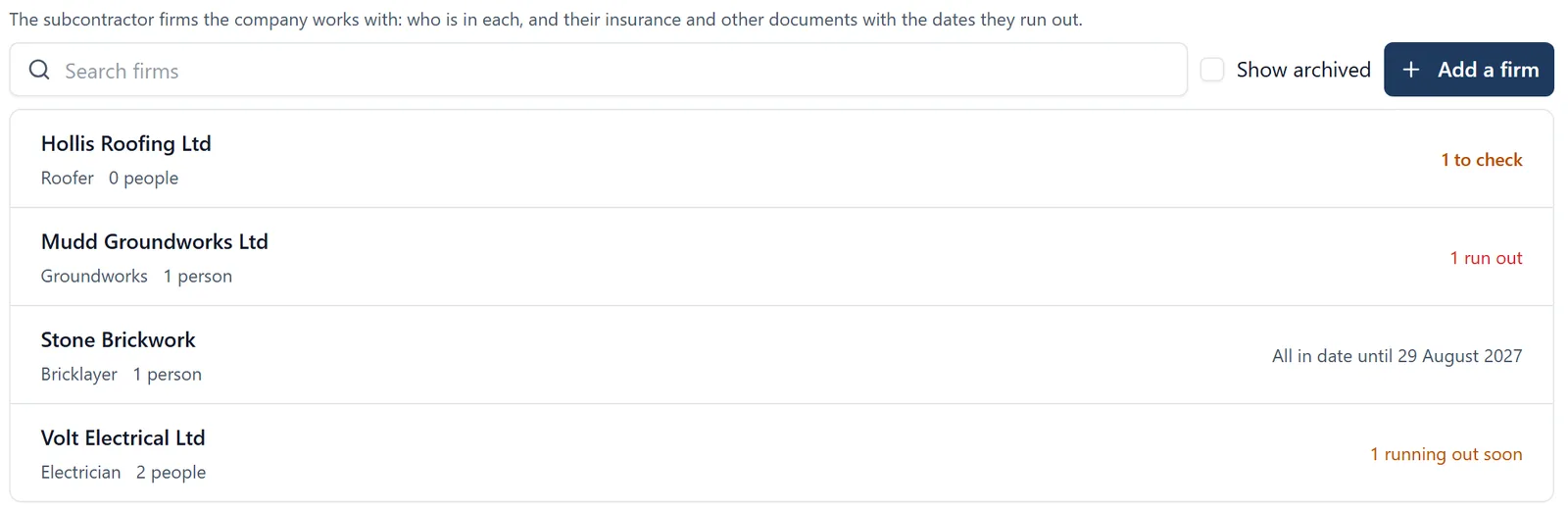
- For: Subcontractor firms. Keep each firm with its trade, its people and its documents: public liability, employers’ liability, contractors’ all risks and professional indemnity insurance, accreditations such as CHAS, SafeContractor or Constructionline, trade bodies and the firm’s standard RAMS or method statement. Each document shows whether it is in date, running out within 30 days, or has run out. See subcontractor firms.
- For: Emails before anything runs out. Your company’s owners and admins are emailed a month before a document runs out, a week before, and on the day.
- For: Every out-of-date document in one list. Out of date or running out on the Firms tab lists every firm with something to chase, and Ask for a current one sends the request with those documents already ticked.
- For: Documents from a link, no account. Ask for documents emails the firm a link where they upload each document, say what it is and when it runs out. One certificate covering several insurances arrives as one document per insurance. What they send waits for you to accept or turn down.
- For: RAMS briefed to a whole firm. Choose the firm under Who signs it? and everyone from that firm on the job is added, including anybody who joins later. Attach the firm’s own RAMS as a PDF and it is read and signed on the phone in the same way. Once somebody has signed, that version cannot be changed. See RAMS.
- For: Inductions and cards. Each person does the site induction on their own phone, with an emergency contact, their skills card and who they work for, and the site manager countersigns. CSCS and other cards are read from a photo of the card and carry expiry alerts.
- For: Tender packages. Send each trade only its drawings and documents, from the drawing register, and send each reissue to the firms pricing or building from it. Each firm has its own link and needs no account.
- For: Task invitations. Invite a trade, building control or the client to a task at a set time. They answer Yes, Maybe or No from the email with no account, and every answer is kept on the task. See task invitations.
- For: Stage sign-off. The person who did the work signs the stage with a photo, on their phone or yours, and a project administrator signs it off or sends it back with a reason. See stage sign-off.
- For: Snags from the people following the job. A project admin can let followers raise snags, which is useful when a main contractor follows a subcontractor’s job or a client walks round with a list. Snags can be pinned to the spot on a drawing.
- For: Purchase orders the firm approves. Raise an order for the agreed price and send it. The firm approves or declines from a link, with no account, and the order records who answered and when. See purchase orders.
- For: Invoices with CIS and the reverse charge. Put each supplier invoice against its order, and one that would take more than is left is refused. Tick CIS subcontractor invoice, enter the labour, and the deduction at 20% or 30% is worked out on the labour only. Tick the reverse charge when the firm charged no VAT. Invoices go to QuickBooks Online as bills when you press Send, or to QuickBooks, Xero or Sage as a bill file.
- For: Who sees what. A subcontractor added to a job as a follower sees only the tasks they are involved in, not the whole project: not the site diary, not who is on site, and not the job’s costs or supplier invoices. See permissions.
- For: Who is where. The people planner sends each person their sites for the week, as a push on their phone or by email.
The steps for firms are on the subcontractor firms help page, and for CIS on the supplier invoices help page. Our free CIS calculator and reverse charge VAT calculator work out a single invoice, and the RAMS template is a starting point for your own.
What it does not do
So that you know before you try it:
- An out-of-date document never stops anybody working. It is shown on the firm and emailed about, for your information. Whether a firm starts is your decision.
- The card register only covers admins and members of a job. Subcontractors added as followers do not appear in it, so an empty list of expired cards is not proof that everybody on site is in date.
- It does not file your CIS return or check a subcontractor’s status with HMRC. It works out the deduction at the rate you set (gross, 20% or 30%) and never guesses a rate. Verify subcontractors with HMRC and file the monthly return from your accounts package, as you do now.
- It does not check a card against the CSCS database. It records the card and its expiry date from the photo, for you to check.
- There is no live Xero link. Xero takes bills as a file you import. QuickBooks Online is a live connection.
- The Firms tab is in a browser, for your company’s owners and admins. On the phone, a worker doing their induction says who they work for.
What to Check Before You Choose
Try it with one real firm on one live job. Check:
- Can the firm send its insurance without making an account?
- Are you told before a document runs out, and how far ahead?
- Can one RAMS be briefed to everyone from a firm, and do the operatives sign on their own phones?
- Can you send a firm its drawings and its reissues, and see which issue it has?
- Is each invoice held to the agreed price, and is CIS worked out on the labour only?
- What can the subcontractor see of your job?
- What does it cost when the trades are on it? Per-user pricing grows with every operative you add.
BuildersAI pricing is flat by team size, with no per-user fees: Starter is £149 a month for up to 10 people, Professional is £299 a month for 11 to 50, and Business is £599 a month for 51 to 100, all plus VAT, with a 14-day free trial. A person on four of your jobs counts once. A firm sending its documents, approving an order or answering a task invitation from a link does not need an account. See the pricing page.
FAQ
What is subcontractor management software?
Software that keeps each subcontractor firm’s people, insurances, accreditations and RAMS in one place with their expiry dates, and links the firm to the jobs it works on: inductions, drawings, tasks, purchase orders and invoices with CIS.
How do I track subcontractor insurance expiry dates?
Record each certificate against the firm with the date it runs out, and have the software warn you. In BuildersAI each document shows whether it is in date, running out within 30 days or run out, and your company’s owners and admins are emailed a month before, a week before and on the day.
Do subcontractors need an account to send their documents?
Not in BuildersAI. Ask for documents emails the firm a link where they upload each one and say when it runs out. The link works for 30 days, and what they send waits for you to accept it.
Does subcontractor management software handle CIS?
BuildersAI works out the CIS deduction on each subcontractor invoice at 20% or 30% of the labour, never on materials, and shows the amount to pay. You still verify subcontractors with HMRC and file the monthly CIS return from your accounts package.
Can a subcontractor see my prices?
In BuildersAI a subcontractor added to a job as a follower sees only the tasks they are involved in, not the whole project. Supplier invoices and the job’s costs are seen only by the job’s admins and the company’s owners and admins.
How much does subcontractor management software cost?
BuildersAI is £149 a month plus VAT for up to 10 people, £299 for 11 to 50 and £599 for 51 to 100, with no per-user fees and a 14-day free trial. Subcontractor firms, RAMS, inductions, purchase orders and supplier invoices are in every plan.
BuildersAI
See a Firm's Paperwork in One Place
See a subcontractor’s insurance, RAMS, order and invoice on one job, on a 30-minute demo.
14-day free trial. Every feature. No card.
Written by
William Charlesworth-Jones
Founder, BuildersAI
William grew up in a family that builds houses for a living and has been around construction sites for as long as he can remember. He has seen first hand that eight-figure sites are often run on WhatsApp and spreadsheets, and started BuildersAI to cut the invisible costs that take chunks of margin across a site. His aim is for BuildersAI to be the all-in-one site management platform built in the UK, for UK sites.
LinkedIn