
Site Inspection Apps UK: Your Own Forms, Checklists and Walk-Round Reports on a Phone
Most builders already have their inspection sheets: a scaffold handover check, a daily site check, a van check. The question is how to get them filled in on site, checked and kept. Here is what a site inspection app should do, and how forms and walk-round reports work in BuildersAI.

- Author
- William Charlesworth-Jones
- Category
- Construction Software
- Published
- Updated
- Reading time
- 9 min read
What Is a Site Inspection App?
It is the phone version of the clipboard. The person doing the check opens a form, answers each question, takes the photos and signs, and the completed form is kept on the job where the office can read it, check it and print it. The checks themselves are your own: a scaffold handover check, a daily site check, a permit, a door survey before ordering, a yard inspection or a weekly van check. What the app changes is that the answers arrive the same day, with photos, in the same format every time, and cannot be altered once sent.
A second kind of inspection has no form at all: walking a site for a pricing visit, a survey or a progress check, noting what you see as you go. An app can help with that too, by turning what you said and photographed into a report.
What Should a Site Inspection App Do?
- For: Your own forms, not a library of somebody else’s. The questions you ask on paper today, answered in the right way: yes or no, a choice from a list, a measurement with its unit, a date, photos, a table of rows, a signature.
- For: Questions that appear only when they are needed. “Why not?” shown only when “Door fitted?” is answered No.
- For: Work with no signal. The form, its photos and signature kept on the phone and sent when it reconnects.
- For: A completed form that cannot be changed. A correction is a new form, and the old one stays.
- For: A second person checking. Somebody other than whoever filled it in checks it, or sends it back with a reason.
- For: Forms given to a person. With a day it is wanted by, and a list showing what is late, including checks that belong to no job, such as a van check.
- For: Answers you can get out. A printed copy, a spreadsheet of every form filled in, and ideally a feed into your own systems.
How Do Company Forms Work in BuildersAI?
Forms belong to the company. Owners and admins make them, in a browser or on the phone with signal, and the people working on the company’s jobs fill them in on the phone or in a browser.
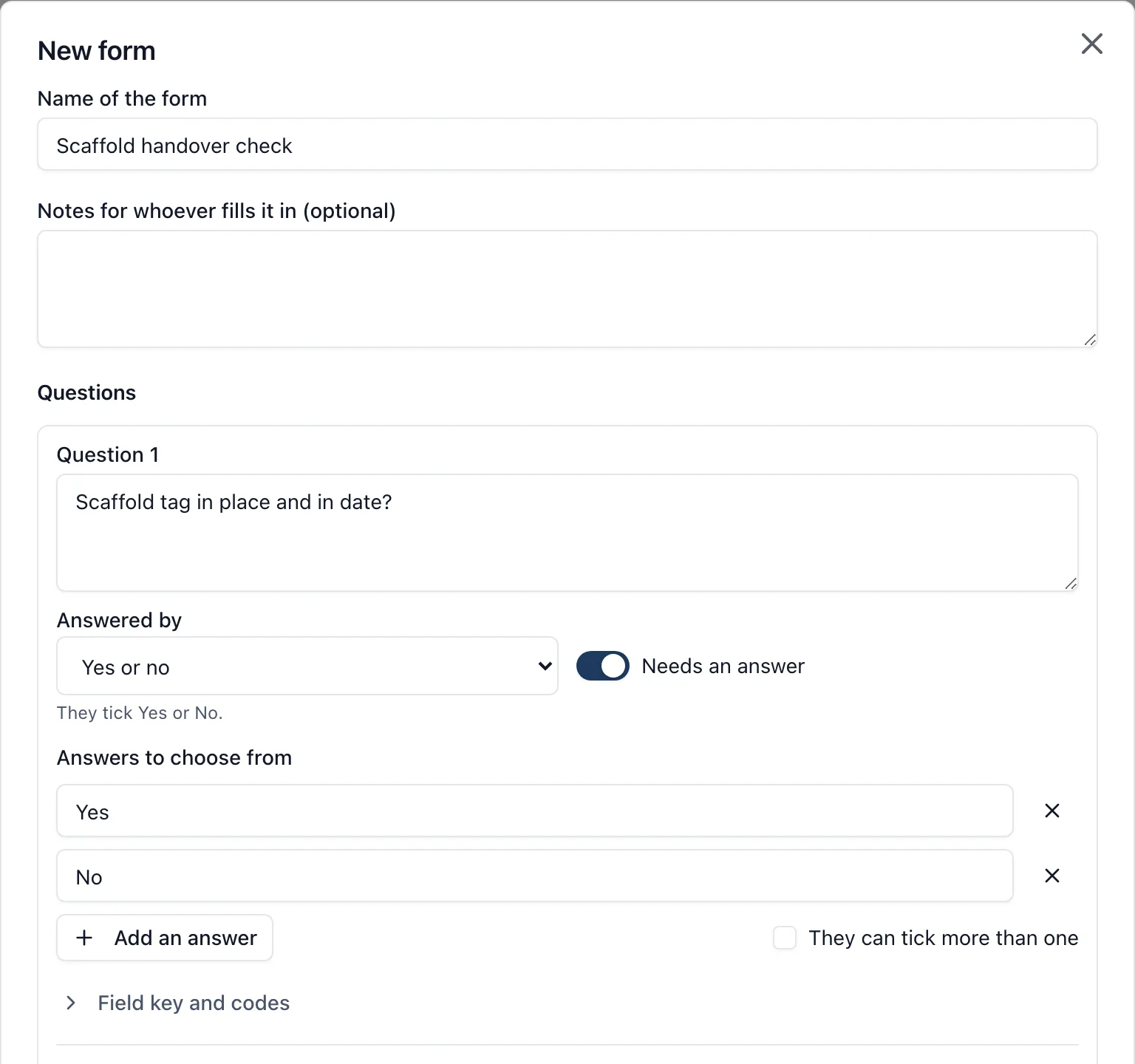
Making a form. Give it a name and any notes, then add the questions. Each is answered by multiple choice (one answer or several), yes or no, a typed answer, a number or measurement with a unit such as mm, a date, photos (up to 20), a table of rows (up to 8 columns and 30 rows), or a signature. Headings split the form into sections, and a block of text to read can carry an instruction, such as how to measure. A form can have up to 150 questions, headings and blocks of text, and Needs an answer decides which ones must be answered before it can be sent.
Questions that appear on an answer. Any question can be set to appear only after certain answers to an earlier multiple choice question. A question not on show is never needed, and anything typed in it before it was hidden is not sent.
Versions. Every save makes a new version. Forms already filled in keep the questions exactly as they were and say which version they were.
Filling it in on site. On a job, open Forms, tap Fill in a form, answer the questions, sign with a finger and tap Send. With no signal the form is kept on the phone and sent when the phone is back online, and its photos follow. A form filled in on a job can also be pinned to the spot on a drawing it is about, such as a door survey on the door it surveys.
Somebody checks each one. Switch this on for a form and every one filled in waits until an admin of the job checks it, with a note if they like, or sends it back and says why. The person who filled it in cannot check their own. A form sent back is filled in again with the earlier answers in place, and the one sent back stays on the job.
Giving a form to someone. An owner or admin of the company, or an admin of the job, can give a form to one or more people, on a job or on no job, with a day it is wanted by and a note. They are told on their phone, or by email if they have no phone app. Given on the company’s Forms tab shows who has what, and what is late.
Forms on no job. A van check or a yard inspection belongs to no job. An owner or admin fills one in from All projects; anybody else fills one in when it is given to them, once each time it is given. Only whoever filled it in and the company’s owners and admins can read it.
Printing and exporting. Any completed form prints with its answers, signatures, who filled it in and when, and whether it was checked. On the phone, Print makes a PDF to share. An owner or admin can download every completed copy of a form as a CSV spreadsheet or as JSON, with one row per form and a column per question, and whether each was checked or sent back, by whom and when.
Sending forms to your own system. An owner or admin can have each form sent to an address in your own system as it is filled in, checked or sent back, as JSON with every answer. Each question can carry a field key, and each answer a code such as a product code, so the answers arrive in the shape your system expects.
What Is a Walk-Round Report?
A walk-round is for walking a site, talking about what you see and taking photos as you go, and coming away with a report. It is made for pricing visits, surveys and site inspections, and it is in the phone app, on a job or on a lead.
- Press Walk-round. The camera opens and the phone starts listening.
- Walk the site, say what you see, and take photos. Your words come up on screen as you speak.
- Press Finish. A walk-round can be up to 30 minutes and 60 photos.
- Read your points. What you said near a photo goes with that photo, and photos taken close together are one point. For each point you can correct the words, take a photo off, join it to the one above or remove it, and choose what it is: a Note for the report only, a Snag, which is raised on the project, or a Material, which adds a material request. BuildersAI suggests one, and you can always pick another.
- Press Save. Every photo goes in the project’s gallery, each snag or material request is raised with its photos, and a PDF walk-round report (the project, the day, who walked it, then each point with its words and photos) goes in the project’s files. Share report sends it from the phone by email or any other app.
A walk-round works with no signal: the phone keeps the photos, makes the report and sends everything when it is back online. Most phones hear you without signal; a phone without British English dictation on it needs signal for that part. The sound is not kept. Your words go in the report, and the recording does not.
Forms, Walk-Rounds, Inspections or Completion Reports?
BuildersAI has four ways of recording a check, and they suit different jobs.
| Use | When | What you get |
|---|---|---|
| A company form | The check has fixed questions you ask every time | Answers in the same format every time, checked by a second person if you want, exportable |
| A walk-round | You are walking a site and the points are not known in advance | A PDF report with photos, plus snags and material requests raised from it |
| An inspection | A check is planned on the programme, such as a building control visit | A dated item on the board with who is inspecting and whether it passed |
| A completion report | A trade has finished a job, such as a repair | Before and after photos, whether the work met the specification, a signature, checked by an admin |
Completion reports are off until a project administrator switches them on for that project. Snags found by any of these routes are tracked to a fix and a manager’s check: our snagging app guide covers that.
What Are the Options for UK Builders?
Paper. Cheap and familiar. The sheets arrive late or not at all, the photos are on somebody’s phone, and nobody in the office can see what has not been done.
A general-purpose forms or checklist app. Good for building forms and collecting answers. The completed forms then sit apart from the job’s drawings, snags, RAMS and programme, so check how the app is priced as more of your team and your subcontractors need it.
A large construction platform. The international platforms cover far more than inspections, and are priced accordingly. Procore, for example, publishes no prices: its UK pricing page says it charges an upfront annual fee by product, based on annual turnover (checked 23 November 2026).
BuildersAI. Forms and walk-rounds are part of the site app, on the same phone the team uses for drawings, tasks, site photos and RAMS, and they work without signal. It is £149 a month + VAT for up to 10 people, £299 + VAT for 11 to 50 and £599 + VAT for 51 to 100, flat for the whole company with every feature and no per-user fee. Every plan starts with a 14-day free trial, with no card needed. See pricing.
What BuildersAI Does Not Do With Inspections
- It does not check what your forms ask. Your company is responsible for its own questions. BuildersAI keeps the forms and the answers.
- Forms do not repeat by themselves. There is no daily or weekly schedule. A form is filled in when somebody needs it, or given to a person each time it is wanted.
- Followers cannot see forms. A client following the job does not see them. A walk-round report saved in the project’s files by a member can be opened by anyone who can see files on the project, followers included.
- Walk-rounds are on the phone only, they listen in English, and the PDF report is written in English. Names may come out wrong, which is why you read the points before saving.
- Checking a form needs signal on the phone. Filling one in does not.
FAQ
What is a site inspection app?
An app for filling in inspection forms and checklists on a phone on site, with photos and signatures, so the completed form is kept on the job with who filled it in and when. Most also let the office read, check and export the results.
Can I use my own inspection forms?
In BuildersAI, yes. The company’s owners and admins write the questions, choose how each is answered, and decide which must be answered. Forms are not chosen from a fixed library.
Does a site inspection app work without signal?
In BuildersAI, filling in a form, its photos and signature, and a whole walk-round work with no signal. They are sent when the phone is back online.
Can a form be checked by someone else?
Yes. Switch on Somebody checks each one for a form and every one filled in waits until an admin of the job checks it or sends it back with a reason. Nobody can check a form they filled in themselves.
Can I do a daily van check in BuildersAI?
Yes, as a form on no job. An owner or admin of the company fills it in from All projects, or gives it to the driver, who fills it in once each time it is given. It does not repeat by itself.
Is the voice recording kept from a walk-round?
No. Your words are written into the points and the report, and the recording itself is not kept.
Can I export inspection results?
Yes. An owner or admin of the company can download every completed copy of a form as CSV or JSON, or have each form sent to your own system as it is filled in, checked or sent back.
BuildersAI
See Your Own Forms on a Phone
Bring one of your paper inspection sheets to a demo and see it built as a form, filled in on a phone and checked in the office.
14-day free trial. Every feature. No card.
Written by
William Charlesworth-Jones
Founder, BuildersAI
William grew up in a family that builds houses for a living and has been around construction sites for as long as he can remember. He has seen first hand that eight-figure sites are often run on WhatsApp and spreadsheets, and started BuildersAI to cut the invisible costs that take chunks of margin across a site. His aim is for BuildersAI to be the all-in-one site management platform built in the UK, for UK sites.
LinkedIn