
RAMS Software UK: What It Should Do for a Builder, and How the Options Compare
Most builders already have RAMS. What they lack is a quick way to put the right one on every job, get it approved and signed before work starts, and find the record later. Here is what RAMS software should do, and how the options compare.

- Author
- William Charlesworth-Jones
- Category
- Health and Safety
- Published
- Updated
- Reading time
- 8 min read
This guide is about choosing software. If you want to know what goes in a RAMS, with a worked example, read RAMS for small builders. If you want a blank one to fill in, our free RAMS template is an Excel or PDF download with no sign-up.
What Is RAMS Software?
RAMS software is where a company’s risk assessments and method statements are written or stored, issued to jobs, approved and signed. Some products are built mainly for writing the document. Others are built around what happens after it is written: getting it to the right people on site, collecting their signatures before work starts and keeping a record that cannot be changed afterwards. Many builders need the second more than the first, because they already have RAMS for the work they do every week.
Do You Need Software for RAMS?
Not to comply with the law. The legal duty is the risk assessment: regulation 3 of the Management of Health and Safety at Work Regulations 1999 requires every employer to make a suitable and sufficient assessment of the risks to their employees and to other people affected by their work, and an employer with five or more employees has to record the significant findings. A Word document and a paper signing sheet can meet that.
Where paper falls short is the record. The common problems on small sites are:
- The same RAMS retyped on every job, with the address changed and the hazards left as they were on the last site.
- A signing sheet with no times on it, so nobody can show that people signed before the work started.
- Wording changed after people signed, because somebody tidied the Word file and reprinted it.
- The signed copy in the back of a van on the day somebody asks for it.
Software is worth paying for when it fixes those four. If it only makes the document look neater, a template does the same for nothing.
What Should RAMS Software Do for a Builder?
- For: Write a RAMS once and use it on any job. A company library of the RAMS you use again and again, with versions, so changing one later never changes a RAMS already signed on a job.
- For: Issue one RAMS to several jobs at once. When the same work runs on five sites, you should not have to open five jobs.
- For: Take the RAMS you already have. Your own document, with your photographs and logo, or a subcontractor’s, attached as it is and signed in the same way as one typed in the app.
- For: Signing on the phone with no signal. Cabins, basements and new estates often have no signal, and the signature should be stored on the phone and sent later.
- For: Fixed wording once signed. If the hazards or the method can be edited after somebody has signed, the signature does not mean much.
- For: Approval, and a record of who approved. Somebody other than the author, or the author themselves where your company allows it, with the record saying which.
- For: Who still has to sign. The people doing the work, ticked off as they sign, so the person running the briefing can see who is missing.
- For: A printed copy and an export. A document to hand to a principal contractor, and a spreadsheet of every signature with its time for an inspector or an insurer.
It also helps when RAMS are connected to the rest of the site’s records: the site induction that asks people to read them, and the toolbox talk that briefs the hazards again on Monday morning.
What Are the Options for UK Builders?
| Option | What it is good at | Where it falls short |
|---|---|---|
| Word or Excel and a paper sheet | Free, and everybody knows how | No times on signatures, no control over changes after signing, copies get lost |
| A free template, such as ours | A consistent layout and headings, a briefing sign-off sheet | Still paper once printed |
| A dedicated RAMS writing tool | Writing and approving RAMS, often with a content library | A separate system from the rest of the site, and a separate bill |
| A site management app with RAMS in it | RAMS signed on the same phone the team already uses for drawings, tasks and photos | Check how much of the writing side it covers for your work |
A dedicated RAMS tool. HandsHQ is one of the better known in the UK. Its site describes it as software to create better risk assessments (RAMS) in less time, and lists a content library. Its teams pricing page lists Small from £275 a month for up to 10 users, Medium from £550 a month for up to 25 and Large from £750 a month for up to 60, each billed annually plus a set-up fee, with Enterprise on custom pricing (HandsHQ’s pricing page, checked 23 November 2026). The page does not say whether VAT is included. If writing RAMS for complex or varied work is the hard part of your week, a tool built for that is worth a trial.
A site management app. If your RAMS are mostly written already and the trouble is issuing them and getting them signed, a site app that does RAMS alongside everything else may do the job without a second system. That is the approach BuildersAI takes.
How RAMS Work in BuildersAI
BuildersAI is the all-in-one site management app for UK builders. RAMS is one section of it, on the phone and in a browser. The step by step for writing and signing a single RAMS is in our RAMS guide for small builders and on the RAMS help page. What matters when you have more than one job running is below.
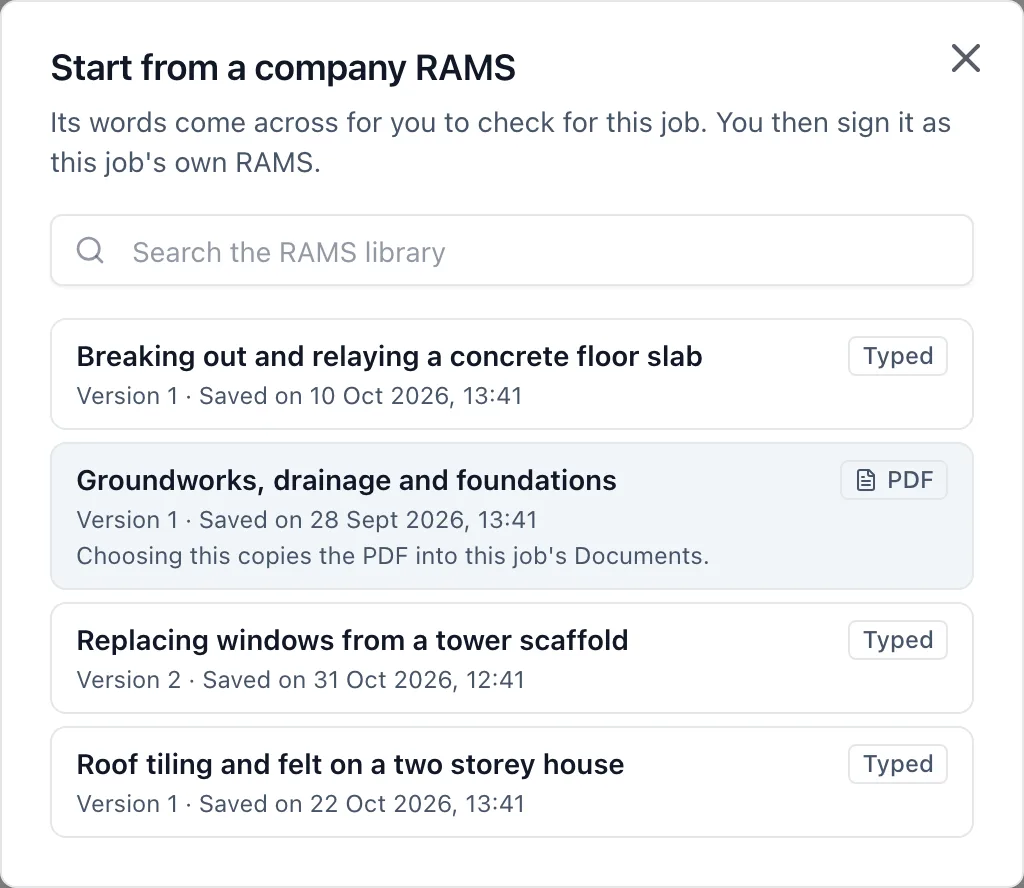
A RAMS library for the company. The company’s owners and admins keep the RAMS it uses again and again in one RAMS library, typed in or as your own PDF. Every save makes a new version. RAMS already on jobs are never changed: each says which version it started from, and the library shows how many jobs still have an older one.
Issued to several jobs in one go. From the library, Issue to jobs lets you tick the live jobs you administer, or all of them, and optionally tick your subcontractor firms so each firm’s people on each job are asked to sign once it is approved there. You sign once. Each job gets its own RAMS with its own number, which then waits for that job’s own approval. A job that cannot take it is listed with the reason, and the others go ahead.
Your own RAMS, or a subcontractor’s. Attach any RAMS as a PDF instead of typing it again, and put the subcontractor’s company under Prepared by. Each signature button reads Open the document first until the person has opened it, and once it is signed the document it points at cannot be swapped.
A method statement in sections. The method statement is written in short sections, such as the scope, the sequence of work, permits, welfare and emergency and first aid, and you fill in only the ones that apply. If the job has a published site induction, Use the site induction’s words copies its first aid or welfare wording in for you to check.
Signed on the phone, with no signal. The author signs with a finger, which sends it for approval and fixes the wording: from then on the hazards, control measures, method and PPE cannot be changed by anybody. The whole thing, signature included, works with no signal and is sent when the phone has some.
Approval is your company’s choice. An administrator counter-signs it or sends it back with a reason. A company can instead let the person who writes a RAMS approve it, and the record then says Approved, no second reviewer beside the approval, on screen and on the printed copy.
The gang signs on. Everybody chosen under Who signs it?, and everybody on the linked task, is told to sign on once it is approved, and the record ticks each one off under Briefed to. A labourer who joins next week can be added and is told straight away.
On your letterhead. A RAMS on a company’s job prints with the company’s logo, name, address, phone, email, website and company number. One submitted from now on keeps the letterhead it was submitted on, so a new address later never changes it.
The register. Export produces a spreadsheet with one row per signature: raised and signed, approved, or signed on, each with its time. A RAMS that has been approved or sent back cannot be deleted by anybody.
Connected to the rest of the site. A site induction can list the approved RAMS each new starter must read before they sign. A toolbox talk can start from this week’s tasks and the hazards on the project’s approved RAMS, and each person at the talk signs the register on one phone.
What BuildersAI Does Not Do With RAMS
- It does not write or check your RAMS. The library keeps and copies them, and the suggested control measure under each hazard is a starting point for you to edit. Your company is responsible for what its RAMS say.
- It attaches PDFs only. A RAMS in Word is saved as a PDF first (File, Save As, PDF).
- Followers cannot read RAMS. A follower, such as a client, is told the section is for the site team. Only a job’s administrators and members can be chosen to sign one, so a subcontractor’s operatives who work to it need to be on the job as members.
- The library, issuing and form defaults are done in a browser. Starting a typed RAMS from the library works on the phone, with no signal.
What Does It Cost?
BuildersAI is a flat monthly price for the whole company, with every feature: £149 a month + VAT for up to 10 people, £299 + VAT for 11 to 50 and £599 + VAT for 51 to 100. There is no per-user fee and no extra charge for RAMS. Every plan starts with a 14-day free trial, with no card needed. See pricing.
FAQ
What is RAMS software?
Software for writing or storing risk assessments and method statements, issuing them to jobs, and recording who approved and signed each one and when. The useful kind collects signatures on site before work starts and keeps a record that cannot be changed afterwards.
Is RAMS software a legal requirement?
No. The legal duty is to assess the risks, and an employer with five or more employees has to record the significant findings (regulation 3 of the Management of Health and Safety at Work Regulations 1999). Paper can meet that. Software makes the record easier to prove and to find.
Can a RAMS be signed on a phone with no signal?
In BuildersAI, yes. The signature is stored on the phone as the strokes you drew and sent when the phone next has signal.
Can I use the RAMS I already have?
Yes. Attach them as PDFs, on a job or in the company’s RAMS library, and they are approved and signed on the phone in the same way as a RAMS typed in the app. A subcontractor’s RAMS can be attached the same way, with their company named on it.
Can I put one RAMS on all my jobs at once?
Yes. From the RAMS library, Issue to jobs puts a company RAMS on every live job you tick, and you sign it once. Each job gets its own copy, which waits for that job’s approval.
Is there a free RAMS template?
Yes. Our free RAMS template is an Excel or PDF download with a method statement, a risk assessment with a 5 by 5 risk matrix and a briefing sign-off sheet. No sign-up is needed.
How much does BuildersAI cost?
£149 a month + VAT for up to 10 people, £299 + VAT for 11 to 50 and £599 + VAT for 51 to 100, flat for the whole company with every feature. Every plan starts with a 14-day free trial and no card is needed.
BuildersAI
See RAMS Issued, Approved and Signed on Site
See a RAMS issued from the library to several jobs and signed on a phone, then try it on your own jobs.
14-day free trial. Every feature. No card.
Written by
William Charlesworth-Jones
Founder, BuildersAI
William grew up in a family that builds houses for a living and has been around construction sites for as long as he can remember. He has seen first hand that eight-figure sites are often run on WhatsApp and spreadsheets, and started BuildersAI to cut the invisible costs that take chunks of margin across a site. His aim is for BuildersAI to be the all-in-one site management platform built in the UK, for UK sites.
LinkedIn