
Best Construction Apps 2026: 12 Apps for UK Site Managers, Trades and Small Builders
The best construction apps for UK builders in 2026, chosen by the job they do: running the site, free plans, safety, time tracking and invoicing, with every competitor's price checked on their own website.

- Author
- William Charlesworth-Jones
- Category
- Construction Apps
- Published
- Updated
- Reading time
- 8 min read

What Apps Do UK Construction Workers Use?
It depends on the job they do. Most UK sites still run on a mix of WhatsApp, a phone full of photos and a paper diary, with an app or two for the parts that hurt most.
| Role | Apps they use |
|---|---|
| Site managers | BuildersAI, Fieldwire, SafetyCulture |
| Builders running the whole job | BuildersAI, Procore, Buildertrend |
| Trades and subcontractors | Tradify, ServiceM8, QuickBooks |
| Office and accounts | QuickBooks, Xero |
| Time tracking | Clockify, Connecteam, QuickBooks Time |
How We Chose These Apps
BuildersAI is our product, and it is in this list. We have judged every app, ours included, on the same five things, and checked every competitor’s plans and prices on its own website on 23 November 2026:
- Works on site with no signal. Patchy 4G, basements and rural plots are normal on UK sites (see our offline construction apps guide).
- Simple enough for the trades. If it needs a training day, half the site will never open it.
- UK fit. UK terms, VAT and CIS where money is involved, prices you can see.
- Price as the team grows. Per-user pricing and flat pricing come out very differently at 15 or 40 people.
- Clear about what is free. A free plan, a free trial and a paid plan are different things, and we say which each one is.
Best All-in-One Construction Apps
| App | Published price | Works offline | Best for |
|---|---|---|---|
| BuildersAI | £149, £299 or £599 a month + VAT for the team | Yes | UK builders with 5 to 100 people on their jobs |
| Fieldwire | Free Basic plan; Pro £33, Business £54, Business Plus £76 per user a month, billed annually | Yes | Tasks pinned to drawings |
| Procore | Not published; annual fee based on construction volume | Ask the vendor | Large contractors |
| Buildertrend | Not published; custom quote | Ask the vendor | US residential builders |
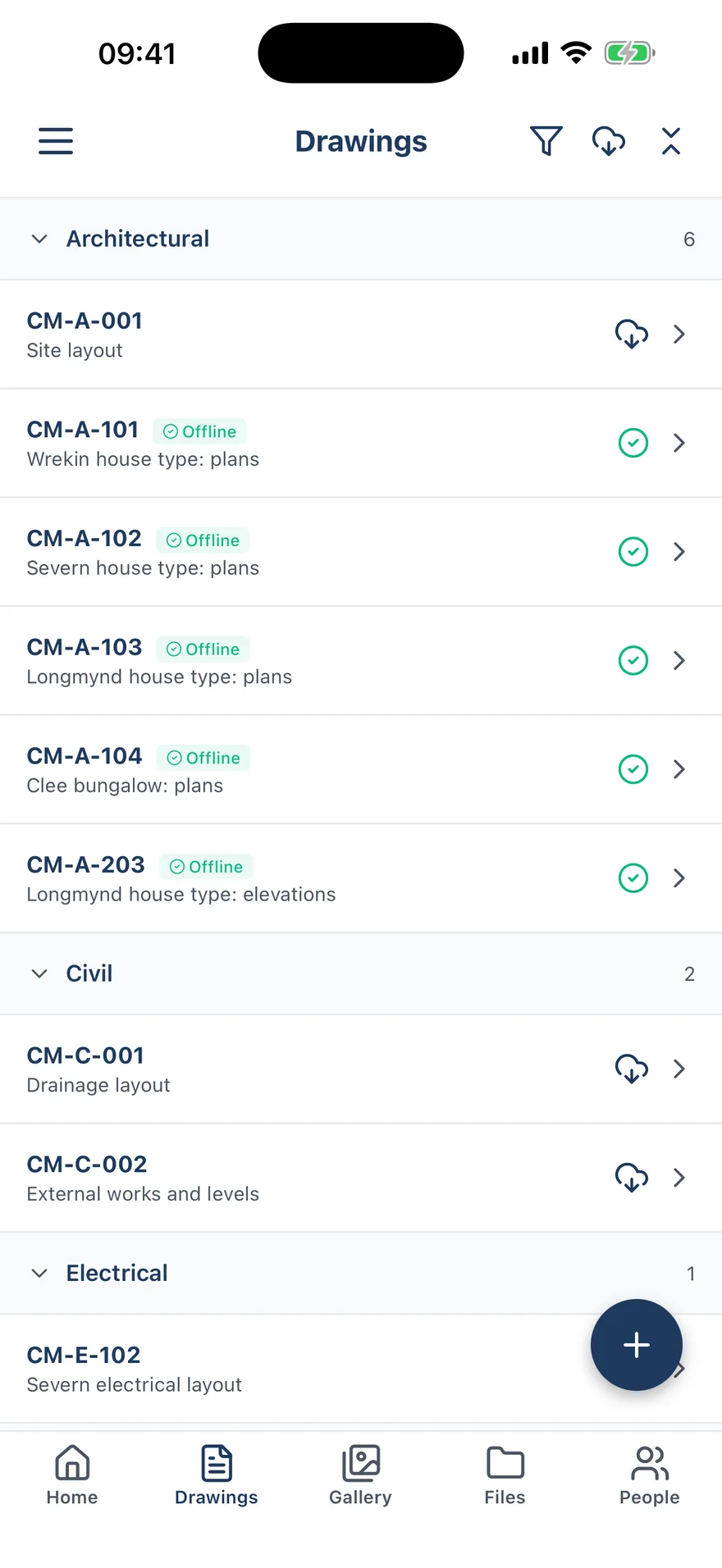
BuildersAI runs the site and the job’s money in one app. On the phone: drawings with the current revision, tasks and snags, geo-tagged photos, the site diary, check-in and timesheets, RAMS and inductions, all of it working with no signal. In the office: estimates the client signs on their phone, purchase orders, supplier invoices read for you with CIS worked out, invoices to the client month by month, and each job’s forecast margin. SiteBot, the AI assistant, answers questions about the job and searches the Building Regulations and CDM, and company owners can connect Claude or ChatGPT to it. It is one flat price for the whole team by headcount, with a 14-day free trial. It is not an accounts package and takes no payments: bills and client invoices go to QuickBooks Online through a live link, and supplier bills and hours go to Xero and Sage as files.
Fieldwire, owned by Hilti, is strong on tasks pinned to drawings, punch lists and plan viewing, with good phone apps. RFIs, change orders and budgets are on its top Business Plus plan. It is priced per user (£33, £54 or £76 a month each on its UK page, billed annually), so the bill rises with every person you add. See BuildersAI and Fieldwire compared.
Procore covers the whole project lifecycle for large contractors. It publishes no prices: it charges an upfront annual fee based on the value of construction work you do, and does not charge for adding users. It takes real setting up, and most builders with fewer than 50 people will not use most of it. See BuildersAI and Procore compared.
Buildertrend is a US company built for home builders and remodellers, with client communication and scheduling at its centre. Its pricing page publishes no prices and shows no UK offer or prices in pounds. See BuildersAI and Buildertrend compared.
Try BuildersAI free for 14 days: the site, the job’s money and SiteBot, with every feature included.
Best Free Construction Apps
These apps have a free plan you can keep using with no time limit, as their own websites showed on 23 November 2026. Each one has a cap.
| App | What the free plan includes | The cap |
|---|---|---|
| Fieldwire Basic | Tasks, plan viewing and markup on drawings | 5 users, 3 projects, 100 sheets |
| SafetyCulture | Inspections and checklists on the phone | Up to 10 seats, 5 active inspection templates |
| Clockify | Time tracking, timesheets and reports | Up to 5 users; GPS and scheduling need a paid plan |
| Connecteam | Time clock, scheduling, tasks, forms and chat | Up to 10 users; one time clock and one schedule |
SafetyCulture’s pricing page now opens on Mitti (by SafetyCulture), which is where these limits are published.
For a small builder spending nothing: Fieldwire Basic for one job’s drawings and tasks, SafetyCulture for checklists, and Clockify for hours. That is three apps to keep in step, which is the cost of free.
Best Apps for Site Managers
A site manager’s app has to handle the diary, drawings, tasks, photos and who is on site, and keep working when the signal goes.
| App | Published price | What it does best |
|---|---|---|
| BuildersAI | £149 to £599 a month + VAT for the team | The whole day in one app: diary, drawings, tasks, photos, check-in, RAMS |
| Fieldwire | Free Basic plan; Pro £33 per user a month, billed annually | Tasks and punch lists on drawings |
| SafetyCulture | Free for up to 10 seats; Premium $24 per seat a month, billed annually | Inspection checklists |
BuildersAI covers the whole day rather than one part of it, and one fee covers everyone, so nobody is left off to save money. See our site management apps guide for more.
Fieldwire suits teams who work from task boards on drawings, and markups can be made offline.
SafetyCulture is the specialist for recurring checks, and sits well beside a site app.
Best Apps for Subcontractors
Trades and subcontractors need to quote, schedule, invoice and get paid. See our contractor apps guide for more, including apps to find work.
| App | Published price | Best for |
|---|---|---|
| Tradify | £34, £37 or £44 per user a month | Trades running many jobs with a small team |
| ServiceM8 | Free for 1 user and 30 jobs a month; then £25 to £269 a month by jobs, any number of users | Service trades doing same-day jobs |
| QuickBooks Online | Five plans, priced on its website; every plan calculates and submits CIS | Accounts with CIS and VAT |
| Xero | £18 to £70 a month + VAT; submitting CIS returns is £5 a month extra | Accounts shared with a bookkeeper |
Best Safety and Compliance Apps
BuildersAI keeps RAMS signed on site, inductions on the phone, toolbox talks, CSCS and other cards with expiry alerts, and accident reports, inside the site app. SafetyCulture has the widest library of inspection templates and a free plan. Our free RAMS template and snagging list template cover the paperwork if you are not ready for an app.
Best Time Tracking Apps
| App | Published price | Notes |
|---|---|---|
| BuildersAI | Included in the team price | Check-in is a deliberate tap that records the distance from site; timesheets export for Xero, QuickBooks and Sage |
| Clockify | Free up to 5 users; paid from $3.99 per seat a month, billed annually | GPS tracking and scheduling need the Pro plan |
| Connecteam | Free up to 10 users; paid plans priced per hub | The free plan has one time clock and one schedule |
| QuickBooks Time | £16 a month plus £6 per user, + VAT (Premium) | Links to QuickBooks |
What Makes a Construction App Actually Usable?
| Test | Why it matters |
|---|---|
| Works offline | Basements, steel frames and rural plots have no signal. Check you can create a record offline, not only view one |
| The 30-second rule | If a common job takes longer than 30 seconds, people stop doing it |
| Runs on older phones | Plenty of the workforce use phones that are a few years old |
| No training day | If the trades cannot pick it up at a toolbox talk, they will not use it |
| Price at next year’s size | Per-user prices that look small at five people look different at thirty |
An app can have 500 features and still lose to a WhatsApp group if it needs Wi-Fi to save a task.
Quick Recommendations by Company Size
| People on your jobs | What to use | BuildersAI price |
|---|---|---|
| 1 to 3 | Free plans (Fieldwire Basic, Clockify) if spending nothing matters most; BuildersAI Starter if you want one app | £149 a month + VAT |
| 4 to 10 | BuildersAI Starter, with QuickBooks or Xero for the books | £149 a month + VAT |
| 11 to 50 | BuildersAI Professional, with QuickBooks or Xero | £299 a month + VAT |
| 51 to 100 | BuildersAI Business | £599 a month + VAT |
| Over 100 | BuildersAI Enterprise or Procore | On request; Procore quoted |
On per-user pricing: an app priced per user costs more each time you take someone on. Work out the cost at the size you expect to be next year, with every trade on it, before you choose. See our construction software pricing guide.
Key Takeaways
| Need | Pick |
|---|---|
| The whole site and the job’s money in one app | BuildersAI |
| Tasks pinned to drawings | Fieldwire |
| Large contractor, enterprise platform | Procore |
| Inspections and checklists | SafetyCulture |
| Free time tracking | Clockify |
| Trades quoting and invoicing small jobs | Tradify, ServiceM8 |
| The books | QuickBooks, Xero |
BuildersAI
Try BuildersAI free for 14 days
Drawings, tasks, photos, the site diary, RAMS, timesheets and job costs on every phone, working with no signal. Every feature, no card, then from £149 a month + VAT for the team.
Frequently Asked Questions
What is the best construction app in 2026?
For most UK builders, BuildersAI: drawings, tasks, photos, the site diary, RAMS, timesheets and job costs in one app that works offline, £149 to £599 a month + VAT for the team. Fieldwire suits teams who only want tasks on drawings; Procore suits large contractors.
What construction apps do UK workers use?
Site managers use BuildersAI, Fieldwire and SafetyCulture. Trades use Tradify or ServiceM8 for jobs and invoices. Time is tracked in Clockify, Connecteam or the site app, and the books are kept in QuickBooks or Xero.
What is the best free construction app?
Fieldwire Basic for drawings and tasks on a small job, SafetyCulture’s free plan for inspections, and Clockify’s free plan for time tracking. Each has a cap. BuildersAI is not free; it has a 14-day free trial.
What apps do builders need?
One app for the site (drawings, tasks, photos, diary, safety records) that works offline, one for time if the site app does not do it, and an accounts package such as QuickBooks or Xero. BuildersAI covers the site, the hours and the job’s costs and invoices in one.
Is there an app for construction projects?
Yes. BuildersAI runs a job from the estimate to the final invoice, with the site side working offline. Procore covers the project lifecycle for large contractors, and Buildertrend is built for home builders and remodellers.
Do construction apps work offline?
Some do. BuildersAI keeps drawings, tasks, photos and the diary on the phone and syncs when signal returns, and Fieldwire says markups can be made offline. Before you choose, check that you can create a record offline, not only view one.
Written by
William Charlesworth-Jones
Founder, BuildersAI
William grew up in a family that builds houses for a living and has been around construction sites for as long as he can remember. He has seen first hand that eight-figure sites are often run on WhatsApp and spreadsheets, and started BuildersAI to cut the invisible costs that take chunks of margin across a site. His aim is for BuildersAI to be the all-in-one site management platform built in the UK, for UK sites.
LinkedIn