
Construction Management Software: A Buyer's Guide for UK Builders
A guide to construction management software for UK builders: what it is, what it does on site and in the office, the UK requirements to check, what to look for, and how to get a first job running on it.

- Author
- William Charlesworth-Jones
- Category
- Construction Software
- Published
- Updated
- Reading time
- 10 min read

Most UK building firms run their jobs across three or four tools that were never designed to work together: WhatsApp for messages, email for drawings, a spreadsheet for the programme, and the site manager’s memory for everything else. It works until a drawing revision is missed, a delivery arrives with nobody expecting it, or a dispute comes up and there is no record to point to.
This guide explains what construction management software is, what it does, which UK requirements to check, and how to get started. If you already know what you want and need the platforms side by side with prices, read our construction project management software comparison.
What Is Construction Management Software?
Construction management software is a single system for running building jobs day to day. Instead of information spread across separate apps, it keeps the drawings, documents, tasks, photos, site records, team messages and job costs in one place, and makes them available to everyone on the job from a phone, tablet or laptop.
The category is broad. At one end are large platforms built for tier-one contractors and multi-million-pound programmes. At the other are mobile-first tools built for the small and medium builders who make up most of the UK industry. They share one idea: one record of the job, so nobody works from the wrong information.
What It Actually Does
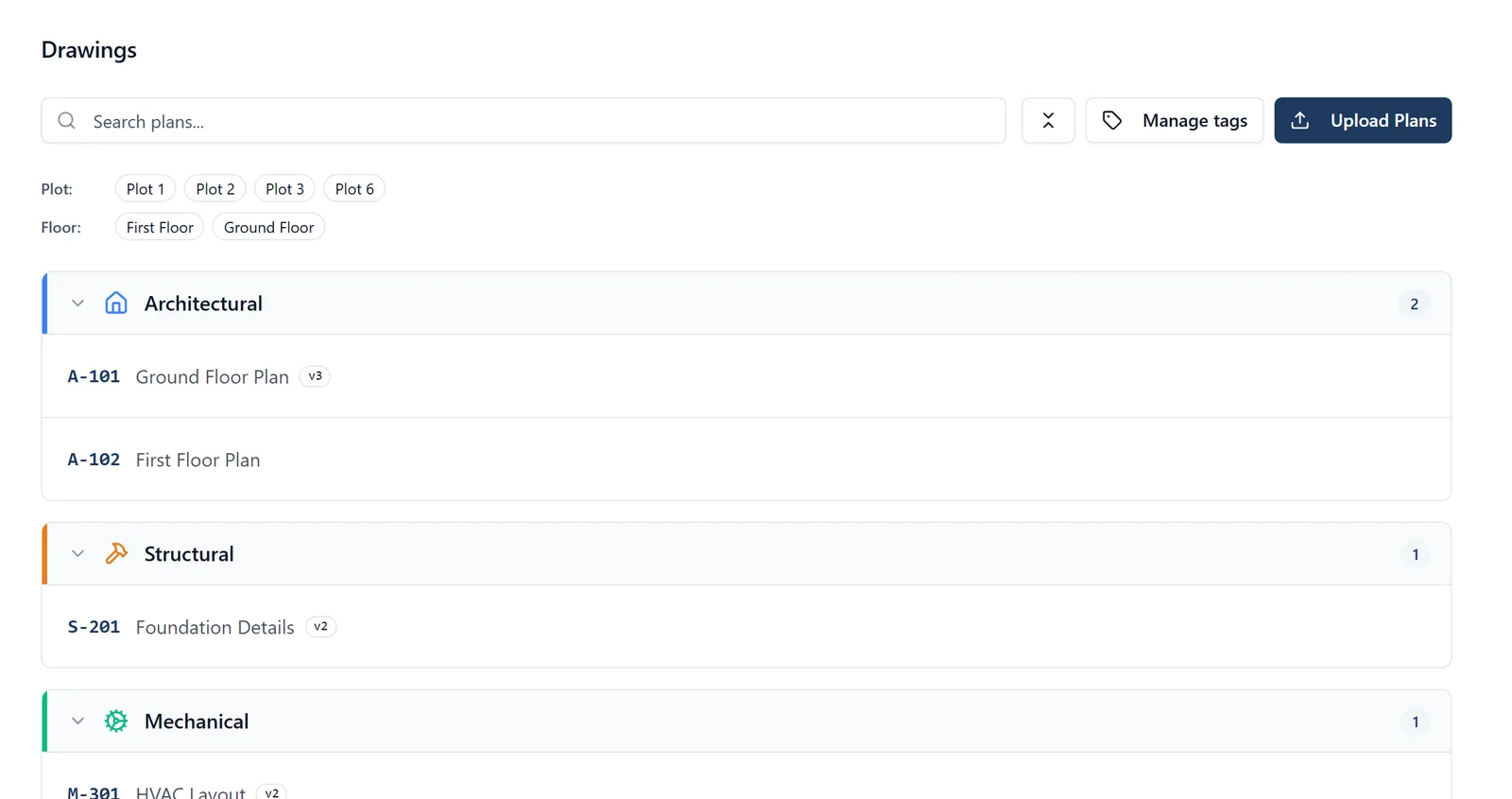
Keeps everyone on the current drawing. When a new revision is issued it replaces the old one for the whole team, so nobody builds to a superseded sheet found in an old email.
Puts documents and specifications in one place. Method statements, specifications, O and M manuals and certificates, in one library anyone on the job can search.
Plans the work. Tasks, snags, inspections and deliveries, on boards, lists and a Gantt programme with dependencies, so the order of work is visible to the team rather than held in one person’s head.
Records who is on site. People check in and out on their phone, which gives you timesheets and a roll call without a paper sign-in sheet.
Keeps a photo record. Site photos carry the date, time and place, and are filed against the job and the plan.
Holds the safety records. RAMS, site inductions, toolbox talks, CSCS cards with expiry dates and accident reports, signed on the phone.
Tracks the money on the job. The estimate, purchase orders, supplier invoices, labour from time on site and invoices to the client, so you can see whether the job is making money while it is still running.
Why UK Builders Are Switching
The cost of running a job across scattered tools rarely shows as one line in the accounts. It shows as rework from an old revision, a trade waiting for an answer, a day lost because a delivery was not expected, and a dispute with no record behind it.
The Get It Right Initiative estimates that avoidable errors cost around 5% of a project’s value. On a £1 million job that is about £50,000, which is far more than a year of software for a small or medium builder. Software does not remove every error, but it removes the common ones that come from people working from different information.
UK Requirements to Check
Much of the best-known software was built for North America. A UK builder should check how it handles these.
| Requirement | What the software should do |
|---|---|
| CIS | Work out and record the deduction (0%, 20% or 30%) on each subcontractor’s invoice, or pass the figures cleanly to the accounts package that files the monthly CIS300 return |
| VAT domestic reverse charge | Carry the reverse charge on invoices for CIS-reportable work |
| Making Tax Digital | Link to MTD-compatible accounts software; the software you run the site on does not file VAT itself |
| Building Safety Act | Keep drawings and documents with a revision history and a record of who opened each one, for the golden thread on higher-risk buildings |
| CDM 2015 | Hold RAMS, inductions and the construction phase plan where the site team can read and sign them |
Sources: GOV.UK Construction Industry Scheme, HSE CDM 2015. For CIS deductions, try our free CIS calculator.
UK terms. Programme, not schedule. Snagging, not punch list. Valuation, retention, dayworks, first fix and second fix. Software that uses US terms is usable, but it makes the trades work harder to follow it.
Accounts link. UK builders mostly use QuickBooks, Xero or Sage. Check which edition the link supports and what it actually sends. See our accounting integration guide.
What to Look For in the UK
- For: Simple enough for any trade to use on the first day, with no training course
- For: Works offline, because signal fails in basements, plant rooms and rural sites
- For: Mobile first, since most of the team works from a phone, not a desk
- For: One price for the team rather than per user, so every trade can be on it
- For: Published prices in pounds, so you know the cost before you talk to anyone
- For: Live on a real job within a day, not a months-long implementation
- For: A free trial on your own job, not just a demo
Management Software vs Enterprise Platforms
The questions below separate a tool built for a small or medium builder from one built for a tier-one contractor. Ask each supplier.
| Question | Why it matters |
|---|---|
| Is the price published, and is it per user? | Per-user pricing leads firms to leave trades off, and those trades then miss updates |
| Does the phone app work with no signal? | Many sites have poor signal; an app that needs a connection fails when it is needed |
| Can a trade use it on day one without training? | Training days cost money and are the usual reason a rollout stalls |
| How long until a live job is running on it? | A day is normal for SME tools; large platforms often run a formal implementation |
| Does it handle CIS and UK accounts packages? | Otherwise the office types everything twice |
| Is there a free trial on your own job? | A demo shows the software; a trial shows whether your team will use it |
For how each platform answers these, with prices checked on 23 November 2026, see the platform comparison.
How BuildersAI Does It
BuildersAI is construction management software built in the UK for builders and contractors with up to 100 people. It keeps every trade on the current drawing, plans the work on a Gantt programme, records check-ins and timesheets, holds RAMS, inductions, toolbox talks and cards, and runs the job’s money from the estimate to the client’s invoice. The phone app works with no signal and syncs when it has one, and is available in Polish, Romanian, Lithuanian, Bulgarian, Punjabi and Hindi as well as English.
SiteBot, the AI assistant, answers questions about the job and searches the Building Regulations and CDM, and anything it changes is read back to you before it is written. QuickBooks Online is a live link; Xero and Sage take bill files. It is not an accounts package and takes no payments.
Pricing is one published fee for the team: £149 a month + VAT for up to 10 people, £299 for 11 to 50, £599 for 51 to 100, with no per-user fees. There is a 14-day free trial with every feature, and no free plan. See pricing and all features.
BuildersAI
See it on a project like yours
We show you how BuildersAI would run one of your jobs, then set up your first job with you.
Getting Started
Starting does not need to be a project of its own. With a tool built for site, the first day looks like this:
- Create one live job, not every job at once.
- Upload the current drawing set and the programme if you have one.
- Invite the site team and the trades. They get a link, download the app and are added to the job.
- Run the day from it: tasks, the diary, check-ins, RAMS and photos.
A week later, check whether the team is using it or has drifted back to WhatsApp. That is the test that matters. If you want a paper version to start with, our free site diary template and other free tools cover the basics.
Further Reading
- Construction project management software UK: the platforms compared, with prices
- How to choose construction software, a step-by-step selection process
- Construction software pricing UK, what the costs include
- CIS compliance software UK, deductions, verification and returns
- Cloud vs on-premise construction software
- Offline construction apps, what working offline means in practice
- Construction software for small builders
- Construction document management
- Construction site safety in the UK, CDM, RAMS, inductions and RIDDOR
FAQ
What is construction management software?
Construction management software is a single system for running building jobs. It keeps drawings, documents, tasks, the programme, site photos, check-ins, safety records and job costs in one place, available to everyone on the job from a phone, tablet or laptop, so nobody works from out-of-date information.
Do small UK builders need construction management software?
It is most useful where mistakes cost the firm directly, which is true of small builders. The value is in what it prevents: rework from old drawings, disputes with no records, and a site manager answering the same questions all day. Choose a tool simple enough that the trades will use it, and try it on one live job first.
How much does construction management software cost in the UK?
It ranges from free plans with limits to enterprise platforms quoted on turnover. BuildersAI is £149 a month + VAT for up to 10 people, £299 for 11 to 50 and £599 for 51 to 100, with no per-user fees and a 14-day free trial. For other platforms’ prices, see our comparison.
What is the difference between construction management and construction project management software?
Very little in practice. “Project management” tends to stress the programme and the money; “management software” is used more broadly to include drawings, site records and compliance as well. Most tools, including BuildersAI, cover both.
Does construction management software work offline?
Some does and some does not. BuildersAI keeps drawings, tasks, photos and the diary on the phone so they work with no signal, and syncs when the signal returns. Ask any supplier to show you the app in flight mode.
What is the best construction management software for UK builders?
The one your team will use. For UK builders with up to 100 people, look for something simple enough for any trade, that works offline, handles CIS, and has one published price for the team. Our comparison sets the main platforms side by side.
Is there free construction software in the UK?
Some platforms have a free plan with limits on users or projects; Fieldwire’s Basic plan is one. BuildersAI has no free plan but offers a 14-day free trial with every feature and no card. See also our list of free construction apps.
Does it replace WhatsApp?
It does not have to. WhatsApp is fine for quick chat. The problem is using it as the record of the job: no drawing revisions, no record of who has read what, and nothing to point to in a dispute. Construction management software holds the information that needs a record.
BuildersAI
Run your next job from one place
Every feature, no card. We set up your first job with you.
Written by
William Charlesworth-Jones
Founder, BuildersAI
William grew up in a family that builds houses for a living and has been around construction sites for as long as he can remember. He has seen first hand that eight-figure sites are often run on WhatsApp and spreadsheets, and started BuildersAI to cut the invisible costs that take chunks of margin across a site. His aim is for BuildersAI to be the all-in-one site management platform built in the UK, for UK sites.
LinkedIn