
People and contacts
One directory of everybody on the job, whether they use the app or not.
- Area
- People and access
- Works on
- Browser, Phone and tablet
- How to use it
- Help Centre guide
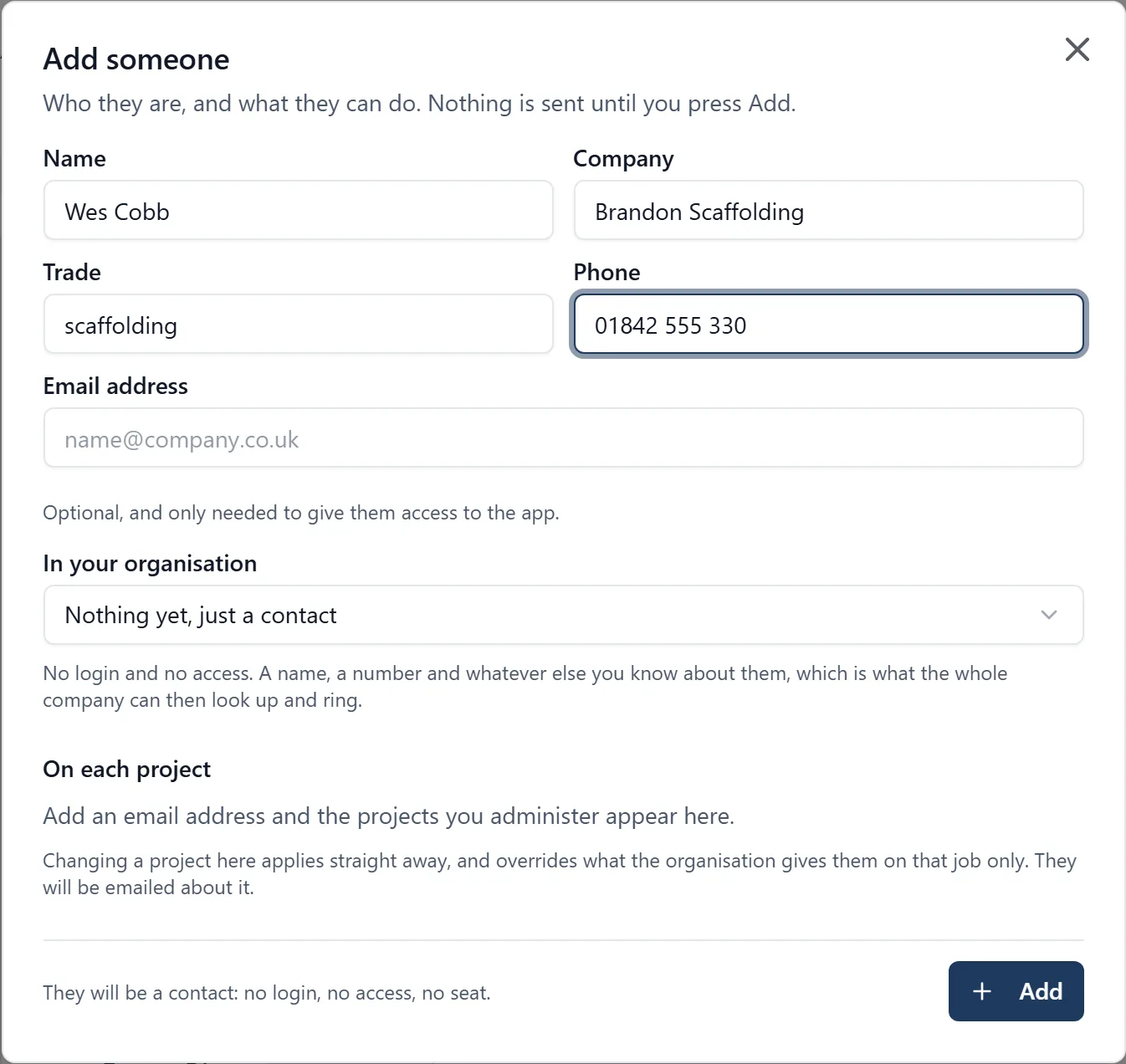
Half the people involved in a job will never log into anything. They still need to be in the directory.
What it does
- One list holding both app accounts and plain contacts
- Look anybody up and ring them from the phone
- Record a firm, a trade and how to reach somebody
- Give a contact access later without retyping them, or import the contacts you already have
- Both in a browser, and on the phone for whoever runs the company account
Why it matters on site
A contacts list that only holds people with logins is a contacts list somebody keeps a second copy of on their phone.
- Which plan
- This is included in every plan, from £149 a month. Plans differ by how many people they seat, not by what the software does. See pricing.
- How to use it
- The manual page for this is in the Help Centre, and it is the same guide SiteBot reads inside the app. Read the guide.
People and access 03 more
Also in people and access
| Feature |
|---|
| People planner Who goes to which site each day, planned once a week and sent to every phone. |
| Roles and permissions Let a subcontractor see their work and nothing else, without a conversation about it. |
| Organisation and seats One company account, every job under it, and a clear count of who is using it. |