Construction Estimating Software UK: A Buyer's Guide for Small Builders
William Charlesworth-Jones8 min read
Quick Answer
Construction estimating software prices a job from your own rates and turns that price into a document the client can accept. For a small UK builder it needs to keep your rates in one price list, let a markup sit on a line, a trade or the whole estimate, set VAT per line so zero rated work sits beside standard rated work, import a QS’s priced bill, print a quote on your letterhead without your costs on it, and record the client’s acceptance. The accepted estimate should then become the figure the job is costed against, so you can see whether it is making money while it is still running.
Most builders we speak to price in a spreadsheet they have refined over years. The trouble starts after the price is agreed: the figures are retyped into a Word document for the client, and nobody compares the job’s spend with the spreadsheet until the final account.
What Does Construction Estimating Software Do?
It holds the lines of a price (a description, a quantity and unit, your cost, your markup and the price to the client) grouped by trade, does the arithmetic for totals, VAT and margin, and produces the document the client reads. Takeoff-led tools are built around measuring quantities from drawings and suit full-time estimators. Builder-led tools are built around your rates, your quote and what happens once the job is won, which is what most small firms need more, because their measuring is often done on site or by a QS.
What Does a Small Builder Actually Need From It?
Your own rates, kept once. A price list of the items you price again and again, imported from the Excel list you already keep. Changing a rate later should not quietly change an estimate already sent.
Markups where you actually apply them. A subcontract package might carry 10% while your own labour carries 30%. A markup should sit on the line, the trade or the whole estimate, with the more specific one winning, and your margin should show as you go.
VAT per line. A new dwelling is usually zero rated, some conversions are at 5%, and most repair and extension work is at 20%. Plenty of jobs mix them, and an estimate that only knows one rate will give the client a wrong total. Each line should carry its own rate (20%, 5%, zero rated, exempt, or no VAT if you are not registered), and the document should show each rate on its own line. Whether a piece of work qualifies for a lower rate is a decision for you or your accountant, not the software.
A QS bill imported, not retyped. A quantity surveyor’s priced bill comes as a spreadsheet with sub-totals and “carried to summary” rows. The software should guess which column is which, show you its guess, and leave out the totals so they are not counted twice.
A document on your letterhead. One line per trade for most domestic clients, every line for a commercial client or a QS, and never your costs or markups.
Acceptance on record. The client accepts from a link with their name and signature, or you record a yes given by phone. Once accepted, the estimate should be locked, so there is never an argument about which version was agreed.
Can You Trust AI to Draft an Estimate?
Partly. AI is quick at reading a specification, a schedule or a set of drawings and suggesting the trades, items and a first set of quantities. It is not a take-off, and nobody should price from quantities they have not checked.
Three things separate a tool you can trust from one you cannot:
It says where every quantity came from. “Measured”, “you said”, “counted from the door schedule” and “rough guess” are different levels of confidence. A rough guess should start unticked, so it cannot slip in unnoticed.
Prices come from your rates, not the AI’s. An AI model has no idea what you pay your bricklayer, so rates should come from your price list or your own past estimates.
It admits when it has no rate. If there is no rate for a line, a good tool says so and puts the line in at nothing for you to price. A tool that fills the gap with a plausible-looking figure is the dangerous one, because a guessed rate looks exactly like a real one on the printed quote.
A check against your own history helps too: if a trade comes out far off what it usually costs you a square metre, you want to know before the client does.
Why Should the Estimate Feed Job Costing?
Because the estimate is the budget. If the price and the costs live in different places, you only find out the job has overrun when someone adds them together, usually at the end. We go through the numbers that matter in job costing for small builders.
When the accepted estimate becomes the job’s quote automatically, every cost is measured against it from day one, each cost code gets a budget from its trade, and signed extras add to the agreed total. The same lines can then be invoiced month by month, with what is left on each always in view.
A spreadsheet. Free and already set up the way you think. It falls down on versions, on producing a client document without retyping, and on linking the price to the job’s costs. If only you ever open it, it may be enough.
An estimating-led app for small builders. Buildxact is one of the better-known names, and there are others. Apps in this group are built around quoting, and many go on into scheduling and client management. We could not load Buildxact’s own site when we checked on 2 November 2026, so we are not quoting its features or price here: check its current UK offer directly and try it on a real job.
An enterprise platform. Procore’s UK site lists estimating with takeoff from 2D drawings and 3D models, AI-assisted symbol counting, bills of quantities built from takeoff data, and estimates that move into the project budget (checked 2 November 2026). Procore publishes no prices: its UK pricing page says it charges an upfront annual fee by product, depending on the construction volume you do, with unlimited users. It is aimed at main contractors with estimating teams. Our Procore pricing guide goes into the cost.
An all-in-one site app with estimating built in. This is where BuildersAI sits: the estimate, the costs, the invoices and the site all live on the same job. If all you want is takeoff, a dedicated takeoff tool will measure more than it does.
How Estimating Works in BuildersAI
BuildersAI is the all-in-one site management app for UK builders, and Estimates is the part of it that prices a job. It is in the web app, for the job’s admins and the company’s owners and admins.
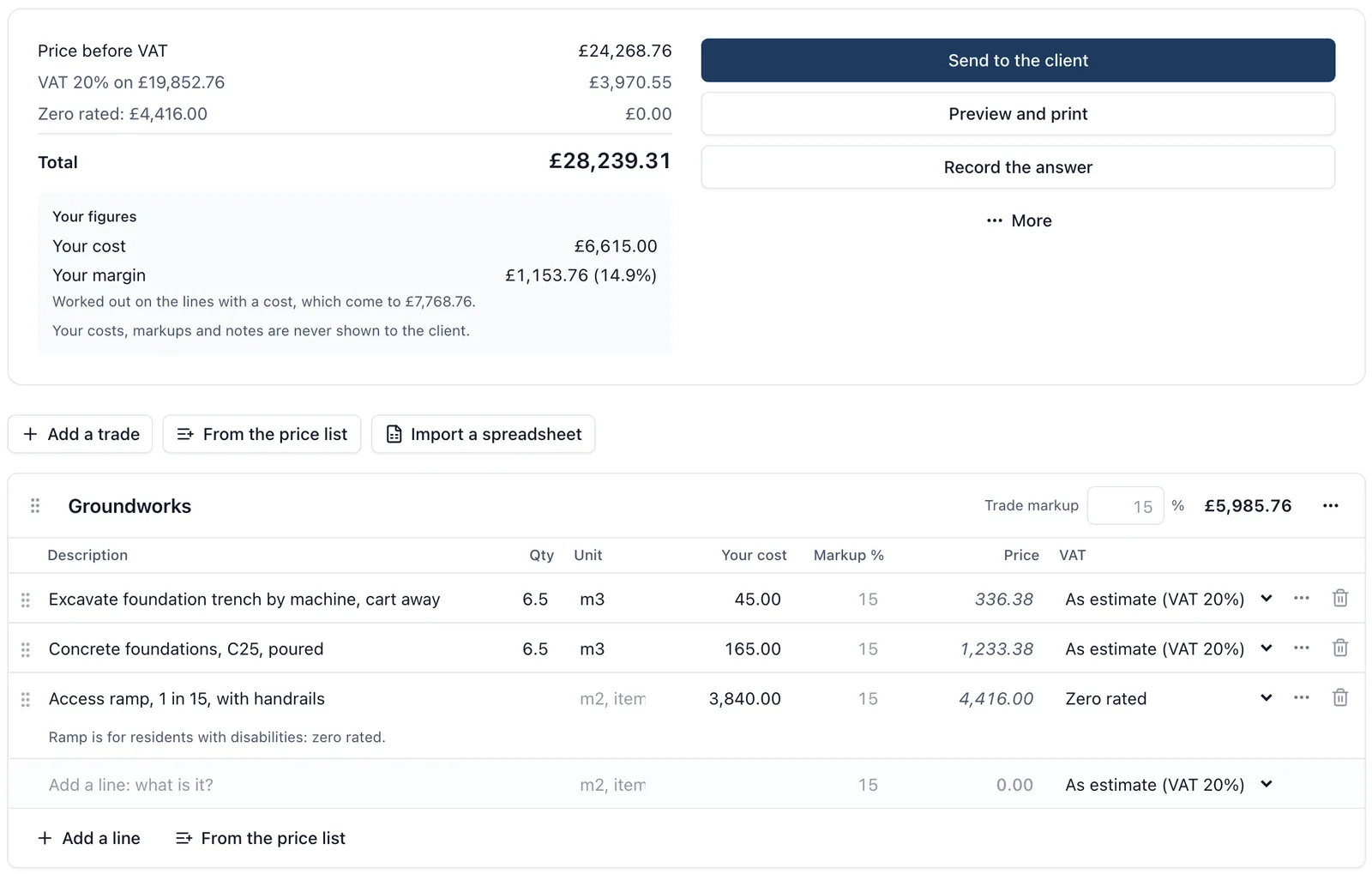
✓Trades and lines. A line is one figure (“Electrical, £5,160”), or a quantity with your cost for one and a markup. Markups sit on the line, the trade or the estimate, and the totals show your cost and your margin as you go.
✓VAT per line. VAT 20%, 5%, zero rated, exempt or no VAT, with each rate shown on its own line of the document. A company that builds new homes can start every new estimate on zero rated.
✓Your price list and your QS’s spreadsheets. Rates kept once for the company, imported from Excel or CSV. A QS bill is imported with BuildersAI’s guess at each column shown before anything is added.
✓Drafted by SiteBot, priced by you. SiteBot suggests lines and quantities from what you tell it and the drawings you tick, and says where each quantity came from. SiteBot is never given your rates: each price comes from your price list, then your past estimates, then your day rate for the trade. A line with none says Needs a rate and goes in at £0.00. It warns when a fully priced trade is more than 30% off what it came to a square metre on your past jobs. See drafting an estimate with SiteBot.
✓Your letterhead, accepted from a link. The client sees each trade’s total or every line, never your costs or markups. Send to the client emails a link to accept with their name and signature or decline, and Record the answer covers a yes by phone.
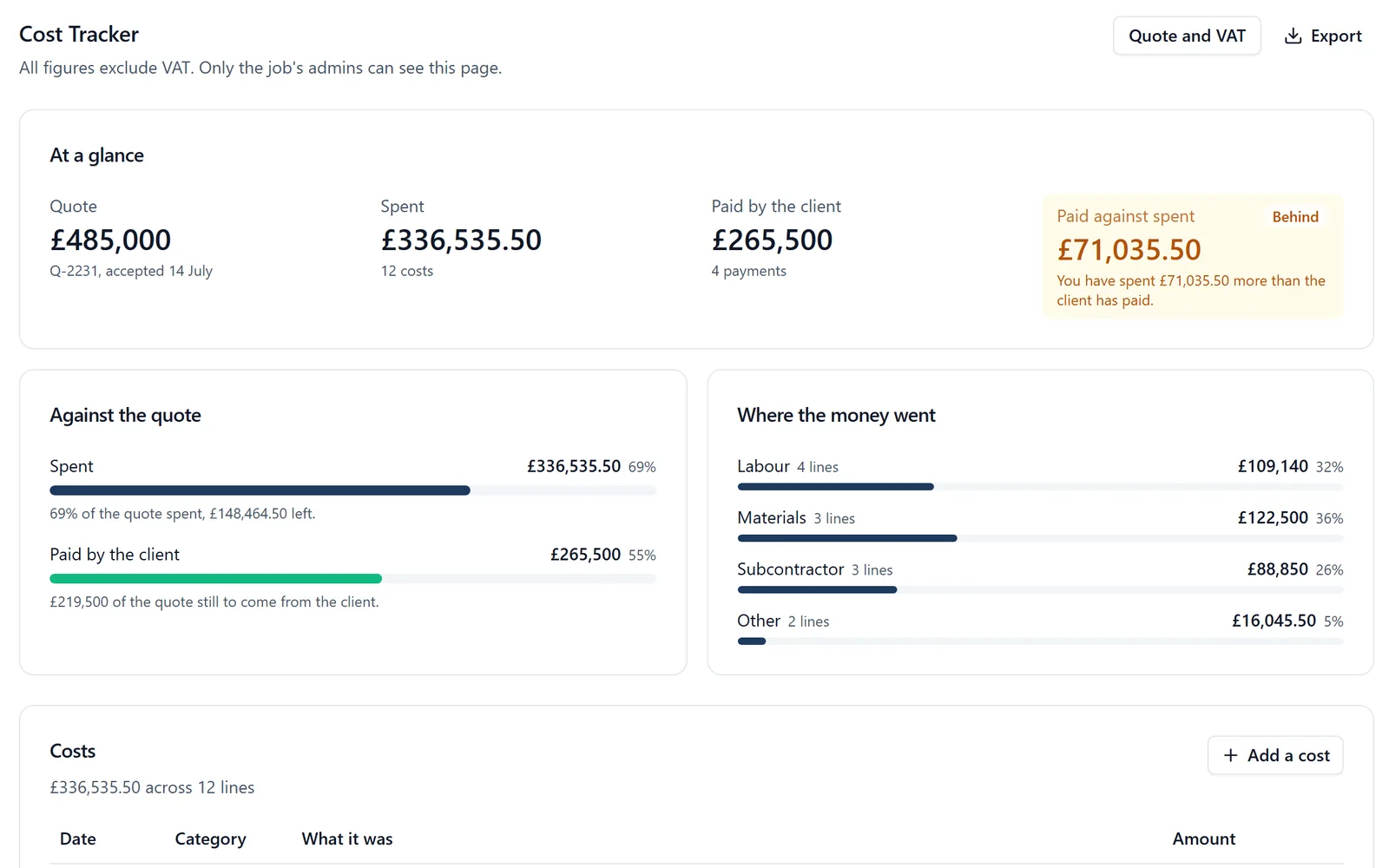
✓Locked, then costed. An accepted estimate cannot change. It becomes the job’s quote on the Cost Tracker, each cost code’s budget comes from it, and its lines can be invoiced month by month with invoices to the client.
Pricing is flat, with no per-user fees: BuildersAI Starter is £149 a month for up to 10 people, Professional is £299 a month for 11 to 50, and Business is £599 a month for 51 to 100, all plus VAT, with a 14-day free trial on every plan. See the pricing page.
FAQ
What is the best estimating software for a small UK builder?
The one that prices from your own rates, handles VAT per line, produces a quote on your letterhead and links the accepted price to the job’s costs. If you mostly measure from drawings, look at a takeoff-led tool as well.
Can estimating software handle zero rated and standard rated work on one quote?
It should. Each line needs its own VAT rate, and the document should show the VAT for each rate separately. In BuildersAI each line can be VAT 20%, 5%, zero rated, exempt or no VAT, and the totals are worked out per rate. Whether work qualifies for a lower rate is for you or your accountant to decide.
Can I import my quantity surveyor's bill of quantities?
In BuildersAI, yes, from Excel or CSV. It guesses which column is which, shows you its guess to correct, and leaves out sub-totals and summary rows before adding the trades and lines.
Should I trust AI to measure quantities from my drawings?
Treat them as a starting point. A good tool says where each quantity came from and marks rough guesses so they start unticked. Check every quantity, and measure the ones that matter. Prices should always come from your own rates, and a tool should say when it has no rate rather than inventing one.
What happens when the client accepts an estimate in BuildersAI?
The client accepts with their name and signature, the estimate is locked and it becomes the job’s quote on the Cost Tracker. Each cost code gets its budget from it, and its lines can be invoiced month by month.
Price Your Next Job From Your Own Rates
See an estimate built, sent and turned into the job’s budget on a 30-minute demo.
William grew up in a family that builds houses for a living and has been around construction sites for as long as he can remember. He has seen first hand that eight-figure sites are often run on WhatsApp and spreadsheets, and started BuildersAI to cut the invisible costs that take chunks of margin across a site. His aim is for BuildersAI to be the all-in-one site management platform built in the UK, for UK sites.
A spreadsheet per job tells you what you spent. It rarely tells you whether you are ahead of the client or carrying the job. Four numbers, kept weekly, do.
Procore does not publish its pricing. This breakdown covers what UK contractors actually pay, why the total cost is higher than the headline figure, and what alternatives exist for builders who do not need enterprise-scale software.
A job budget is only useful if it is split the same way your costs are recorded. Set a budget per cost code from the estimate, count what is on order as well as what is spent, and look at it every week.
8 min read
Get started
Ready to bring your whole team onto
one simple app?
14-day free trial with every feature, no card and no contract, and your team can be set up
within a day.