Construction Cost Management Software UK (2026): 8 Options Compared for Builders
William Charlesworth-Jones9 min read
Quick Answer
For a UK builder running whole jobs with a crew on site, BuildersAI is the strongest all-round choice: one app covers the money from estimate to final account (budgets by cost code, labour from time on site, purchase orders, supplier invoices with CIS, change orders, monthly and cost plus invoicing) on the same job as the drawings, tasks and timesheets, for a flat £149 a month + VAT for up to 10 people. Trades firms invoicing small jobs will also look at Fergus and Tradify, residential builders who estimate from takeoffs at Buildxact, SME main contractors who want cost control alone at LiveCosts, and contractors turning over tens of millions at Procore, Eque2 or Access Coins.
Which Construction Cost Management Software Is Best in the UK?
The best one is the one that fits how your firm makes and loses money, and that depends mostly on size and on the kind of work you do.
Builders running whole jobs with a crew on site: BuildersAI. The money and the site are one app, so the costs come from the people doing the work rather than from someone retyping them in the office.
Trades firms doing many small jobs a week: Fergus or Tradify, which are built around quote, job, invoice and get paid.
Residential builders who live in takeoffs and estimates: Buildxact.
SME main contractors who want cost control and nothing else: LiveCosts.
Contractors and housebuilders turning over tens of millions: Procore, Eque2 or Access Coins, which are bought with an implementation project and priced on a quote.
What Should Cost Management Software Do for a Builder?
It should tell you whether each job is making money while it is still running, not at the final account:
✓One page per job. The agreed price, what is spent, what is committed on orders and what the client has paid.
✓A budget per cost code, so you see which part of the job is running over. Our guide to construction budget tracking goes through it.
✓Purchase orders and supplier invoices on the job, each with its cost code, VAT and any CIS deduction. See purchase orders for builders.
✓Variations signed before the work, then added to the job’s agreed total.
✓Invoices to the client from what was agreed, monthly drawdown on a fixed price or costs plus a markup on a cost plus job.
✓A clean hand-off to QuickBooks or Xero, so nobody types anything twice.
If you only want the method, our guide to job costing for small builders covers the four numbers to keep on any job, with or without software.
How Do You Manage the Costs on a Building Job, Step by Step?
Cost management is not one task, it is a habit that runs from the first price to the final account. These are our practical guides to each stage, in the order a job runs. Each one works with a spreadsheet, and each shows how BuildersAI does the same thing with less typing.
Stage of the job
What you are trying to do
Our guide
1. Pricing
Win the work at a price that covers your costs, overheads and profit
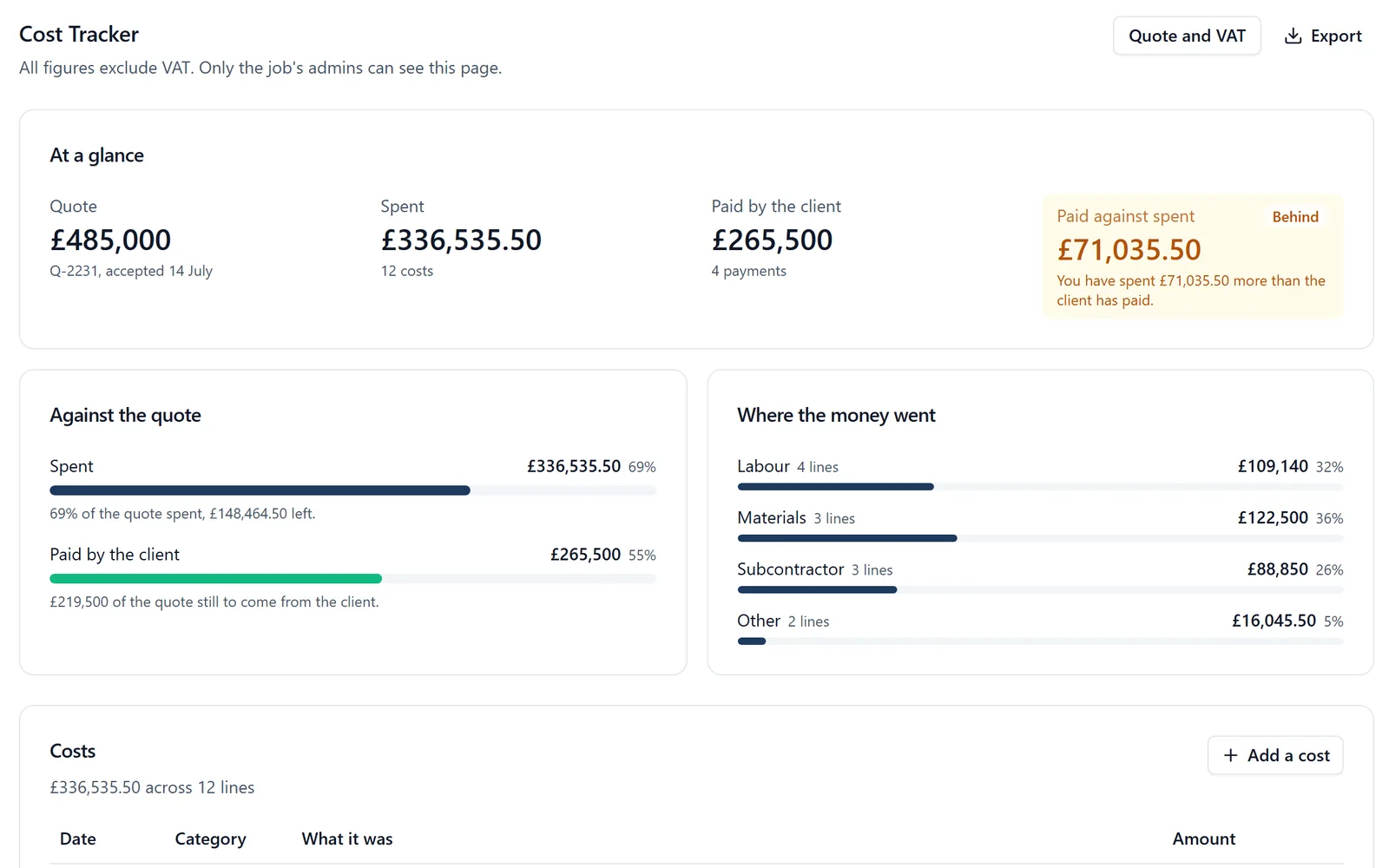
In BuildersAI every one of those stages happens on the same job, so the estimate becomes the budget, the timesheets become the labour cost, the purchase orders become the committed cost, and the signed variations change the agreed price on their own. The Cost Tracker shows one job; the Overview shows every job’s forecast margin on one page.
How Do the Eight Options Compare?
Competitor details were checked on each vendor’s own website on 2 November 2026, with the source linked in each entry below. Where a vendor’s site does not mention something, the table says “Not listed” rather than guessing.
Software
Built for
Estimates
Purchase orders
Invoices to the client
App for the crew on site
Published UK price
BuildersAI
UK builders running whole jobs with a crew on site
Yes
Yes
Yes, monthly drawdown and cost plus
Yes, the same app as the office
£149, £299 or £599 a month + VAT, flat, no per-user fees
LiveCosts
SME main contractors and subcontractors
Not listed
Yes
Not listed
Yes, for costs and time
On request
Buildxact
Residential builders
Yes, with takeoff
Yes
Yes
Yes, on the middle plan and up
From £119 a month + VAT, unlimited users
Fergus
Trades businesses
Quotes
On the higher plan
Yes, with card payments
Yes
From £39 a month, timesheet users from £12
Tradify
Trades businesses
Quotes
On the top plan
Yes, with online payments
Yes
£34 to £44 per user a month
Procore
Mid-size and large contractors
Yes, sold as a separate product
Yes
Yes
Yes
None, an annual fee on turnover
Eque2
Contractors on Sage or Xero
Yes (Evaluate)
Yes, procurement
Yes, applications for payment
Not listed
None, quote only
Access Coins
Contractors and housebuilders, ERP
Yes
Yes, procure to pay
Yes, valuations
Not listed
None, quote only
The Options One by One
1. BuildersAI
BuildersAI is the all-in-one site management app for UK builders: drawings, tasks, timesheets, RAMS and job costs in one simple app, on every phone. That is the difference that matters for cost management. The costs on a job come from the same place the work is planned and recorded, so the person on site who clocks in, takes a delivery or signs a RAMS is feeding the same job the director reads the margin from.
The money side covers the whole job, estimate to final account:
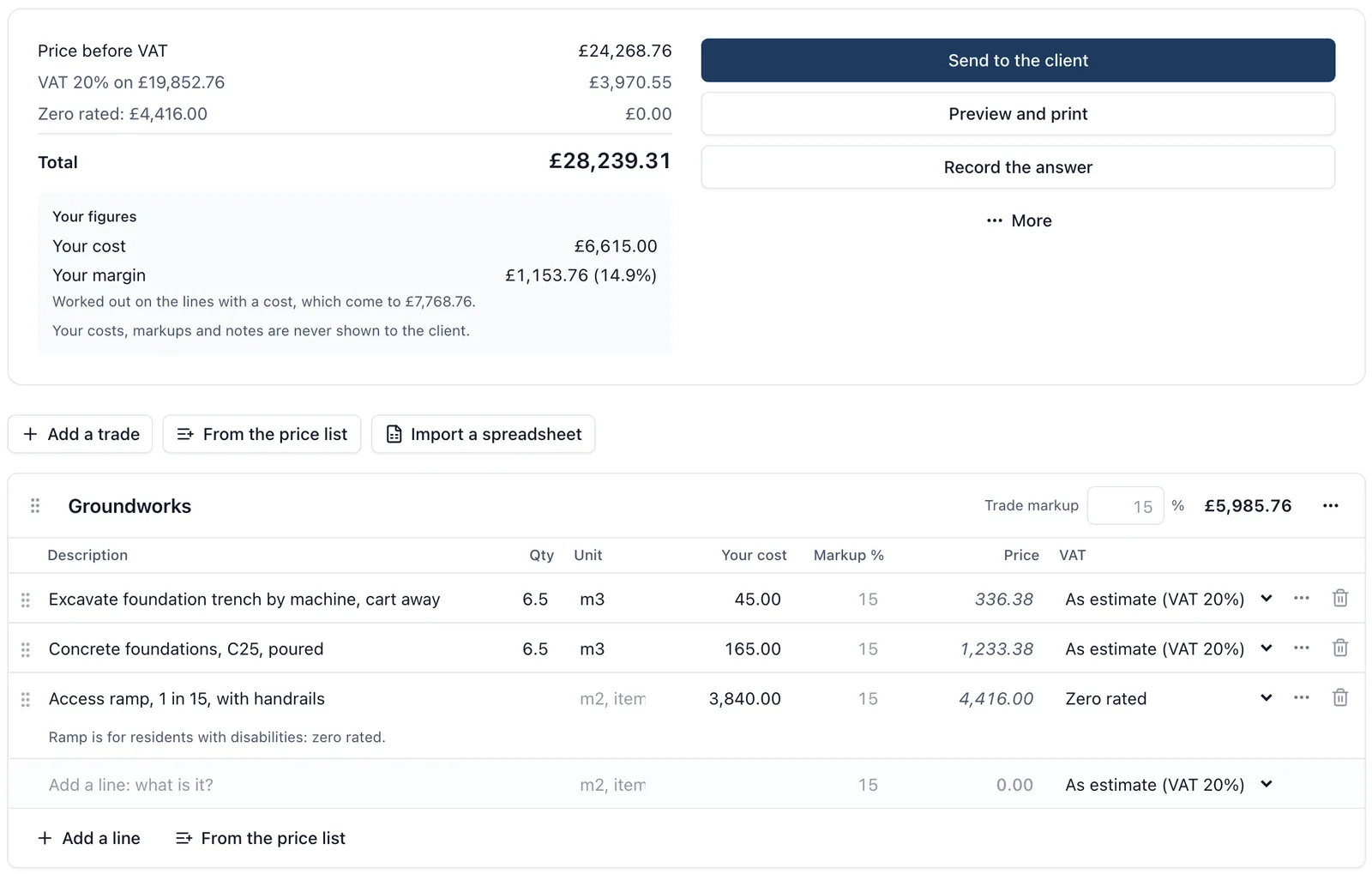
✓Estimates on your letterhead from your price list, past jobs or your QS’s spreadsheet. SiteBot can draft the lines from your drawings, the client signs on their phone, and the accepted estimate becomes the job’s quote. See construction estimating software.
✓Budgets by cost code, taken from the accepted estimate, with what is on order, what is spent and what each code is projected to cost.
✓Labour from time on site. Each person’s timesheet or check-in time on the job, at their cost per hour, counted in what the job has spent.
✓Purchase orders the supplier approves from a link. Each invoice draws the order down, and one for more than is left is refused.
✓Supplier invoices dropped in a week at a time, read for you to check, with VAT, the reverse charge, any CIS deduction and a cost code.
✓Change orders the client signs on their phone with no account, including omissions, added to the job’s agreed total once signed.
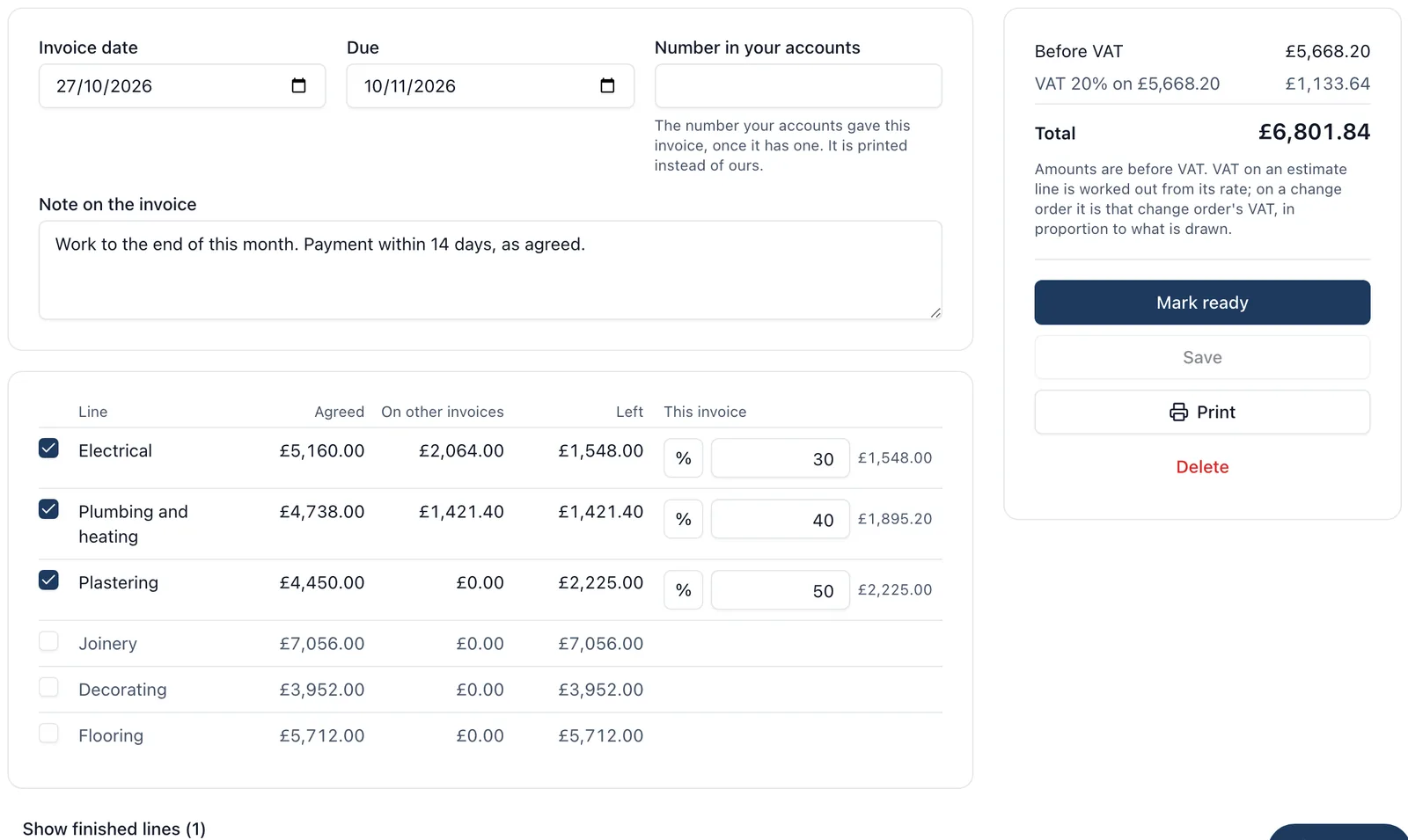
✓Invoices to the client, drawn down month by month from the estimate and signed change orders (how monthly invoicing works), or on a cost plus job the supplier invoices since the last claim plus your markup.
✓The client’s view of the money, when you switch it on. Never your own costs.
✓Every job on one page: quote, spent, still to draw on orders, forecast margin, invoiced and paid.
✓QuickBooks and Xero. With QuickBooks Online connected, supplier bills and client invoices go across when you press Send and the client’s payments are read back onto the job. Supplier invoices and timesheet hours go to Xero as bills.
The price is flat and published, with no per-user fees, so the whole crew can be on it: £149 a month + VAT for up to 10 people, £299 for 11 to 50 and £599 for 51 to 100, with a 14-day free trial and no card. See pricing and the Cost Tracker.
Best for: builders running whole jobs who want the site and the money in one place, and want the whole crew on it without paying per head.
2. LiveCosts
LiveCosts describes itself as real time job costing for contractors, built for SME main contractors, with offices in Dublin and London. Its site lists purchase order tracking, supplier invoice management with AI line extraction and three-way matching, time tracking for employees, subcontractor dayworks and plant, and budget against actual, WIP and profit and loss reports. It links to Xero, Sage Business Cloud, Sage 50 and QuickBooks, and has iOS and Android apps. Estimating and invoicing the client are not listed on its homepage, and pricing is on request (checked 2 November 2026).
Best for: a main contractor who wants to control committed costs and already has estimating, planning and site records elsewhere.
3. Buildxact
Buildxact is estimating and job management for residential builders: digital takeoff, estimates from supplier price files, quotes with e-signatures, purchase orders, scheduling, cost tracking and invoicing. It links to Xero and QuickBooks. Its UK plans are £119, £209 and £349 a month excluding VAT on monthly billing, less on an annual plan, all with unlimited users. The schedule, job management and the site app start on the £209 plan, not the entry one, and its AI estimating tools are add-ons at £99 to £149 a month each below the top plan, so a builder who wants the site app and AI estimating pays from about £308 a month + VAT (Buildxact UK pricing, checked 2 November 2026). The same Planyard review notes no CIS handling.
Best for: a residential builder whose biggest job is pricing work from drawings.
4. Fergus
Fergus is job management software for UK trades: electricians, plumbers, builders, roofers and more. It quotes, invoices from the quote and takes payment by card, tap to pay and direct debit. Supplier invoices emailed in are read and put on the right job, and it syncs contacts, invoices and payments with Xero and QuickBooks. Its UK pricing page lists plans from £39 a month, timesheet users from £12 a month and contractors at £2 a day, with purchase orders on the higher plan (checked 2 November 2026).
Best for: a trades business running many short jobs, where getting paid on the day matters most.
5. Tradify
Tradify is quote, schedule, invoice software for trades. Its UK pricing page lists three plans at £34, £37 and £44 per user a month: job costing and bill tracking start on the middle plan, and purchase orders and reading bills by AI on the top one. It syncs with Xero, Sage and QuickBooks Online, and runs on iPhone and Android (checked 2 November 2026).
Best for: a small trades team that wants something simple. Per-user pricing adds up as the team grows.
6. Procore
Procore is the big international construction platform. It publishes no price: its UK pricing page says it charges an upfront annual fee by product, based on your annual turnover, with unlimited users (checked 2 November 2026). Financials, estimating and the site tools are separate products. Our Procore pricing guide and BuildersAI vs Procore go further.
Best for: mid-size and large contractors with a commercial team, and the budget for an annual contract paid upfront.
7. Eque2
Eque2 adds construction job costing and contract management to Sage and Xero. Its Construct product is for contractors up to around £25m turnover, and Evision, built on Microsoft Dynamics 365 Business Central, is for those above it. Its site lists CIS, the reverse charge, retentions, applications for payment, variations and CVRs, and says over 3,000 construction businesses use it. No price is published: it is a demo and a consultant (checked 2 November 2026).
Best for: a contractor whose books are already in Sage and who needs CVRs and applications for payment run by a commercial team.
8. Access Coins
Access Coins is a construction ERP for UK and Irish contractors and homebuilders: finance, job costing with CVR reporting, estimating and valuations, procurement, payroll and project management in one system. Access says 43 of the top 75 UK homebuilders use it. Its pricing page gives no figures: pricing is tailored to business size, modules and users, with implementation quoted separately (checked 2 November 2026).
Best for: large contractors and housebuilders replacing their whole back office.
Is Xero or QuickBooks on Its Own Enough?
No, not for job costing on a building job. Xero and QuickBooks know what was paid and to whom, and both can tag a cost to a project. They do not know what was agreed with the client, what is committed on orders that have not been invoiced yet, which variations were signed, or how many hours the crew put in on each job this week.
The better pattern is to keep the books where they are and put the job’s money in a tool built for it, which then hands the bills and invoices to your accounts. Our guide to construction software and accounting integration covers how the two fit together.
How Much Does Construction Cost Management Software Cost?
BuildersAI is £149 a month + VAT for up to 10 people, £299 + VAT for 11 to 50 and £599 + VAT for 51 to 100, flat for the whole company with every feature. Of the others, Buildxact, Fergus and Tradify publish prices (in the table above, checked 2 November 2026). LiveCosts, Procore, Eque2 and Access Coins do not: Procore charges an annual fee based on turnover, and the rest quote.
The figure to compare is the cost for your whole team, not the headline. Per-user pricing looks cheap for the office and gets expensive the moment you put the crew on it, which is where the costs are actually incurred. Our construction software pricing guide has the wider picture.
FAQ
Which software is best for managing construction costs in the UK?
For builders running whole jobs, BuildersAI, because the money from estimate to final account sits in the same app as the drawings, tasks and timesheets, at a flat £149 a month + VAT for up to 10 people. Trades firms may prefer Fergus or Tradify, and large contractors Procore, Eque2 or Access Coins.
What is construction cost management software?
Software that keeps each job’s money in one place: the estimate and budget, what is committed on orders, what has been spent, what the client has agreed and paid, and the extras signed along the way, so you can see whether a job is making money while it is still running.
What is the difference between cost tracking and cost control?
Cost tracking records what has been spent against the budget. Cost control acts before the money goes: purchase orders agreed before the supplier invoices, variations signed before the work, and a forecast that shows a job heading over while there is still time to do something about it.
Can I use Xero or QuickBooks for job costing?
For simple jobs, partly. Both can tag a cost to a project, but neither knows the agreed price, committed orders, signed variations or hours on site. Most builders keep the books in Xero or QuickBooks and run the job’s money in a construction tool that sends bills and invoices across.
What tools include scheduling and budgeting together?
BuildersAI has the programme, tasks and Gantt on the same job as the budget by cost code, purchase orders and invoices. Procore and Buildxact also cover both, Procore as separate products and Buildxact from its middle plan.
How much does BuildersAI cost?
£149 a month + VAT for up to 10 people, £299 + VAT for up to 50 and £599 + VAT for up to 100, flat for the whole company with every feature. Every plan starts with a 14-day free trial and no card is needed.
See Every Job's Money in One App
See estimates, budgets by cost code, purchase orders and invoices to the client on a 30-minute demo, then try them on one of your own jobs.
William grew up in a family that builds houses for a living and has been around construction sites for as long as he can remember. He has seen first hand that eight-figure sites are often run on WhatsApp and spreadsheets, and started BuildersAI to cut the invisible costs that take chunks of margin across a site. His aim is for BuildersAI to be the all-in-one site management platform built in the UK, for UK sites.
Most estimates are built in a spreadsheet, retyped into a quote and never looked at again once the job starts. Here is what estimating software should do instead, what AI can and cannot be trusted with, and how the options compare.
A monthly invoice on a building job is really a running schedule: what was agreed, what has been billed, what is on this invoice and what is left. Keep that schedule straight and nothing gets billed twice or forgotten.
A spreadsheet per job tells you what you spent. It rarely tells you whether you are ahead of the client or carrying the job. Four numbers, kept weekly, do.
7 min read
Get started
Ready to bring your whole team onto
one simple app?
14-day free trial with every feature, no card and no contract, and your team can be set up
within a day.