Construction Invoicing Software UK: How to Bill a Client Month by Month
William Charlesworth-Jones8 min read
Quick Answer
To invoice a client for building work month by month, keep one schedule per job with every agreed line (the accepted quote plus each signed change order) and, against each, what was agreed, what earlier invoices have billed, what this invoice bills and what is left. Each month you bill a percentage or an amount of the lines that have progressed, never more than is left. VAT follows each line’s rate, retention is held back if the contract says so, and on work for a VAT and CIS registered contractor the domestic reverse charge usually applies. Construction invoicing software earns its place by keeping that schedule for you, so nothing is billed twice and nothing is forgotten.
Most invoicing problems on building jobs come from not knowing, at the end of the month, how much of each part of the job has already been billed, so a line gets missed or the plastering gets billed at 50% twice. Cash flow suffers either way, as we cover in construction cash flow management.
Stage Payments or Monthly Drawdown: Which Should You Use?
Stage payments tie each payment to a point in the job: a deposit, then so much at foundations, wallplate, watertight, first fix, second fix and completion. They are simple for a domestic client to understand, and common on extensions and single houses. Their weakness is that a stage that slips also delays your money, even though you have spent heavily getting close to it.
Monthly drawdown (often called interim valuations or applications for payment on commercial work) bills whatever has been done that month against an agreed price. Each line of the price is billed by the percentage complete, so if the electrics are 30% done you bill 30% of the electrical line. It tracks your spending more closely and suits longer jobs and jobs for contractors and developers.
For commercial contracts, the Construction Act gives a right to interim payments on work expected to last 45 days or more, and sets out payment and pay less notices. Contracts with a homeowner for work on their own home are outside it, so on domestic jobs the payment terms in your quote are what count. If in doubt, take advice on the contract rather than relying on a template.
On a cost plus job the invoice is built differently, from what the job has actually cost plus your agreed fee. Our guide to cost plus contracts covers how that works.
How Do You Invoice a Client Month by Month?
Start from the agreed price broken into lines: usually the trades of your accepted estimate, such as Groundworks, Brickwork, Electrical, Plumbing and heating, Plastering. Then each month:
Walk the job and decide what proportion of each line is done.
For each line, bill that proportion less what you have already billed on it, or a fixed amount if the line was agreed that way.
Add any signed change orders, billed the same way.
Work out VAT from each line’s rate.
Take off retention if the contract has it.
Show the client the whole schedule, not just this month’s total.
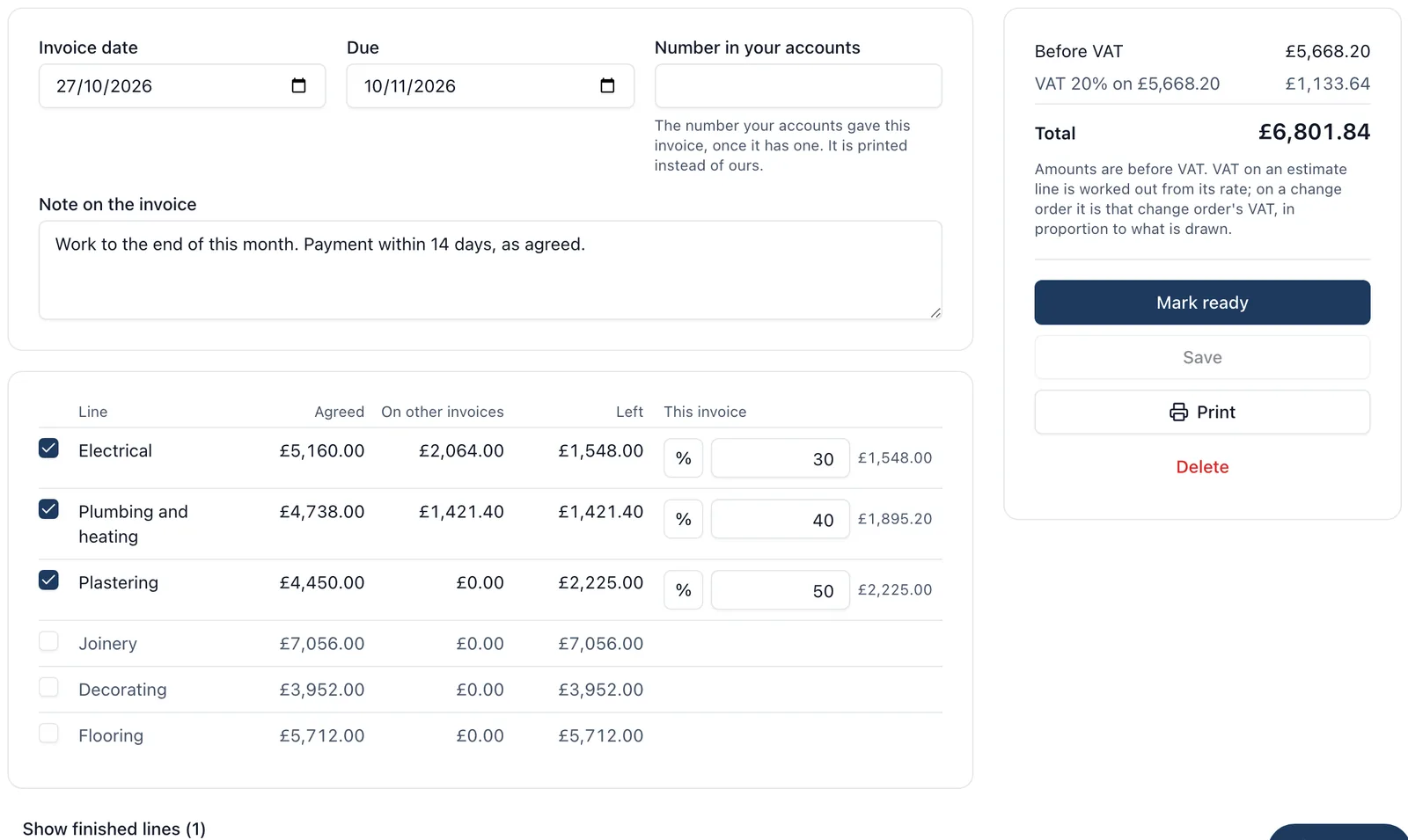
A clear drawdown invoice shows four columns per line: agreed, invoiced before, this invoice, and left.
What Is Retention, and How Does It Work?
Retention is a percentage of each payment the client holds back as security against defects, often 3% or 5% on commercial work. Typically half is released at practical completion and the rest at the end of the defects period, commonly 12 months later. It is rare on domestic jobs and common when you work for a main contractor or developer.
On the invoice, show the gross value, the retention taken off and the net due, and keep a running total per job so you remember to claim it back.
How Do Change Orders Get Onto an Invoice?
Treat each signed change order as another line on the schedule, drawn down like any other, in full when done or in part as it progresses. Extras agreed on site and never written down are the ones that turn into arguments at the final account, so get the price signed before the work starts. Our guide to job costing explains why the agreed total has to move when extras are signed.
How Does VAT Work on a Building Invoice?
Each line keeps the VAT rate it was priced at: 20% for most repair, maintenance and extension work, 5% for some conversions and renovations, and zero rated for most new dwellings. An invoice mixing rates should show the VAT for each rate separately. The rate is decided by the work, not the invoice, so check anything unusual with your accountant.
The domestic reverse charge changes things when you work for another business in the construction chain. From 1 March 2021, standard and reduced rated construction services supplied to a customer who is VAT registered and CIS registered, and who is not the end user, are invoiced under the reverse charge. You do not charge the VAT; the invoice states that the reverse charge applies and the customer accounts for the VAT to HMRC. It does not apply to work for a homeowner, to zero rated work, or to a customer who has told you in writing they are the end user. HMRC’s guidance on the domestic reverse charge has the wording and exceptions.
CIS deductions also apply when you work for a contractor: they deduct from the labour part of your invoice (not materials) at 20% if you are registered, 30% if not, or nothing if you have gross payment status. Split labour and materials clearly on the invoice so the deduction is worked out on the right figure. See our CIS guide for the wider picture.
How Do You Stop Billing Twice or Forgetting a Line?
The mistakes come from rebuilding the schedule by hand. Four habits prevent most of them:
Count drafts as billed. If two people draft invoices in the same month, both must see the other’s figures, or the same money goes out twice.
Never bill more than is left on a line. If a line is 100% billed, it should not be possible to add more to it.
Hide finished lines, but keep them. A line with nothing left should be out of the way, not deleted from the schedule.
Start from the agreed lines, not last month’s invoice. Copying last month forward is how a new change order gets left off for three months.
A careful spreadsheet with one editor can do all of this. Software is worth it when more than one person invoices, or the schedule needs to stay tied to the estimate and the job’s costs. The accounting connection guide covers how site software and accounts packages fit together.
How BuildersAI Handles Invoices to the Client
BuildersAI is the all-in-one site management app for UK builders. Invoices to the client are drawn down from the job’s accepted estimate and its signed change orders, in the web app, for the job’s admins and the company’s owners and admins.
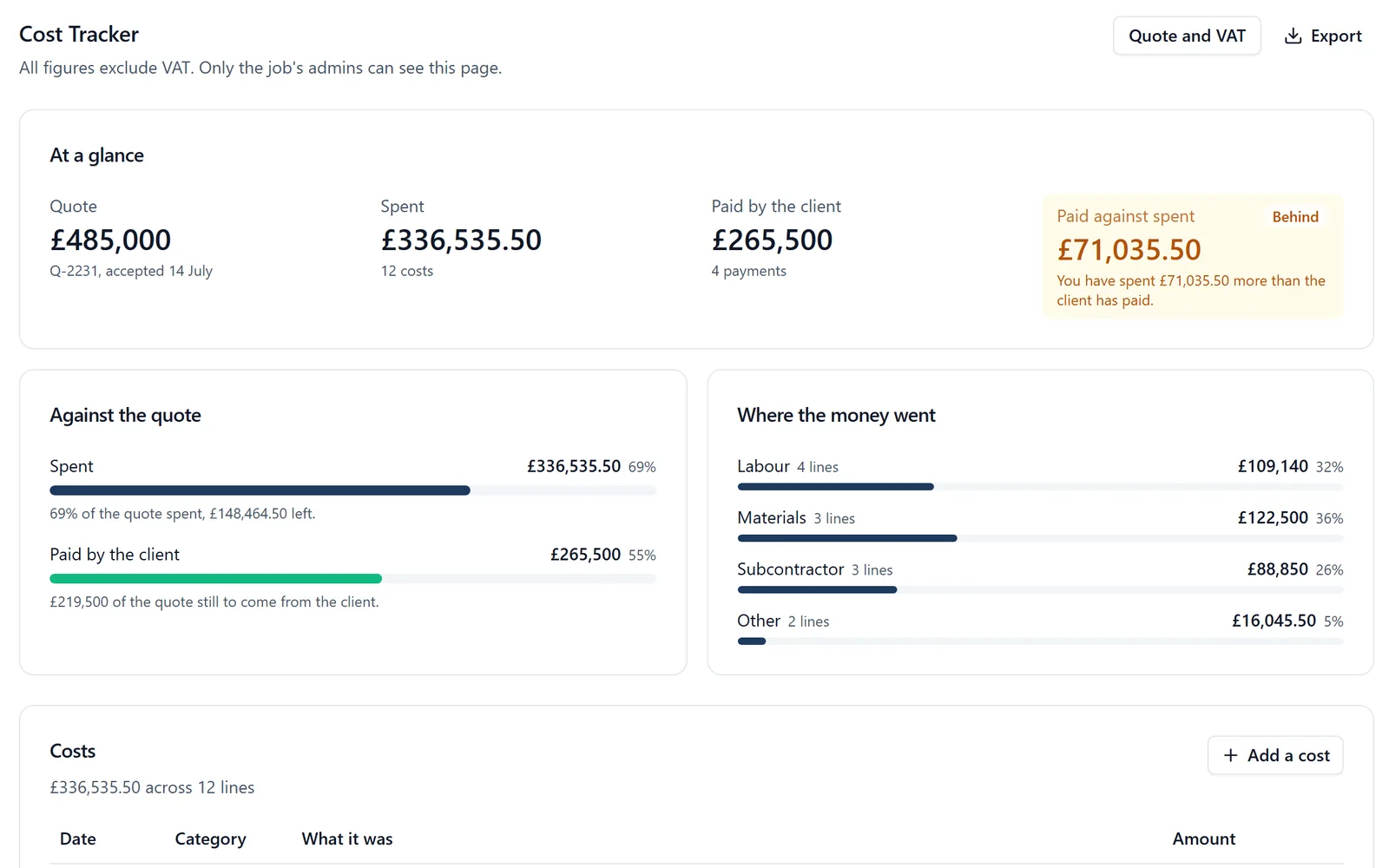
✓Line by line. Start an invoice on the job’s Cost Tracker, tick the lines you are billing, and type an amount or a percentage of each. Every line shows what was agreed, what other invoices have drawn (drafts included) and what is left.
✓Nothing billed twice. You cannot draw more than is left on a line, and two drafts cannot invoice the same money. Lines with nothing left are tucked under Show finished lines.
✓VAT from each line’s own rate. A change order’s VAT is worked out in proportion to what you draw from it.
✓On your letterhead. Print it or save it as a PDF, with each line’s agreed amount, invoiced before, this invoice and what is left, and the number your accounts gave it if it has one.
✓QuickBooks Online. Where your company has connected QuickBooks Online, pressing Send to QuickBooks on a ready invoice puts it in your books as a draft invoice to the job’s customer, for you to check and send from QuickBooks. When the client pays it there, the payment is read back onto the job’s Cost Tracker.
✓Xero. Supplier invoices and hours go to Xero as a bill file you import. An invoice to the client is copied into Xero from the printed copy.
Pricing is flat, with no per-user fees: BuildersAI Starter is £149 a month for up to 10 people, Professional is £299 a month for 11 to 50, and Business is £599 a month for 51 to 100, all plus VAT, with a 14-day free trial. See the pricing page.
FAQ
How do I invoice a client for building work month by month?
List every agreed line (the accepted quote and signed change orders). Each month, bill the proportion of each line done since the last invoice, never more than is left, add VAT at each line’s rate, take off any retention, and show the client agreed, invoiced before, this invoice and left for every line.
What is the difference between stage payments and interim valuations?
Stage payments are fixed sums due at set points, such as watertight or first fix. Interim valuations bill whatever has been done each month against the agreed price, and suit longer jobs and work for contractors.
Does the VAT reverse charge apply to my invoice?
It usually applies when you supply standard or reduced rated construction services to a customer who is VAT and CIS registered and is not the end user. It does not apply to a homeowner, to zero rated work or to an end user who has told you so. Check HMRC’s guidance or your accountant for anything borderline.
How does an invoice from BuildersAI reach my client?
BuildersAI prints the invoice on your letterhead or saves it as a PDF. With QuickBooks Online connected, Send to QuickBooks puts it in your books as a draft invoice to the job’s customer, for you to check and send from there, and the payment is read back onto the job when the client pays.
Can I invoice extras that were agreed after the quote?
Yes, once they are signed change orders. In BuildersAI a signed change order is listed after the estimate’s lines and drawn down the same way. Extras that were never signed cannot be drawn on.
Bill Each Month From What the Client Agreed
See an invoice drawn down from an accepted estimate on a 30-minute demo.
William grew up in a family that builds houses for a living and has been around construction sites for as long as he can remember. He has seen first hand that eight-figure sites are often run on WhatsApp and spreadsheets, and started BuildersAI to cut the invisible costs that take chunks of margin across a site. His aim is for BuildersAI to be the all-in-one site management platform built in the UK, for UK sites.
A spreadsheet per job tells you what you spent. It rarely tells you whether you are ahead of the client or carrying the job. Four numbers, kept weekly, do.
UK construction firms use an average of 7 different software systems, but 57% report they don't share data. Here's how to fix your accounting integration.
Cash flow problems kill more construction businesses than bad workmanship ever will. This guide breaks down practical cash flow management strategies for UK builders, from payment terms that actually protect you, to forecasting methods that prevent nasty surprises.
14 min read
Get started
Ready to bring your whole team onto
one simple app?
14-day free trial with every feature, no card and no contract, and your team can be set up
within a day.