Which of Your Jobs Are Making Money? A Job Profitability Report for UK Builders
William Charlesworth-Jones8 min read
Quick Answer
To know which of your jobs are making money, put every live job on one page and, for each, work out its forecast margin: the agreed price (the quote plus signed change orders), less what has been spent, less what is already committed on orders but not yet invoiced. Beside it, show what you have invoiced and what the client has paid. Read the page once a week, on the same day, before VAT, and look for three things: a margin that is shrinking, spend running ahead of what you have invoiced, and a client who is falling behind on paying. That one page is a job profitability report, and it tells a director in five minutes where to spend the week.
Once a builder is running four, eight or twelve jobs at a time, the question changes. It stops being “is this job making money?”, which is what job costing for a single job answers, and becomes “which of my jobs are making money, and which one is quietly paying for the others?” This guide is about that second question: looking across every live job at once, every week, so a problem shows up while there is still time to do something about it.
It matters more in this trade than most. Construction had more company insolvencies than any other sector in England and Wales in 2025, 16.4% of the total, according to the Insolvency Service figures reported by Roofing Today (February 2026). Being busy and being profitable are different things, and the difference often sits inside one or two jobs nobody was watching.
Why Can’t the Accounts Tell You Which Jobs Make Money?
Your accounts package answers a different question: how the company did over a period. It is built around the year end, the VAT quarter and the bank, not the job. Three things get in the way:
It sees costs late. A supplier invoice lands in the books when it is entered, often weeks after the materials went in, and labour sits in the payroll, not on the job.
It cannot see what you have committed. An order placed with a groundworker for £40,000 is real money you have agreed to spend, but until they invoice it, the accounts know nothing about it.
It does not know what the job is worth. The quote, the extras the client has signed and what is left to invoice live in your estimate and your change orders, not in the ledger.
Tagging transactions by job in Xero or QuickBooks helps, but it gives you a history of spend, not a forecast of where each job will land. Our guide to construction accounting integration covers how site software and the books divide the work.
What Is a Forecast Margin?
A forecast margin is what a job will make if nothing else changes: the agreed price, less what has been spent, less what is still committed. It is a forecast rather than a result because the job is not finished, but it uses only money that is already real.
Worked through on a fixed price job:
Line
Amount
Quote
£180,000
Signed change orders
£12,500
Agreed price
£192,500
Spent so far (labour, materials, subcontractors, plant)
£96,400
Still to draw on approved orders
£48,600
Forecast margin
£47,500 (24.7%)
The middle line is the one most builders leave out. If you only subtract what has been spent, this job looks like it has £96,100 of margin left. It has half that, because £48,600 of the remaining work has already been ordered at an agreed price. Leaving committed costs out is how a job looks fine in month three and loses money in month six. Our guide to purchase orders for builders covers why that commitment needs to be written down before the work starts.
Two rules keep the figure honest:
Use the agreed price, not the original quote. Every signed change order adds to it. Extras that were agreed on site but never priced or signed do not, which is a good reason to get them signed.
Keep everything on one VAT basis. Work before VAT throughout. A job where the price includes VAT and the costs do not will show a margin that is not there.
What the forecast margin will not catch on its own is work that nobody has ordered yet. If the roof is still to price, the margin is optimistic by whatever the roof will cost. That is where a budget by cost code earns its place, as the weekly review below shows.
What Should a Job Profitability Report Show?
A job profitability report should show the same handful of figures for every live job, side by side, so the eye can run down a column and spot the odd one out. These are the six that matter:
Agreed price. The quote plus signed change orders.
Spent. Everything the job has cost so far: supplier and subcontractor invoices, labour, plant, anything else.
Still committed. What is left to draw on approved orders.
Forecast margin. The agreed price less the two above, in pounds and as a percentage.
Invoiced. What you have billed the client.
Paid. What the client has actually paid.
Add a line of progress beside the money (tasks done and late, or the stage) to tell a job that has spent 70% because it is 70% built from one that has spent 70% at the halfway point.
Keep it to one row or one card per job. Twelve jobs at 20% to 25% and one at 6% is a conversation for Monday morning.
What Is WIP, and Why Does It Matter to a Builder?
Work in progress (WIP) is the value of work you have done on a job but not yet billed or been paid for. For a builder, the practical version is the gap between what a job has cost you and what you have invoiced for it, and the gap between what you have invoiced and what has been paid.
Read across every job, those two gaps tell you where your cash is:
Spent well ahead of invoiced. You are funding the job. Sometimes that is just timing before a stage payment; if it persists, an invoice is late going out or the payment schedule was set too far back.
Invoiced well ahead of paid. The client is behind. On one job that is a phone call. On three jobs at once it is a cash flow problem, covered in our construction cash flow management guide.
Invoiced well ahead of spent. You are ahead of the client, which is good for cash, but check you have not billed work that is not done, because it will come back at the final account.
Your accountant may want a formal WIP schedule at the year end. Week to week, spent, invoiced and paid side by side for every job gives you the same warning without the paperwork.
Why Are Fixed Price and Cost Plus Jobs Read Differently?
Fixed price and cost plus jobs answer the profitability question in different places, so they need reading differently on the same page.
On a fixed price job the price is set and every pound you spend comes out of your margin. The forecast margin is the figure to watch, and an overrun is your loss.
On a cost plus job the client pays what the job costs plus your agreed markup, so the margin is set by the markup, not squeezed by overruns. The risk is cost that never reaches an invoice: a late supplier invoice never claimed, or labour never charged, is margin given away. So watch spent against invoiced. If spent keeps running ahead, something is not being billed. Our guide to cost plus contracts covers invoicing them properly.
What Should You Look at Every Week?
Pick a day and go down the page in the same order each time.
Rank by forecast margin. Start with the lowest. Has it dropped since last week, and why?
Check committed against what is left to buy. For each cost code, is the budget still enough for what has not been ordered yet? A job with every trade ordered except the most expensive one is a job with an unknown margin.
Look at labour. Labour is the cost that drifts quietly. If the hours on a job are running ahead of the programme, the margin will follow a few weeks later.
Compare spent with invoiced. Anything more than one billing cycle behind needs an invoice raised this week.
Compare invoiced with paid. Anything overdue gets a call, not an email.
Look for unsigned extras. Work done without a signed change order is cost with no price against it.
A director who looks at every job every week finds an overrun while it is small. One who looks at the year end finds it when it is not. If you run several sites at once, our piece on managing multiple construction sites covers the wider problem of seeing across them.
Can You Run a Job Profitability Report in a Spreadsheet?
Yes, and plenty of builders do. One tab per job with the costs and payments, and a summary tab pulling the six figures from each, will work.
Where it breaks is keeping it fed:
Every invoice is typed twice, once into the books and once into the spreadsheet, and the spreadsheet is the one skipped in a busy week.
Labour is the hardest cost to get in. Timesheets times each person’s cost per hour, split by job, is usually done monthly at best.
Commitments and extras go missing. Unless every order and signed change is logged as it happens, the committed column is a guess and the agreed price is still the original quote.
Summary formulas break silently. One copied tab still pointing at the old job shows the wrong margin with total confidence.
A spreadsheet is fine for three jobs and one careful person. Past that, the cost is the Friday afternoon spent rebuilding the figures instead of reading them.
How BuildersAI Puts Every Job on One Page
BuildersAI is the all-in-one site management app for UK builders, covering the money side of the whole job from the estimate to the final account. The Overview of every job is the job profitability report described in this guide, built from figures each job already keeps, so nothing is typed twice.
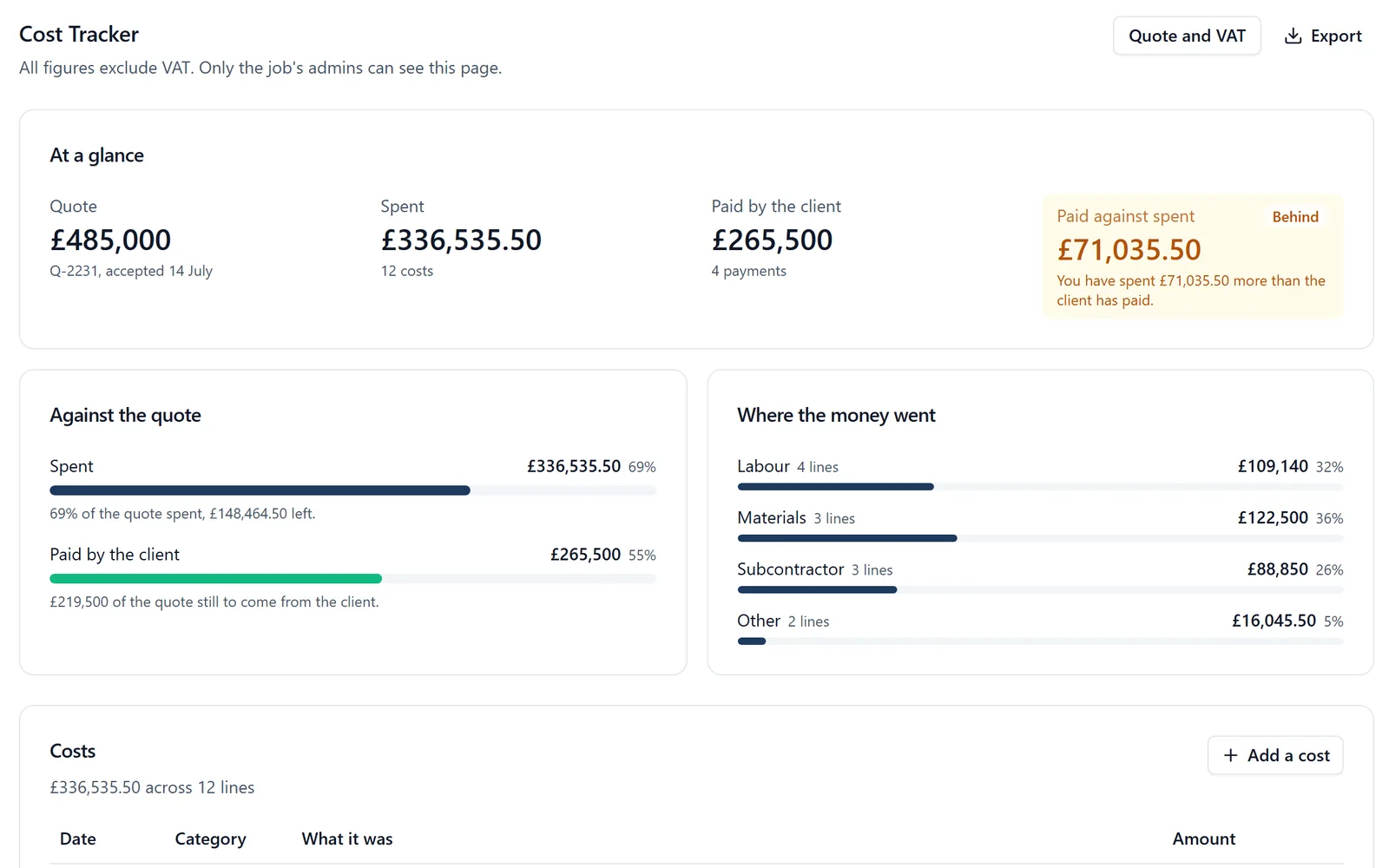
✓Every live job side by side. Open All projects and choose Overview. Each job you run is a card showing tasks done and late, the quote or agreed price, what has been spent, what is still to draw on approved orders, the forecast margin, what has been invoiced and what the client has paid. Click a card to open that job’s Cost Tracker, where every figure is explained.
✓The agreed price moves with the job. Each change order the client signs on their phone is added to what the job is worth, so the margin is worked out on the real price, not the original quote.
✓Committed costs counted.Purchase orders are approved by the supplier from a link, every supplier invoice is drawn against one, and what is still to draw counts towards the forecast margin.
✓Labour from time on site. Each job’s labour cost is worked out week by week from its people’s check-ins and timesheets, at each person’s cost per hour, so labour is in the figures as it happens rather than at the month end.
✓Budgets by cost code. When the job’s quote is an accepted estimate, each cost code shows its budget, what is on orders, what is spent and where it is projected to land, in red when it is over.
✓Invoiced and paid, kept current.Invoices to the client are drawn down from the estimate and signed change orders. With QuickBooks Online connected, supplier bills and client invoices go across when you press Send, and client payments are read back onto the job. Xero takes supplier bills and hours as a file you import.
✓Only the right people see the money. The figures are seen by each job’s admins and the company’s owners and admins. Members on site never see a figure.
On a fixed price job with a quote, the card works out the forecast margin as a pound figure and a percentage. On a cost plus job the card shows spent, invoiced and paid side by side, which is the comparison that matters on that kind of job. More on how it fits the rest of the business is on BuildersAI for directors.
Pricing is flat, with no per-user fees: BuildersAI Starter is £149 a month for up to 10 people, Professional is £299 a month for 11 to 50, and Business is £599 a month for 51 to 100, all plus VAT, with a 14-day free trial. See the pricing page.
FAQ
How do I know which of my building jobs are making money?
For every live job, work out the forecast margin: the agreed price (quote plus signed change orders) less what has been spent, less what is still committed on orders. Put every job side by side on one page, before VAT, and review it weekly, starting with the lowest margin.
What is a job profitability report in construction?
A one page view of every live job with the same figures for each: agreed price, spent, still committed, forecast margin, invoiced and paid. It is for running the business week to week, not for the year end accounts.
What is a good margin for a UK builder?
It varies widely by type of work, size of firm and contract, so there is no single right figure. What matters more on a profitability report is the movement: a job whose forecast margin falls week after week needs looking at, whatever it started at.
Can I get a job profitability report from Xero or QuickBooks?
Tagging costs by job in your accounts package shows what each job has spent. It does not know the job’s agreed price, signed extras or committed orders, so it cannot forecast where a job will land. That is why builders run job figures alongside the books.
Does BuildersAI show every job's margin on one page?
Yes. The Overview shows every live job as a card, side by side: tasks done and late, the quote or agreed price, spent, still to draw on orders, the forecast margin, invoiced and paid by the client.
See Every Job's Margin on One Page
See the Overview of every job, with live figures, on a 30-minute demo.
William grew up in a family that builds houses for a living and has been around construction sites for as long as he can remember. He has seen first hand that eight-figure sites are often run on WhatsApp and spreadsheets, and started BuildersAI to cut the invisible costs that take chunks of margin across a site. His aim is for BuildersAI to be the all-in-one site management platform built in the UK, for UK sites.
Eight cost management tools a UK builder is likely to shortlist, compared on estimates, purchase orders, invoicing the client, the app on site and the price. Every competitor fact is sourced and dated.
A spreadsheet per job tells you what you spent. It rarely tells you whether you are ahead of the client or carrying the job. Four numbers, kept weekly, do.
Cash flow problems kill more construction businesses than bad workmanship ever will. This guide breaks down practical cash flow management strategies for UK builders, from payment terms that actually protect you, to forecasting methods that prevent nasty surprises.
14 min read
Get started
Ready to bring your whole team onto
one simple app?
14-day free trial with every feature, no card and no contract, and your team can be set up
within a day.