Purchase Orders for Builders: Control Committed Costs Before the Invoice Lands
William Charlesworth-Jones8 min read
Quick Answer
A builder raises a purchase order to agree the price with a supplier or subcontractor before the work or materials arrive, so that every invoice can be checked against what was agreed. Each order records one supplier, one job, what it is for and the agreed price before VAT, ideally with their quotation attached and their approval recorded. Approved orders that have not yet been invoiced are your committed costs: money the job will spend whatever happens. Adding them to what has already been spent gives you the job’s real forecast margin weeks before the invoices land. Construction purchase order software holds every order on the job it belongs to, refuses invoices that go over or come from the wrong supplier, and feeds what is still to draw into the job’s figures.
Most builders who start using purchase orders do it after the same experience: a subcontractor’s final invoice comes in well above what was agreed on site, nobody can find the email where the price was settled, and it gets paid because the alternative is an argument nobody has time for. A purchase order is the written agreement that makes that argument short.
Why Should a Builder Raise Purchase Orders?
Because it moves the decision about money to before it is spent. Once a delivery has been tipped or a gang has worked a fortnight, your only choice is how much of the invoice to dispute. Before the order is placed you can still compare prices, check the budget and say no.
Purchase orders earn their keep in four ways:
They fix the price. An agreed figure, in writing, that the supplier has seen and accepted. The invoice is held to it.
They stop invoices going to the wrong job. A supplier working on three of your sites puts the PO number on the invoice, and it goes on the right one.
They show the money the job has already promised. This is the committed cost, covered below, and it is the part most builders do not see until too late.
They give the office a way to say yes. When the person paying invoices is not the person who agreed the price, the order is how they know an invoice is right to pay.
Small builders often think purchase orders are paperwork for big contractors. They are less work than they sound, provided they are raised where the job’s costs already live rather than in a separate system. A one-line order with a price and the quotation attached does most of the job.
What Is a Committed Cost, and Why Does It Change Your Margin?
A committed cost is money the job is going to spend because you have agreed it, but that has not been invoiced yet. An approved order for £18,000 of roofing that has had £6,000 invoiced against it has £12,000 committed.
Committed costs matter because they are invisible in your accounts. Your accounts package knows about invoices. It has no idea that you agreed £40,000 of groundworks last month and the subcontractor has not billed yet.
Take a job with an agreed price of £480,000:
Looking at spend only
With committed costs
Agreed price
£480,000
£480,000
Spent so far
£310,000
£310,000
Still to draw on approved orders
not known
£125,000
What looks left
£170,000
£45,000
Without the orders, the job seems to have £170,000 of room. With them, it has £45,000, and that has to cover the work nobody has ordered yet as well as your margin. The forecast margin (agreed price less spent less still committed) is the number a director actually needs, and you can only work it out if the orders are recorded. Our guide to job costing for builders covers the other figures of a single job, and which of your jobs are making money covers reading the forecast across all of them.
What Should a Construction Purchase Order Include?
Keep it short. A purchase order on a building job needs:
A number, unique across your company (PO-0012, not “Smith’s order”), so a supplier working on several jobs can quote it.
The supplier or subcontractor, as they appear in your accounts.
The job, and the site address if materials are being delivered.
What it is for: “First fix electrics, plots 1 to 4” or “Roof tiles and battens to drawing 104 rev C”. Add a scope if the work needs describing.
The agreed price before VAT. One figure. If it is a rate, put the rate and the expected quantity.
The cost code, so the money lands against the right part of the budget.
Their quotation, attached, so the detail behind the price is kept with it.
Who agreed it and when. Ideally the supplier’s own approval, so nobody can later say they never saw the price.
For subcontract work there is more to agree than a price: programme, retention, payment terms and the notices the Construction Act requires on most commercial work (Housing Grants, Construction and Regeneration Act 1996, Part II). Those belong in the subcontract itself. The order is the price and the scope, kept where the job’s costs are. Our guide to subcontractor management covers the wider relationship.
How Do You Match Supplier Invoices to Orders?
Larger firms talk about a “three way match”: the order, proof the goods or work arrived, and the invoice, all agreeing before anything is paid. On a building site that means:
The order says what was agreed and the price.
The delivery note or the work on site says it arrived. A signed delivery note, a photo of the pallet, or the site manager confirming the stage is done.
The invoice says what the supplier is asking for.
In practice, most builders get the most value from a simpler rule: every invoice is put against an order, and no invoice can take an order past its agreed price. That catches the common problems:
An invoice over the agreed price. It is held, and somebody has to decide whether the extra was agreed.
An invoice from the wrong supplier, or on the wrong job’s order.
The same work invoiced twice. The second invoice finds less left on the order than it is asking for.
An invoice for work nobody ordered. There is no order to put it against, so it stands out.
Day-rate labour and small purchases from the merchant counter often go without an order, and that is fine. Raise orders for anything where the price was agreed in advance, which on most jobs is where most of the money goes. For keeping track of what arrives, see our guide to tracking materials on site.
How Do You Handle Variations on a Subcontract Order?
Agree the extra money before the extra work, and record it as a new order linked to the first rather than quietly changing the original price.
Keeping the variation separate does two things. The original order still shows what was first agreed, which matters at the final account. And the extra shows up as a committed cost on its own line, so you can see how much of the job’s movement is variations and decide whether it should go to the client as a change order. If the client asked for the extra, the matching change order should be signed before the subcontractor starts.
The trap is the variation agreed on site with a handshake. The subcontractor does the work, invoices for it, and the invoice goes over the order. If the variation was never written down, you are back to the argument purchase orders were meant to prevent.
What Should You Look For in Purchase Order Software?
For a UK builder, construction purchase order management software should do these things:
Live on the job. Orders, supplier invoices and the budget in one place, not a separate procurement system nobody on site opens.
Supplier approval without an account. Send the order and let the supplier approve or decline from a link. Asking subcontractors to sign up for software is how the system gets ignored.
Hold invoices to the order. Refuse an invoice that would take more than is left, or that comes from another supplier.
Read the PO number off the invoice, so the invoice finds its order without someone matching it by hand.
Variations as linked orders, not edits to the original price.
Every order across every job in one list, with what is left to draw, that you can download as a spreadsheet.
Feed the forecast. What is still to draw on approved orders should count towards each job’s budget by cost code and its forecast margin.
Work with your accounts package. Supplier invoices go to QuickBooks or Xero with their cost codes, and CIS deductions are worked out on subcontractor invoices.
Flat pricing. Per-user pricing punishes you for giving the site manager and the office access, which is exactly who needs it.
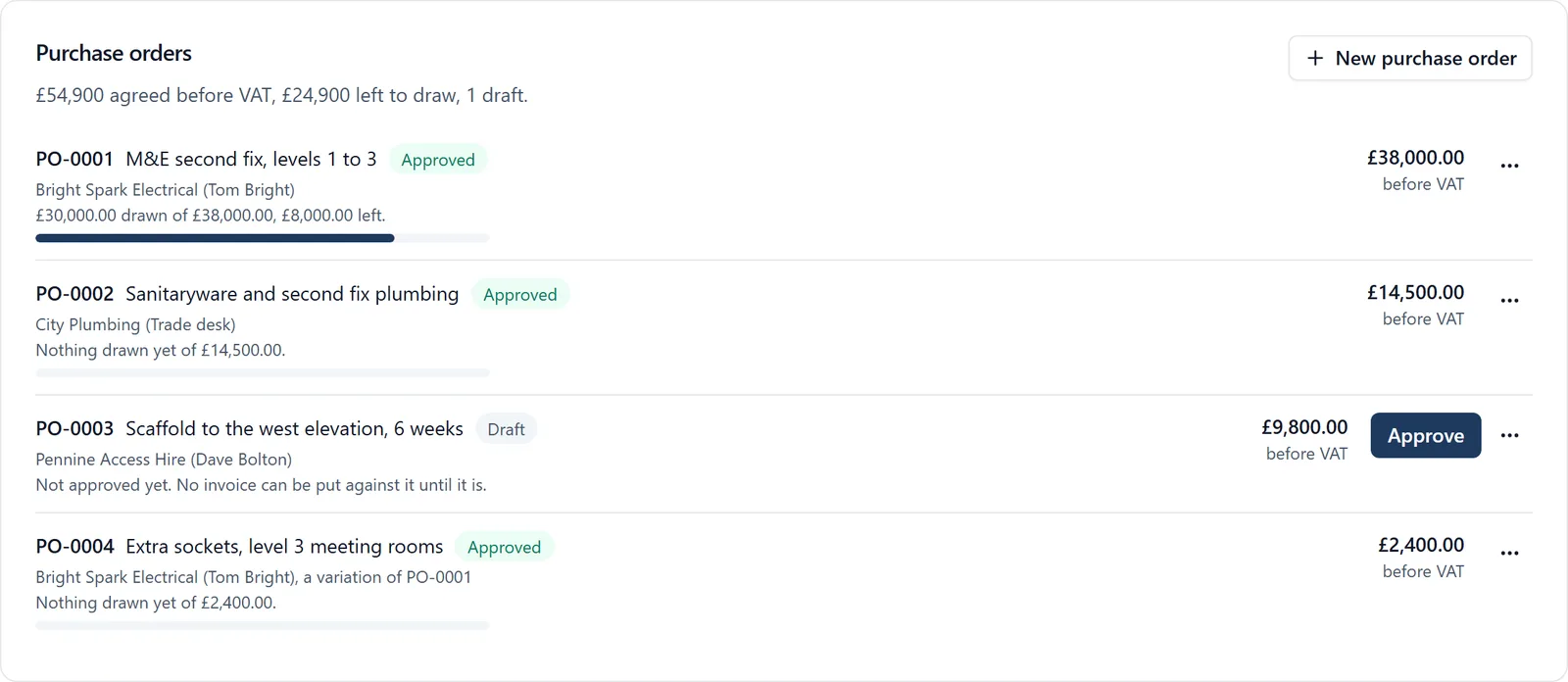
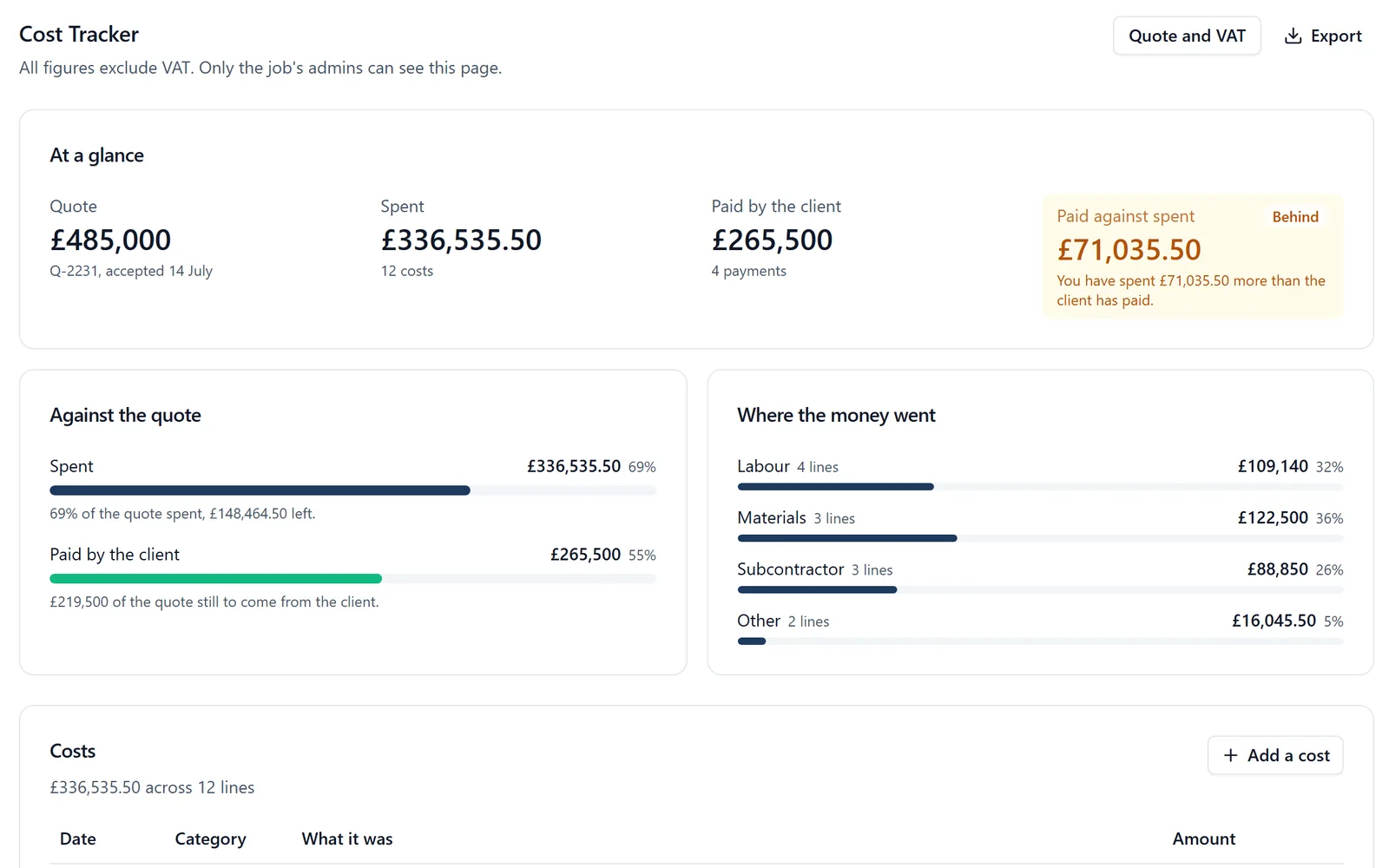
BuildersAI is the all-in-one site management app for UK builders, and it covers the money side of the whole job, from the estimate to the last invoice. Purchase orders live on each job’s Cost Tracker, beside the budget and the supplier invoices.
✓Raise an order on the job. The supplier, what it is for, the scope, the agreed price before VAT and the cost code, with their quotation attached. Orders are numbered across your company (PO-0001, PO-0002).
✓The supplier approves it from a link.Send to supplier emails them the order. They read it and approve it or decline it with a reason, with no account, and the order records who answered and when. Or approve it yourself if the price was agreed another way.
✓Fixed once approved. An approved order’s supplier, price and scope cannot be changed. Extra money is agreed first and raised as a variation: a new order for the same supplier, marked as adding to the first.
✓Invoices held to the order. Each supplier invoice is put against an order, which shows what has been drawn and what is left. An invoice that would take more than is left, or that is from another supplier or another job, is refused.
✓The PO number finds its order. Drop in the invoice as a PDF or a photo, and when the PO number is printed on it, the order is chosen for you to check.
✓Every order in one list.Orders on All projects lists every order on every job you run, open or closed, with what is left to draw, and downloads as a spreadsheet.
✓Committed costs in the forecast. What is still to draw on approved orders shows against each cost code’s budget, and counts towards each job’s forecast margin on the Overview of every job.
✓Into your accounts. Supplier invoices go to QuickBooks Online as bills when you press Send, with CIS worked out, or to QuickBooks or Xero as a bill file.
Before the order there is usually a price to get. Price enquiries ask several merchants at once and compare their quotes side by side, and the quotation you choose goes on the order. The steps for orders are on the supplier invoices help page.
Pricing is flat, with no per-user fees: BuildersAI Starter is £149 a month for up to 10 people, Professional is £299 a month for 11 to 50, and Business is £599 a month for 51 to 100, all plus VAT, with a 14-day free trial. See the pricing page.
FAQ
Do small builders need purchase orders?
For anything where the price is agreed in advance, yes. A one-line order with the supplier, the job, the agreed price and their quotation attached is enough to hold the invoice to it and to show the job’s committed costs. Day-rate labour and small counter purchases can go without.
What is a committed cost in construction?
Money the job has agreed to spend but that has not been invoiced yet, usually what is left on approved purchase orders. Agreed price less spent less committed gives the job’s forecast margin.
What should a construction purchase order include?
A unique number, the supplier, the job, what it is for, the agreed price before VAT, the cost code, the supplier’s quotation and a record of who agreed it and when. Programme, retention and payment terms belong in the subcontract.
How do I handle a variation on a purchase order?
Agree the extra price first and raise it as a new order linked to the original, rather than editing the original price. If the client asked for the extra, have them sign a change order before the work starts.
Can a supplier approve a purchase order without an account?
In BuildersAI, yes. Send to supplier emails them a link where they read the order and approve or decline it, and the order records who answered and when.
Does purchase order software work with QuickBooks and Xero?
BuildersAI works alongside both. Supplier invoices put against orders go to QuickBooks Online as bills when you press Send, or to QuickBooks or Xero as a bill file you import, each with its cost code.
Agree the Price Before the Invoice Arrives
See a purchase order approved by a supplier and an invoice held to it on a 30-minute demo.
William grew up in a family that builds houses for a living and has been around construction sites for as long as he can remember. He has seen first hand that eight-figure sites are often run on WhatsApp and spreadsheets, and started BuildersAI to cut the invisible costs that take chunks of margin across a site. His aim is for BuildersAI to be the all-in-one site management platform built in the UK, for UK sites.
Eight cost management tools a UK builder is likely to shortlist, compared on estimates, purchase orders, invoicing the client, the app on site and the price. Every competitor fact is sourced and dated.
A spreadsheet per job tells you what you spent. It rarely tells you whether you are ahead of the client or carrying the job. Four numbers, kept weekly, do.
Master multi-trade coordination with practical strategies for UK main contractors. From communication systems and compliance tracking to payment processes and software selection.
12 min read
Get started
Ready to bring your whole team onto
one simple app?
14-day free trial with every feature, no card and no contract, and your team can be set up
within a day.