Tracking Materials on Site: How to Stop Giving Them Away
William Charlesworth-Jones8 min read
Quick Answer
To track materials on a construction site, write one line every time something goes to a job: what it was, how much, which job, where it came from (the yard, the van or the merchants), the day it went, and whether it is chargeable. Once a week, list every chargeable line that has not been invoiced, price it, bill it, and write the invoice number against the line.
The way to track materials on site is to record each movement on the day it happens, against the job it went to, with a note of whether the client should pay for it, and then to invoice from that list every week. Most building firms do the first half in their heads and the second half at final account, which is why materials get given away. Nobody decides not to charge for the plasterboard. It never reaches an invoice, because by the time the invoice is written nobody remembers it went.
Everything below works with a notebook or a spreadsheet. The last section explains how BuildersAI, the all-in-one site management app for UK builders, handles the same job.
Where Materials Leak
There are five places, and most firms have all five.
Stock from the yard that is never booked to a job. You paid for it months ago, so it feels free. If it went into an extra it should be on the bill.
The merchant run nobody wrote down. Somebody collects a lintel and two boxes of fixings on the account. The invoice arrives three weeks later with no job name on it.
Extras done as a favour. The client asks for one more stud wall while you are there. The labour gets remembered, the timber and board do not.
Materials moved between jobs. Bricks left over from one job go to the next, and the costing on both jobs is now wrong.
The delivery note lost in a van. Without it you cannot check the merchant’s invoice or show the client what arrived.
What to Record Each Time
Six things, every time something goes to a job:
What it was, described the way the merchant would: “12.5 mm plasterboard”, not “boards”.
How much, with the unit: bags, lengths, sheets, metres, pallets.
Which job it went to.
Where it came from: the yard, the van, stock left over from another job, or the merchant and branch.
The day it went.
Whether it is chargeable, and if so, whether it has been charged yet.
You do not need a price at this stage. The price is added by whoever does the invoicing. The rule that makes it work is that the person who loads the van makes the record, on the day. A list rebuilt from memory on a Friday will miss the same things your invoices miss now.
Inside the Quote or an Extra
Record everything that goes to site, then decide what is chargeable.
Inside the quote. The materials you priced when you quoted. The client is already paying for them, so they are not billed again. They are still worth recording, because they tell you whether the job is costing what you allowed.
Extras. Anything the client asked for that was not on the drawings or in the quote. On a job with a formal contract these are variations. They are chargeable, materials included. Agree an extra in writing before you do it where you can. A text that says “extra stud wall in bedroom 2, £480 plus VAT, agreed” saves the argument at the end.
Materials used putting right your own mistake, or on a warranty call-back, should be marked as not chargeable instead of left blank. A blank line looks like something you forgot to bill.
Merchant Accounts and Delivery Notes
Your account at Travis Perkins, Jewson or an independent merchant can do a lot of this work, provided you give it the information.
Give a job reference as the order number on every purchase, at the counter as well as on the phone, so it prints on the invoice and the monthly statement.
Photograph the delivery note the day it arrives and send it to the office.
Check the monthly statement against your own record. A line with no job reference is either a run nobody wrote down or something that should not be on your account.
Give your subbies the same rule if they collect on your account.
A Worked Example
Take a kitchen extension quoted at £62,000 plus VAT. Halfway through, the client asks for a stud partition and for a section of garden wall to be rebuilt. Both are extras. The prices are for illustration only.
What went to site
From
Cost to you
24 lengths of 47 x 100 C16 timber
Yard
£180.00
12 sheets of 12.5 mm plasterboard
Yard
£108.00
150 facing bricks
Stock left over from another job
£135.00
6 bags of cement
Van
£42.00
Lintel and fixings
Merchant account, collected
£86.00
Total
£551.00
With a 15% markup the materials on those two extras come to £633.65 plus VAT. Only the last line would ever appear on a merchant invoice. The other four, £465 of the £551, exist nowhere except in the memory of whoever loaded them. Lose that on ten jobs a year and you have given away more than £6,000 at the marked-up price.
The Weekly Routine
Pick a day, give the job to one person, and allow about 20 minutes.
List every line that is chargeable and not yet charged, oldest first.
For anything not yet decided, decide: inside the quote, an extra, or not chargeable.
Price the extras at what the material cost you plus your markup.
Put them on an invoice, or on the next valuation if the job is paid in stages.
Write the invoice number against each line you have billed.
Look at finished jobs too. An unbilled line on a job you have left is the one most likely to be lost for good.
The invoice number stops the same line being billed twice. Billing weekly instead of at final account also brings the money in sooner, which we cover in our guide to construction cash flow management.
How to Ask a Merchant for a Price
Send the same written list to each merchant, three if the order is worth the time, so the prices can be compared like for like. Include:
the full specification and the quantity of each item
the delivery address and the date you need it on site
the price before VAT, and the delivery charge if there is one
the lead time
how long the price holds
Compare the quotes before VAT, because some merchants quote with it and some without, and read the lead time next to the price. The cheapest roof trusses are not the cheapest if they arrive a fortnight after the scaffold is up.
How BuildersAI Does It
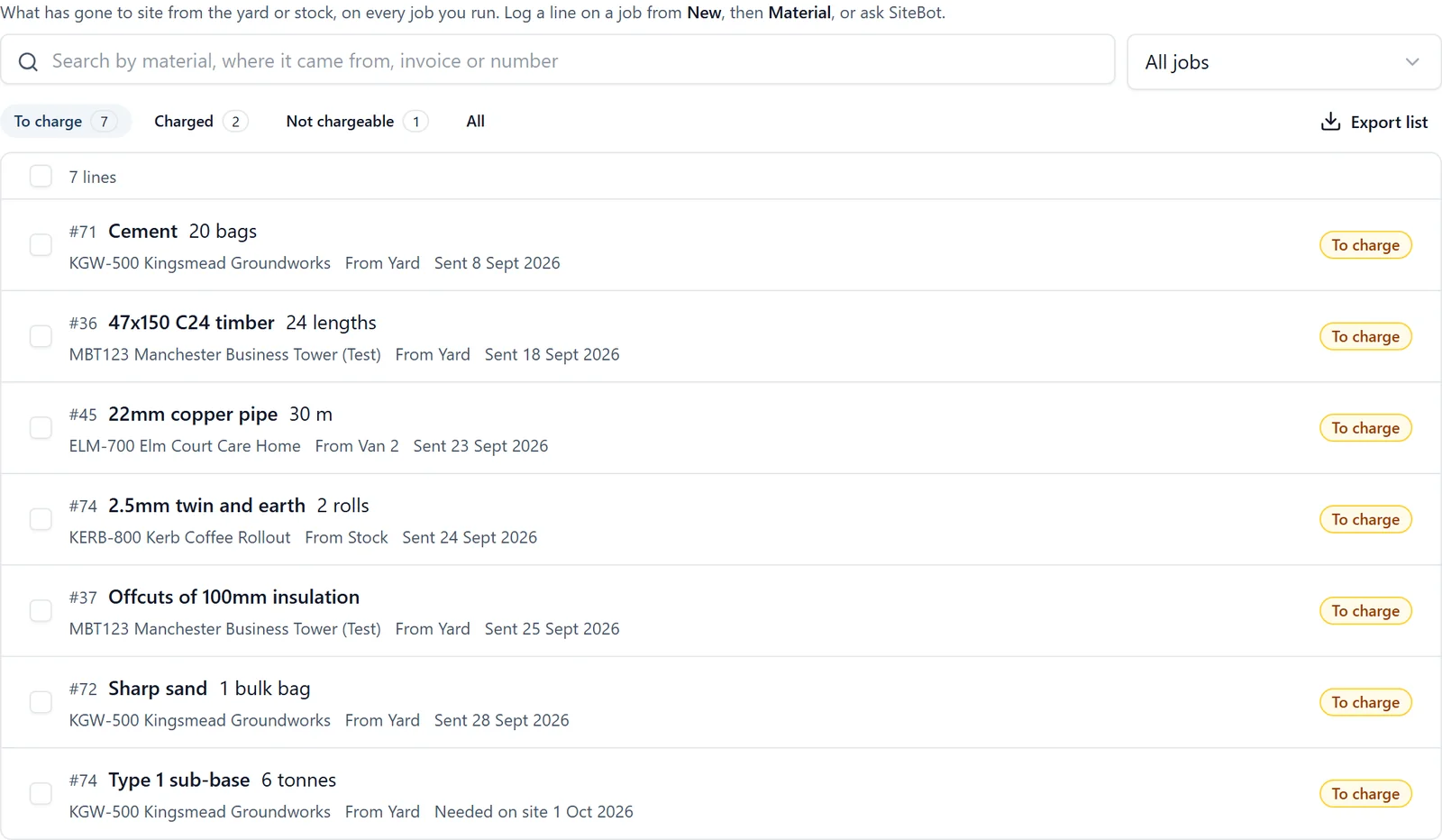
Logging what goes to site. Anything sent from the yard, a van or stock is logged as a material on the job, from the phone or a browser: the day it went, how much, the unit and where it came from. You can also ask SiteBot, for example “log 20 bags of cement to Kingsmead from the yard”. Every new line starts as “To charge”. The steps are in the help page on working on a task.
One list of what is still to charge. The Materials tab on All projects lists every material line on every job you run, and it opens on what is still to charge, oldest first. Finished jobs are included and marked. See the All projects help page.
Marking lines charged. Tick the lines you have billed, mark them charged and add the invoice number they went on. “Not chargeable” is there for a warranty call-back or your own cost. Only the job’s admins can change whether a line has been charged.
Exporting the list. The lines on screen export as a spreadsheet to price and invoice against. A material line carries no price in BuildersAI, so the pricing is done in the spreadsheet or your accounts package.
Asking merchants for a price. From the job’s Mail page in a browser, one price enquiry goes to several merchants at once. Each gets their own email, so none of them sees who else you asked. You record each quote as it comes back, the quotes are compared side by side before VAT, and accepting one sends the order to that merchant alone. The Mail help page has the detail.
This is not stock control: it does not count what is left in your yard, and materials are not pulled into the job’s cost figures automatically. It records what went where and whether you have billed it. The materials to charge page and the full feature list covers the rest of the app, and our guide to construction cost tracking covers job costing.
FAQ
How do I track materials on a construction site?
Record one line each time something goes to a job: what it was, how much, which job, where it came from, the day it went and whether it is chargeable. Once a week, one person lists the chargeable lines that have not been invoiced, bills them and writes the invoice number against each.
Should I charge a client for materials from my own yard?
If the materials went into work inside your quote, the client is already paying for them in the price. If they went into an extra the client asked for, yes, charge for them at what they cost you plus your markup.
What is the difference between an extra and a variation?
They mean the same thing in practice: work the client asked for that was not in the original quote or drawings. Builders on domestic jobs say extras, and formal building contracts say variations.
Does BuildersAI do stock control?
No. BuildersAI records what was sent to each job from the yard, a van or stock, and whether it has been charged, with the invoice number once it has. It does not count what is left in your yard, and a material line carries no price.
What does BuildersAI cost?
Starter is £149 a month for up to 10 users, Professional is £299 a month for 11 to 50, and Business is £599 a month for 51 to 100. Each is a flat price with no per-user fees, and prices exclude VAT. Every plan starts with a 14-day free trial, with no card needed. The detail is on the pricing page.
See What You Have Not Charged For
See the Materials tab and a price enquiry on a 30-minute demo, then try it on one of your own jobs.
William grew up in a family that builds houses for a living and has been around construction sites for as long as he can remember. He has seen first hand that eight-figure sites are often run on WhatsApp and spreadsheets, and started BuildersAI to cut the invisible costs that take chunks of margin across a site. His aim is for BuildersAI to be the all-in-one site management platform built in the UK, for UK sites.
Hours totted up from memory, argued about on a Monday, retyped into payroll. Here is how timesheet software built for construction removes the whole Friday scramble.
Cash flow problems kill more construction businesses than bad workmanship ever will. This guide breaks down practical cash flow management strategies for UK builders, from payment terms that actually protect you, to forecasting methods that prevent nasty surprises.
14 min read
Get started
Ready to bring your whole team onto
one simple app?
14-day free trial with every feature, no card and no contract, and your team can be set up
within a day.