
Part L photos
The photographs Approved Document L asks for on every plot, taken before the detail is covered up.
- Browser
- Phone and tablet
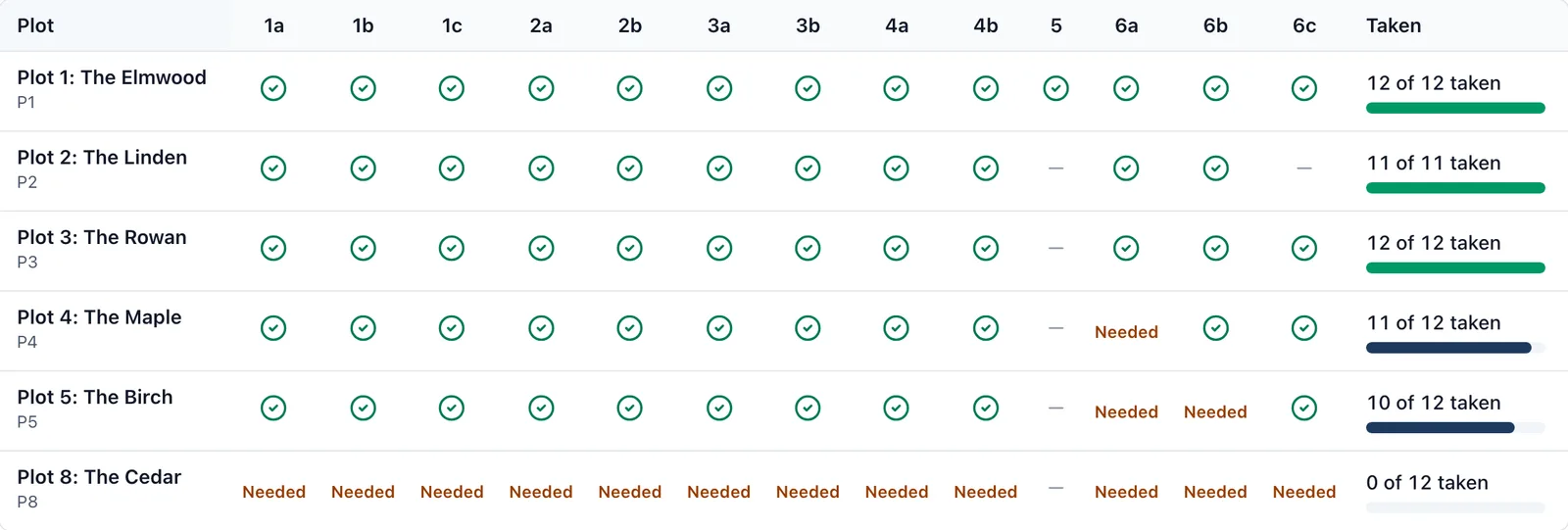
Approved Document L asks for photographs of each new dwelling’s insulation and junctions. Once the plasterboard is on, a missed photo cannot be taken again. BuildersAI keeps the list per plot and warns before it is too late.
What it does
- Each plot’s album carries the list of details Appendix B asks for, from 1a to 6c
- A grid shows every plot and which details have a photograph
- Mark a photo with the detail it shows, and it suggests one from the picture for you to confirm
- A warning goes out the working day before a task that covers a detail up, if its photograph is still missing
- Export a plot’s photographs named for the building control file, such as P7/3b
- Works on the phone with no signal
Which plan
This is included in every plan, from £149 a month. Plans differ by how many people they seat, not by what the software does. See pricing.
How to use it
The manual page for this is in the Help Centre, and it is the same guide SiteBot reads inside the app. Read the guide.