Construction Cost Overruns: Why UK Building Jobs Go Over Budget and How to Catch It Early
William Charlesworth-Jones10 min read
Quick Answer
Construction jobs go over budget for a handful of repeat reasons: underpricing at estimate, extra work done without a signed variation, rework, labour overrunning, material price rises, poor buying, and late information or delays. You catch an overrun early by comparing each cost code’s budget with what it has cost plus what is already committed on orders, and labour hours with the allowance, every week rather than at the final account. Once a job is going over, recover what you can through signed variations, rebuy or re-sequence the work still to come, and tell the client early. An overrun found at 40% complete can usually be cut back; found at the end, it cannot.
Every builder has had the job that looked fine until the last valuation: groundworks a bit over, a gang slower than priced, a few extras done as favours, and nobody added it up until the final account. This guide is about adding it up while there is still time to act. It is part of our guide to construction cost management.
Why Do Construction Jobs Go Over Budget?
Most overruns come from a short list of causes, usually two or three at once.
Underpricing at estimate. A trade missed, a quantity taken off short, an allowance for preliminaries that was too thin, or a price cut to win the work. Our guide to construction estimating covers pricing from your own rates and past jobs.
Unrecorded variations. The client asks for a wider opening or two more sockets, it gets done, and it never gets priced. That is cost with no price against it. See our guide to variations for builders.
Rework. Work set out wrong, built to a superseded drawing or failed at inspection has to be done twice. The Get It Right Initiative says studies put the direct cost of avoidable error at around 5% of project value, well above average profit levels in the sector, with unmeasured and indirect costs taking estimates closer to 10% to 25% of project cost (GIRI flyer, January 2026).
Labour overrunning. Labour is the cost that drifts quietly. A gang that takes 12 days over a 10 day allowance raises no invoice you can query; the money just goes out in wages. Our guide to labour cost per job covers working it out.
Material price rises. A price held in the estimate may not be the price when you order months later. In the government’s building materials statistics (September 2026 edition, published 7 October 2026), the material price index for all work was 6.4% higher in August 2026 than a year earlier, with fabricated structural steel up 21.2%.
Poor buying. Ordering on site from whoever answers the phone, with no agreed price, and paying whatever invoice turns up. An invoice for more than was agreed usually gets paid because nobody can find what was agreed.
Late information and delays. Drawings that arrive late, a client who has not chosen the kitchen, a utility connection that slips. Each leaves a gang standing or coming back twice, and a longer job costs more in plant hire and supervision.
The first two are the most common on smaller jobs, and the cheapest to prevent: price properly, and price every change before it is built.
How Can You Spot a Cost Overrun Early?
Look at each part of the job against its own budget, not the job as a whole: one trade £8,000 over and another not yet bought looks like a job on budget. Four weekly checks find most overruns while they are small.
Budget against actual, by cost code
Break the job’s budget into cost codes (groundworks, brickwork, roofing, first fix, second fix and so on) using the costs from your estimate. Put every cost against a code and compare weekly. Our guide to construction cost tracking covers setting up the codes.
Committed costs, not just spent
A £47,500 order with a bricklaying subcontractor is money you have agreed to spend, even if they have invoiced nothing yet. For each code, the figure that matters is spent plus what is still to draw on orders, or the budget if that is higher (because the work is not all bought yet). Our guide to purchase orders for builders explains why every order needs writing down before the work starts.
Labour hours against the allowance
Your estimate allowed a number of hours or days for your own labour on each stage. Compare the hours booked so far with how far through the stage you are. If the first fix is half done and has used 70% of its hours, the overrun is already baked in, weeks before the wages show it in the accounts.
A weekly review, on the same day
Pick a day and look at every live job in the same order. A forecast margin that has dropped since last week is the single best early warning. Our guide to a job profitability report sets out the one page review.
BuildersAI solution:
In BuildersAI each job’s budget by cost code comes from the accepted estimate, purchase orders count as committed costs, and labour is worked out from time on site, so the weekly check is already done when you open the page. Flat pricing from £149 a month, 14-day free trial.
Worked Example: Catching an Overrun Early or at the End
A builder wins a fixed price job for a pair of semi-detached houses at £400,000 before VAT. The estimate’s costs come to £340,000, so the planned margin is £60,000 (15%). At 40% complete, the director sits down with the figures by cost code.
Cost code
Budget
Spent
Still on orders
Projected
Over or under
Groundworks
£48,000
£52,600
£0
£52,600
£4,600 over
Brickwork and blockwork
£62,000
£21,400
£47,500
£68,900
£6,900 over
Timber and joinery
£22,000
£9,800
£14,600
£24,400
£2,400 over
Roofing
£28,000
£0
£0
£28,000
Not yet bought
Own labour
£70,000
£31,500
n/a
£78,750
£8,750 over (on trend)
Everything else
£110,000
£12,000
£18,000
£110,000
On budget so far
Total
£340,000
£127,300
£80,100
£362,650
£22,650 over
Groundworks: the client asked for a larger patio base, dug and poured with no variation signed.
Brickwork: subcontracted at a higher rate than the estimate allowed.
Timber: gone up since it was priced.
Own labour: allowed 2,800 hours at £25 an hour, and 1,260 hours (45%) used at 40% complete. On that trend it needs 3,150 hours, £8,750 more.
Roofing: not yet bought, so at budget, but exposed to the same price rises as the timber.
Left alone, the forecast margin has fallen from £60,000 to £37,350. Caught now, the director has three moves: price the patio and get it signed by the client at £5,500, rebuy the roofing materials from several merchants to hold them at budget, and re-sequence the gang so the second house’s first fix is not waiting on the first house’s roof, saving an estimated £4,000 of labour.
Caught at 40%
Found at the end
Agreed price
£405,500 (patio signed)
£400,000 (patio disputed, not paid)
Final cost
£358,650
£364,450 (labour on trend, roofing ordered late at about 6% more)
Margin
£46,850 (11.6%)
£35,550 (8.9%)
The early catch does not undo what is already spent or committed, but it recovers £11,300 that the end of job discovery would have lost, and turns the patio from a final account argument into a signed extra.
What Should You Do When a Job Is Going Over Budget?
Work through it in this order, cheapest first.
Find where it is going over. Find the two or three cost codes that explain most of it. “The job is over” cannot be fixed; “brickwork is £6,900 over because of the rate” can.
Recover what is chargeable. Anything the client asked for that was not in the price is a variation. Price it and get it signed, even if the work is already done.
Protect what is not yet bought. For every code still to order, get prices before committing and put each one on a purchase order with an agreed price. This is where most of the remaining margin is.
Re-sequence the work. Labour overruns often come from gangs waiting on information, another trade or materials. Letting each trade work continuously is often the biggest saving left.
Look at the cause, not just the cost. If rework is driving it, find out why (wrong drawing revision, setting out, no inspection before covering up).
Talk to the client early. If part of the overrun is genuinely the client’s (late choices, changes, access), tell them now with the figures in front of you. A client told at 40% has choices; one told at the final account feels ambushed. What you can claim depends on your contract, so check the terms with your adviser if the sums are large.
What Should Be on a Cost Overrun Early Warning Checklist?
Copy this and run it on every live job, every week.
Every cost this week is on the job and against a cost code
No cost code is projecting over its budget (spent plus still on orders)
Every code still to buy has a price, and its budget still covers it
Labour hours used are in line with how far through each stage the job is
Every supplier and subcontractor invoice matches an agreed order or price
Every extra the client has asked for is priced and signed before it is built
Any rework this week has a recorded cause
Any delay this week is recorded, with who caused it and the days lost
The forecast margin has not fallen since last week, or you know why it has
Spent is not running far ahead of what you have invoiced the client
Two weeks running with more than two boxes unticked means that job needs the director’s time. Our guide to construction cash flow management covers the last box.
Can You Control Costs With a Spreadsheet?
Yes, for a few jobs and one careful person. It breaks because every invoice is typed twice and the spreadsheet is the copy skipped in a busy week, orders agreed by phone never reach the committed column, and labour is added monthly at best. By the time the spreadsheet shows the overrun, the 40% moment has passed.
How BuildersAI Catches an Overrun Early
BuildersAI is the all-in-one site management app for UK builders, covering the money side of the whole job from the estimate to the final account. The checks in this guide come from figures each job already keeps.
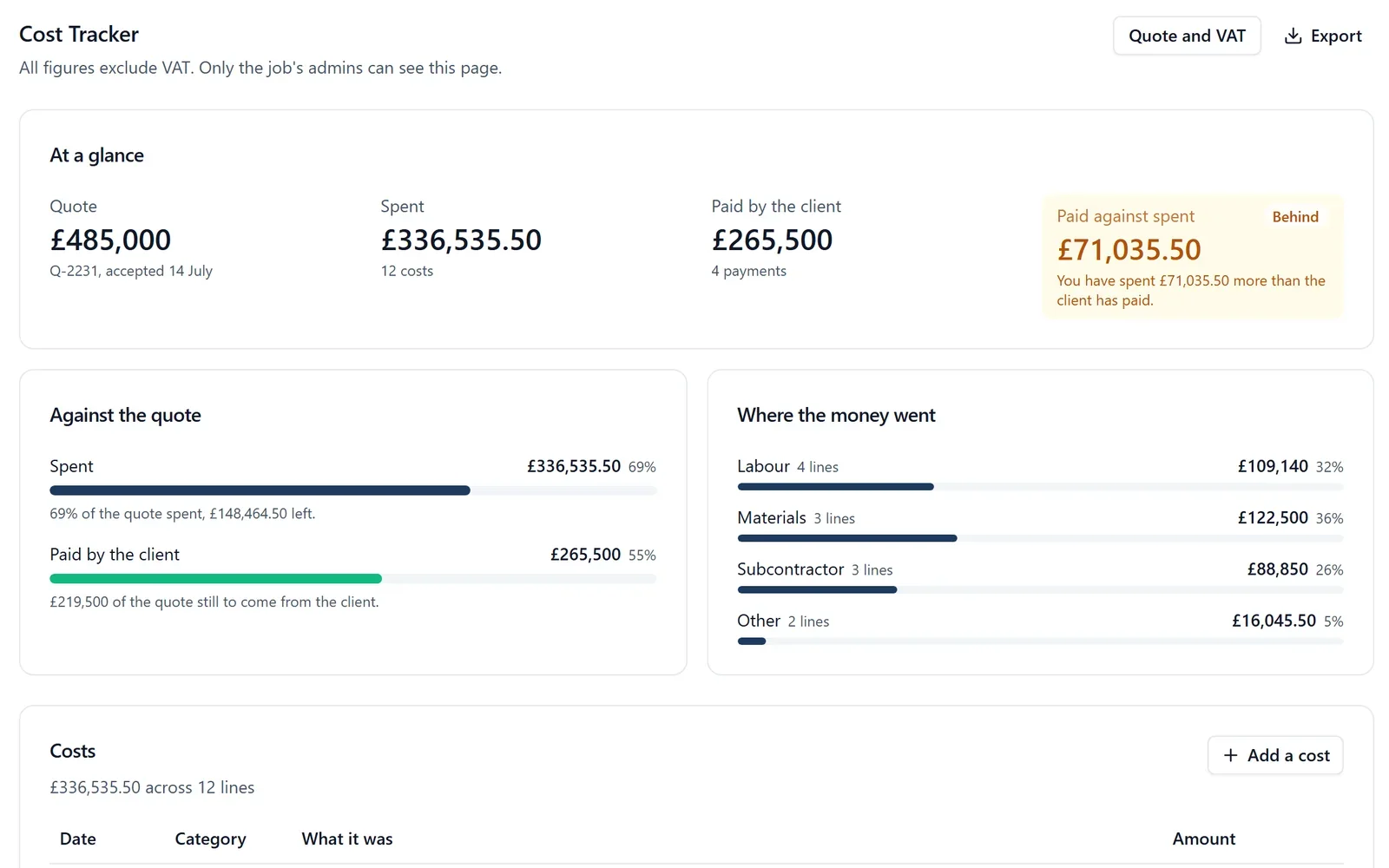
✓Budgets by cost code from the accepted estimate. When the client accepts your estimate, it becomes the job’s quote, and each cost code’s budget comes from it. The Cost Tracker shows each code’s budget, what is on orders, what is spent and where it is projected to land, in red when it is over.
✓Ahead or Behind, at a glance. The Cost Tracker shows how much of the quote has been spent and how far over it the job has gone, and whether you are Ahead or Behind the client: Behind, in amber, means you have spent more than the client has paid and it may be time to invoice.
✓Purchase orders that hold the price. Raise a purchase order with the agreed price and cost code, and the supplier approves it from a link. Every supplier invoice is put against an order, and an invoice that would take more than is left, or that is from another supplier, is refused.
✓Labour from time on site. Once you set what each employee costs an hour, each job works out its own labour week by week from timesheets or time on site, so labour is in the figures as it happens rather than at the month end.
✓Forecast margin across every job. The Overview puts every live job on one page: the quote or agreed price, spent, still to draw on orders, the forecast margin, invoiced and paid, beside tasks done and late.
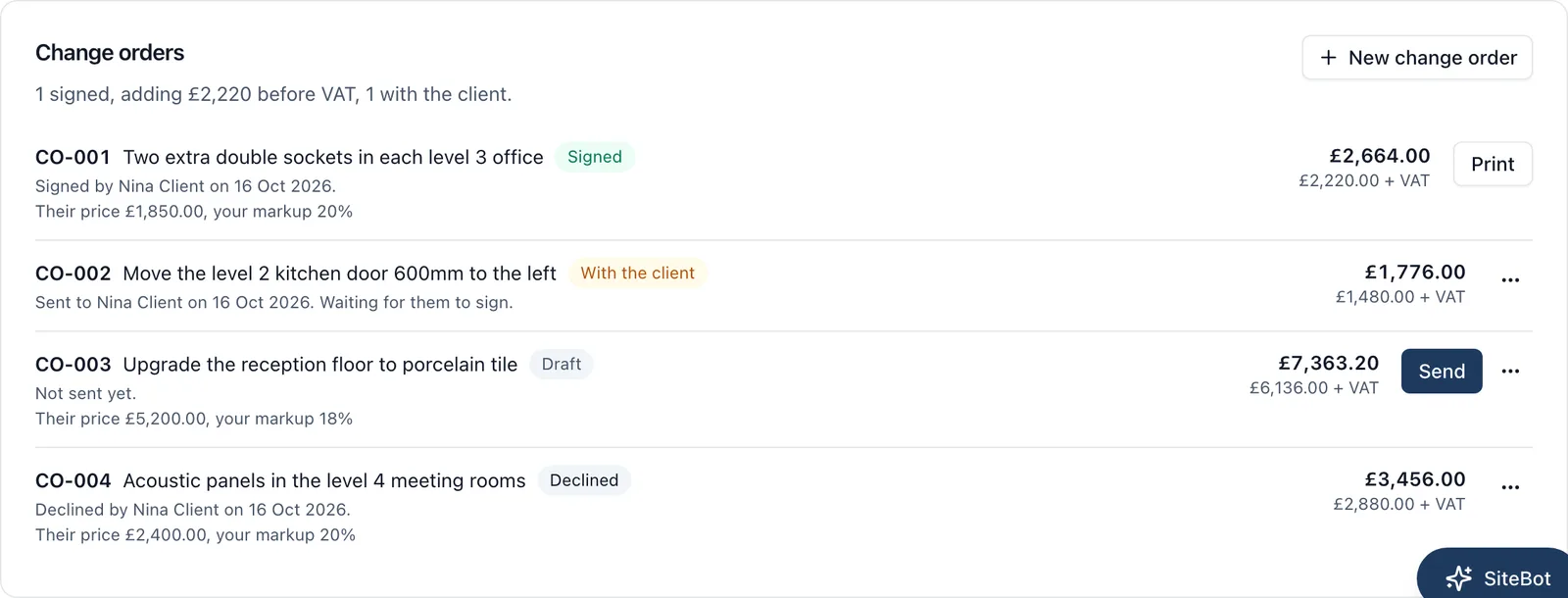
✓Variations signed before they are built.Change orders (BuildersAI’s name for variations) are priced from the subcontractor’s figure plus your markup and signed by the client on their phone, with no account. A signed change order is added to what the job is worth.
The money is seen only by the job’s admins and the company’s owners and admins; members on site never see a figure. To protect what is not yet bought, price enquiries go to several merchants with the quotes side by side.
Pricing is flat, with no per-user fees: Starter is £149 a month for up to 10 people, Professional is £299 a month for 11 to 50, and Business is £599 a month for 51 to 100, all plus VAT, with a 14-day free trial. See the pricing page.
BuildersAI solution:
See a job’s budget by cost code, its committed costs and the forecast margin across every job on a 30-minute demo, using a real demo project.
For the bigger picture, including how cost tracking, purchase orders and invoicing fit together, go back to our guide to construction cost management software.
FAQ
Why do construction projects go over budget?
Usually underpricing at estimate, extra work done without a signed variation, rework, labour overrunning, material price rises, poor buying and late information or delays. Most jobs that go badly over have two or three at once.
How do I know if a job is going over budget?
Compare each cost code’s budget with what it has cost plus what is still committed on orders, and compare the labour hours used with how far through each stage you are. Do it every week. A forecast margin that falls week on week is the clearest warning.
What should a builder do when a job goes over budget?
Find the two or three cost codes causing most of it, price and get signed any extras the client asked for, get agreed prices on everything not yet bought, re-sequence the work to cut waiting time, and tell the client early about anything that is genuinely theirs.
Can I charge the client for a cost overrun?
Only for what the contract lets you claim, such as signed variations, client changes or client caused delays. On a fixed price job, overruns from your own pricing, labour or buying are yours. Check your contract terms with an adviser if the sums are large.
What are committed costs in construction?
Money you have agreed to spend but not yet been invoiced for, such as the rest of a subcontract order. Leaving them out makes a job look healthier than it is.
Does BuildersAI warn me when a cost code is over budget?
Yes. When the job’s quote is an accepted estimate with cost codes, the Cost Tracker shows each code’s budget, on orders, spent and projected figure, in red when it is over. The Overview shows the forecast margin for every live job.
Catch the Overrun at 40%, Not at the End
See budgets by cost code, committed costs and every job’s forecast margin on a 30-minute demo.
William grew up in a family that builds houses for a living and has been around construction sites for as long as he can remember. He has seen first hand that eight-figure sites are often run on WhatsApp and spreadsheets, and started BuildersAI to cut the invisible costs that take chunks of margin across a site. His aim is for BuildersAI to be the all-in-one site management platform built in the UK, for UK sites.
Your accounts tell you how the company did last quarter. They cannot tell you which of the jobs on site right now is eating the profit. A one page report, every live job side by side and read every week, can.
A variation agreed on site and priced at the final account is the easiest money a builder ever gives away. This guide covers what counts as a variation, how to price one properly, what the written version needs, how omissions work, and how variations reach the valuation and the final account.
Eight cost management tools a UK builder is likely to shortlist, compared on estimates, purchase orders, invoicing the client, the app on site and the price. Every competitor fact is sourced and dated.
9 min read
Get started
Ready to bring your whole team onto
one simple app?
14-day free trial with every feature, no card and no contract, and your team can be set up
within a day.