
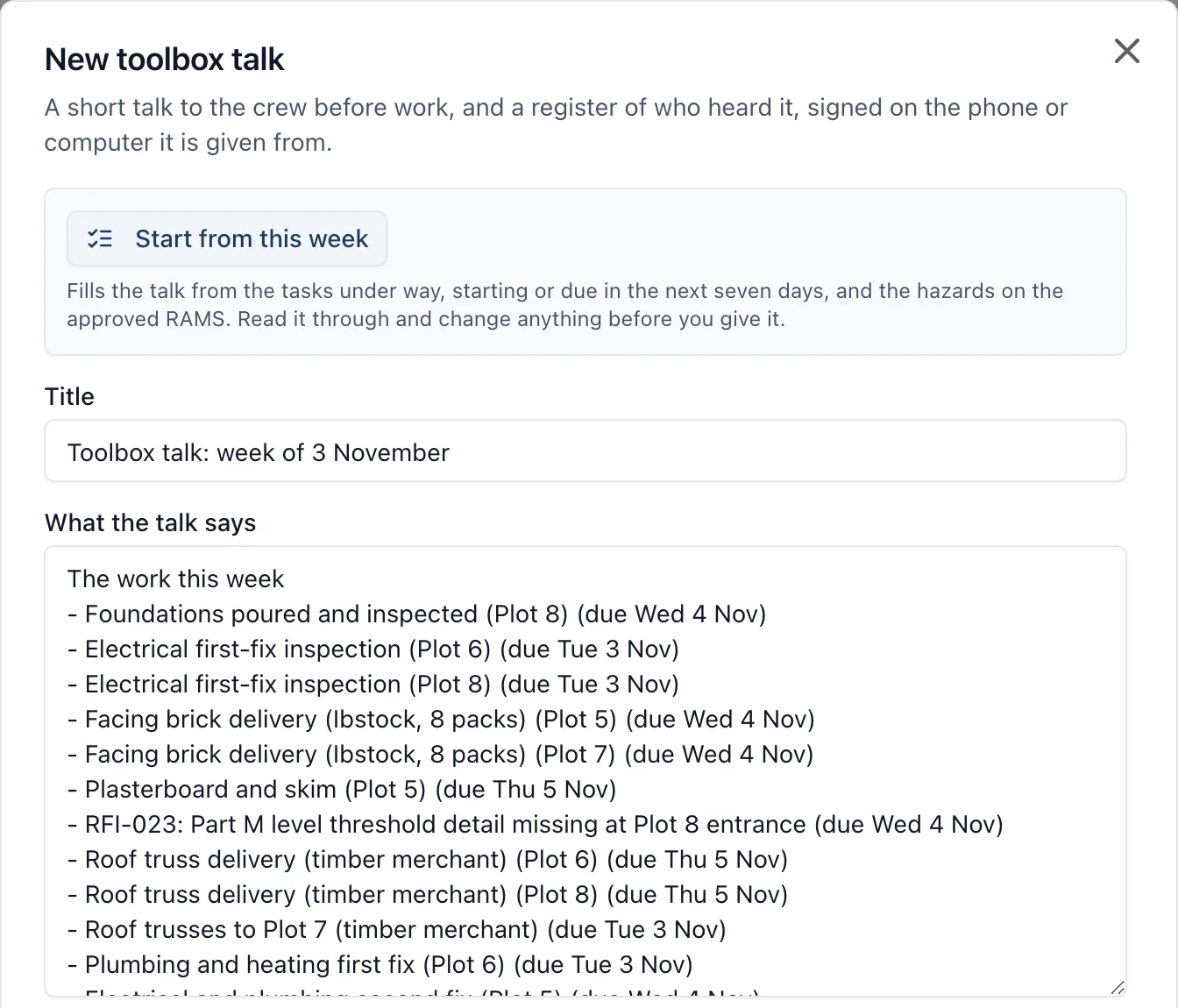
A toolbox talk is a short talk to the crew before work: what is happening this week, the hazards, and how they are controlled. BuildersAI keeps the talk and the register of who heard it. You write the talk, give it on site, and each person signs on your phone, one after another, with no signal needed. It replaces the paper register passed round the cabin, and it lives under Toolbox talks on both the mobile app and the web app.
Why it matters: A talk is only worth having on record if you can show what was said and who was there. Here the words and every signature sit together, with the day it was given and the time each person signed, and once somebody has signed, the words cannot be changed. You can print it with the register at any time.
Where to find it:
- In a browser, Toolbox talks in the project’s menu, beside Accidents
- On the phone, Toolbox talks in the menu
Toolbox talks are for the people working on the project: administrators and members. Followers, such as a client, do not see them.
Writing a talk:
- Open Toolbox talks and press New talk
- Give it a title, and write what the talk says
- Check the day given and who it is given by. They start as today and your own name
- Press Save talk
Start from this week: Press Start from this week and the talk is filled in from what the project already holds:
- the tasks under way, starting or due in the next seven days on the site’s calendar
- the hazards on the project’s approved RAMS, with the controls as they are written there (a very long one is shortened, and says to see the RAMS for the rest)
- the PPE those RAMS ask for
It is a starting point, not a finished talk. Read it through and change anything before you give it. It only uses what is on the project, so if there are no tasks this week and no approved RAMS, there is nothing to start from and it says so. It does not use AI.
Giving the talk and signing the register:
- Open the talk and give it on site
- Press Sign the register
- The first person finds themselves in the list of people on the project, or, if they have no account, types their name and their firm
- They sign in the box with their finger, under “I was at this toolbox talk and understood it.”
- Press Sign, and hand the phone to the next person
It works with no signal. On the phone each signature is saved straight away and sent as soon as the phone can. The register records each person’s name and firm, the time they signed, and whose phone they signed on. Somebody on the project can sign a talk only once; two people with no account can share a name.
If somebody changes the talk’s words in the office while a phone with signatures on it still has no signal, those signatures are not put under the new words: when the phone sends them, they are refused and the phone says the talk was changed after it was given. Give the talk again and have it signed again.
Once somebody has signed: The talk’s words, title, day and giver can no longer be changed, so the talk on record is the one people heard. If something was wrong, write a new talk. A talk nobody has signed can be edited by anybody working on the project, and deleted by whoever wrote it or a project administrator. A signed talk is never deleted; it goes only with the project.
Printing (in a browser): Press Print on a talk for one page with the words and the attendance register, each signature drawn beside the name. It says that it is a record that the talk was given and who heard it. It is not a qualification.
A read-only project: When a project is read-only, no talk can be written or signed. Everything already recorded can still be read, and printed from a browser.
Near misses: To report something that nearly went wrong, use Report an accident and choose a near miss. See the accident reporting guide.