Request a demo, get a 14-day free trial. →
BuildersAI

Construction management software

The all-in-one app for the whole job.

From the estimate to the final invoice: drawings, tasks, timesheets, RAMS and job costs, on every phone and in the office.

On a typical £4M nine-house scheme, builders save around £112,000 using BuildersAI.

  • No contract
  • Free trial
  • Works offline

Three ways BuildersAI increases your margins

  1. 01

    Time lost looking for information

    £80,000

    less rework from out-of-date drawings on a £4M scheme

    Drawings live in WhatsApp groups, email chains and folders that were never set up for a site. BuildersAI is designed for construction: drawings organised the way a site works, old revisions marked superseded, and markup on the drawing itself, so everyone finds the right one in seconds and nobody builds off an old one.

  2. 02

    Miscommunication

    One record

    of every day on site, shared by the whole team

    Instructions given over the phone, in passing or in a group chat get missed or remembered differently. Everyone works from the same source of truth, with a clear record of what happened and what was said on site each day.

  3. 03

    Jobs that take longer than they should

    £32,200 a year

    of time saved with seven people on site

    No more paper trail. RAMS and inductions are signed in the app by the whole team. Timesheets work the way your team does, from QR code check-ins or entered by hand. Supplier invoices, change orders signed by your client and every payment are tracked against the job, so jobs get done quicker and cost less.

Independently backed & compliant

  • GDPR & UK GDPR compliant
  • ICO registered
  • Backed by SETsquared Bristol

Built and run in the UK

Everything in BuildersAI 51 features, every plan

One app for the whole job, from pricing it to getting paid.

Every plan includes all of these, as does the 14-day trial, and nothing is sold as an extra.

BuildersAI on three screens: the drawings on a phone, a job's Cost Tracker on a laptop, and a site photo's details with its place on the map on a tablet
Works with
QuickBooks Online, bills and invoices sent, payments read back Xero, bill files Claude, and any AI app that takes a custom connector (MCP) iPhone and Android, the phone app, offline Any web browser, for the office

Want to see one in the app? Pick a feature below, or browse every feature page.

Comparing options? Our guides explain what site management software is, compare planning tools that work on site, project management software for UK builders and site management apps, and set out how to choose management software with a side-by-side comparison of UK construction software.

Made in Britain CM Digital Solutions Ltd

Built for UK construction, not adapted for it.

For too long, UK builders have made do with software designed in America and elsewhere, built around other countries' contracts, taxes and regulations rather than the way British sites actually work. BuildersAI is built and run in the UK, for UK builders. Our aim is to give UK construction tools as good as anyone's in the world, and to help British builders compete on the global stage.

Designed, built and supported in the UK
The app, feature by feature Web app and phone

Pick a feature to see it working in the app.

The office runs the job in the web app on the left. The site works on the phone on the right.

Running the job

On site

The BuildersAI project overview for Bournville Gardens with boards for programme, safety and quality, drawings, gallery and site presence Bournville Gardens demo project

All the work on the job, on one board.

Tasks, snags, inspections, RFIs and deliveries sit on one board. You can see what needs doing, who has it and what is holding it up.

Try out a demo project yourself.

Start your 14-day free trial and try BuildersAI out for yourself. Tell us what kind of sites you run and we open a demo project that looks like your own work. Every feature, no card needed.

From the estimate to the final invoice Five steps, one job

Know what every job will make, before it starts and while it runs.

The price, the orders, the invoices and the margin sit on the same job as the drawings and the programme, so there is no separate spreadsheet to keep up to date.

  1. Step 1 of 5

    Price the job from your own rates

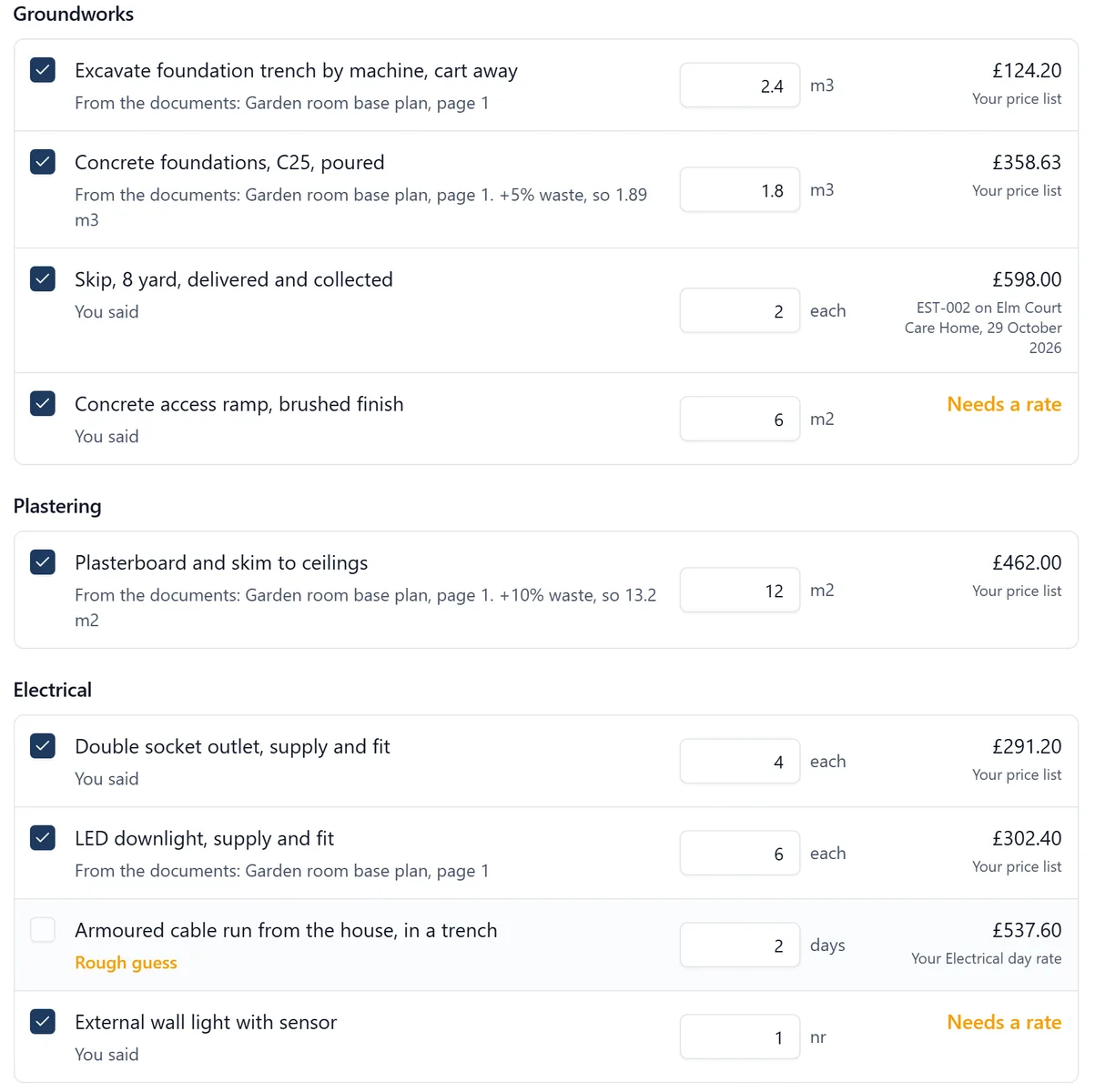
    An estimate is trades and lines, each your cost plus a markup on the line, the trade or the whole job. Bring in your price list or your QS’s spreadsheet, or let SiteBot draft the lines from your drawings, priced from your own rates and past jobs, for you to check.

    A SiteBot draft of an estimate: Groundworks, Plastering and Electrical lines, each saying where its quantity came from and whether its price came from the price list, a past estimate or a day rate, with two marked Needs a rate
  2. Step 2 of 5

    The client signs it, and it becomes the quote

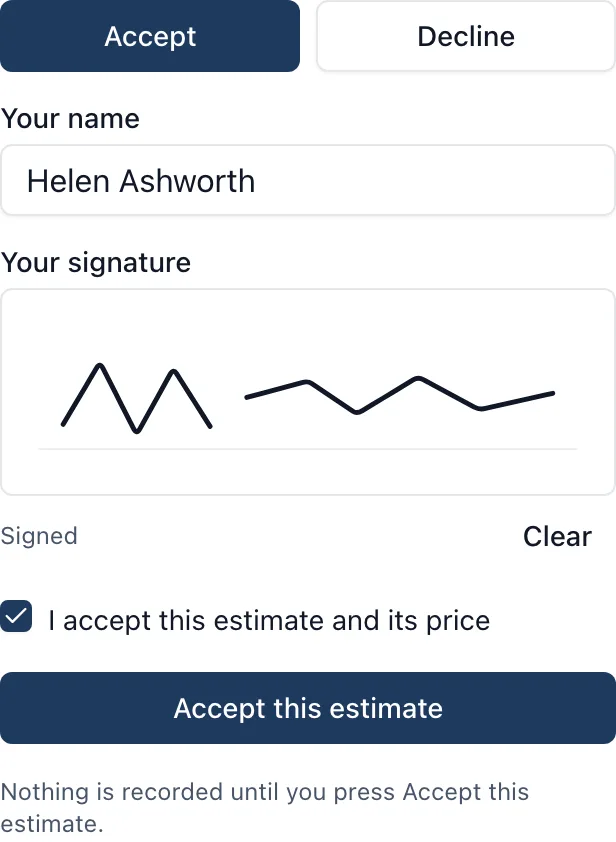
    The client gets your estimate on your letterhead, never your costs or markups, and accepts it on their phone with a signature. Once accepted it is locked, and it becomes the job’s quote on the Cost Tracker.

    The client accepting an estimate on their phone: their name, a signature drawn with a finger, a tick for I accept this estimate and its price, and an Accept this estimate button
  3. Step 3 of 5

    Purchase orders that no invoice can go over

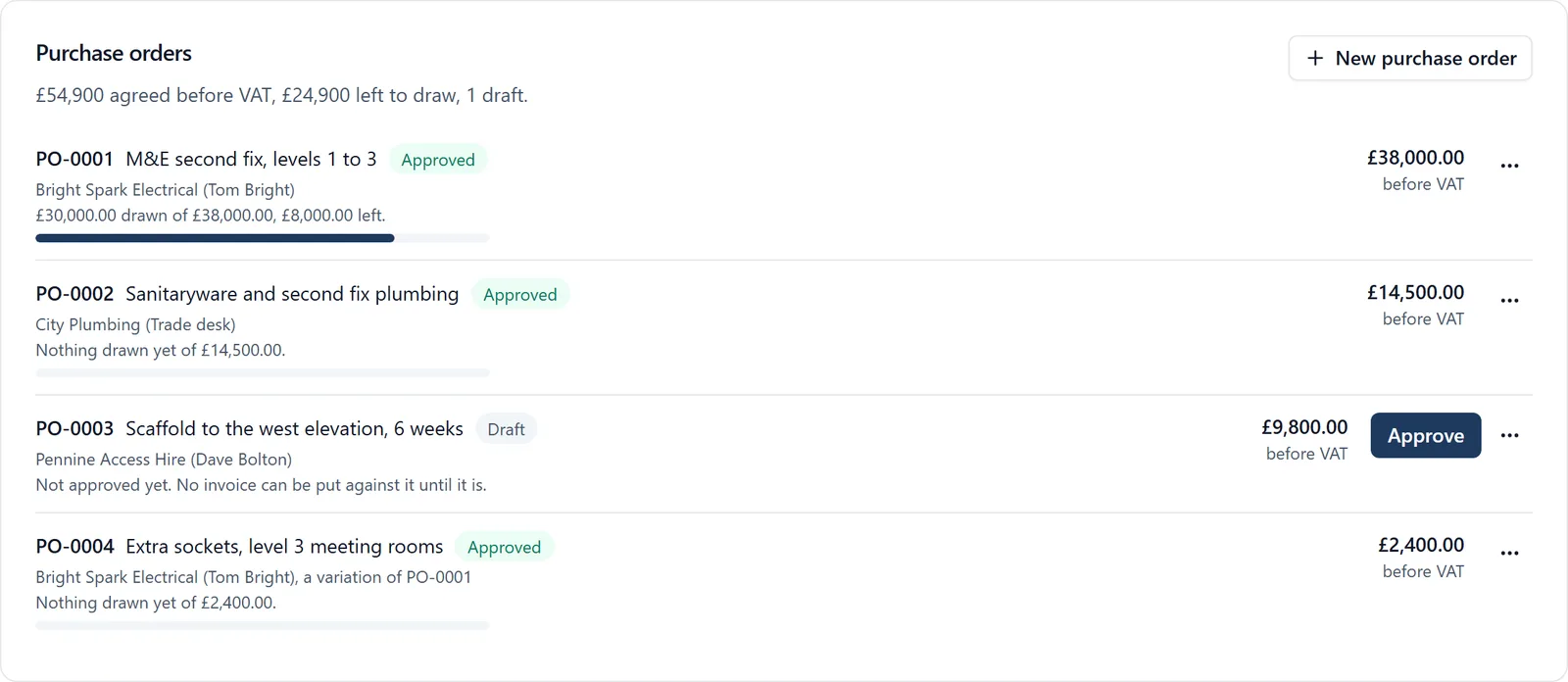
    Raise a purchase order and send it to the supplier, who approves it from a link. Every invoice on it draws it down, and BuildersAI refuses one that would take more than is left.

    The purchase orders on a job: £54,900 agreed, £24,900 left to draw, with each order’s supplier, what has been drawn of it and whether it is approved or a draft
  4. Step 4 of 5

    Add a whole week of invoices at once, with CIS worked out

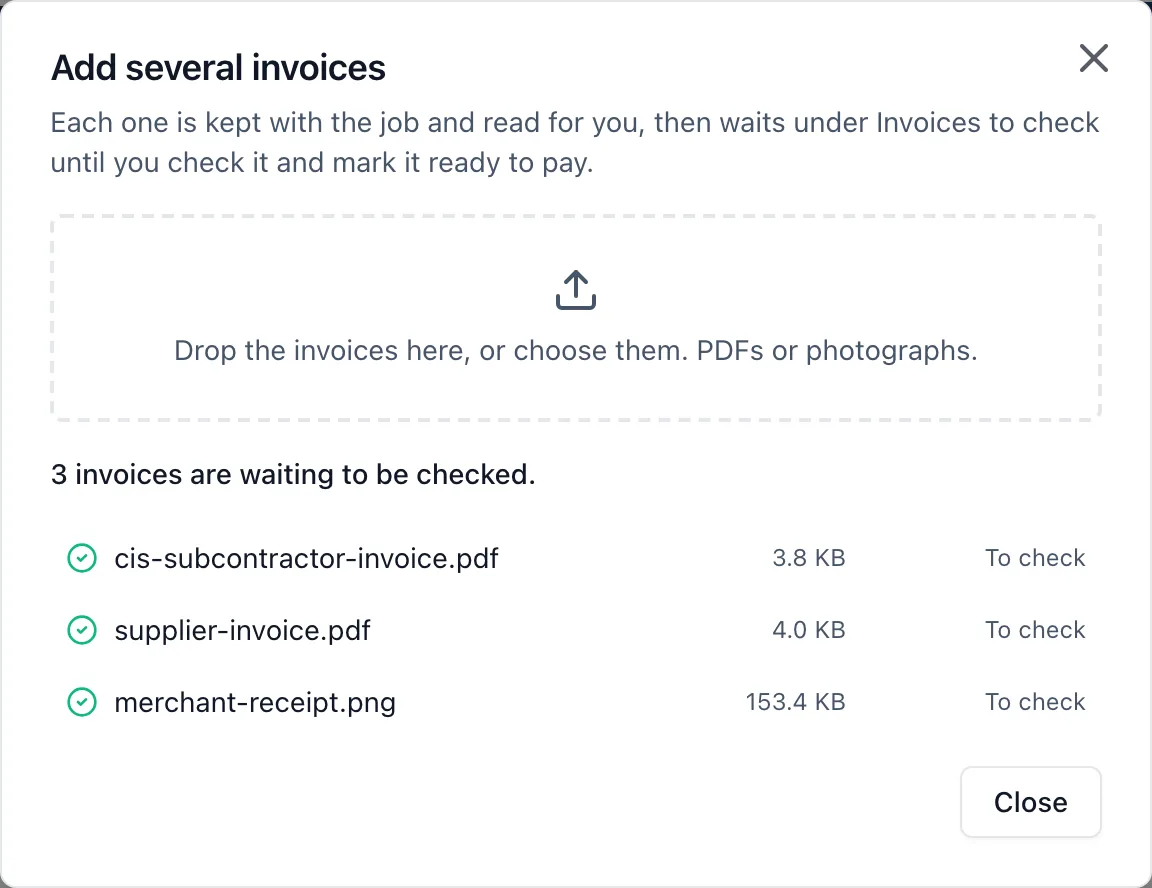
    Drop the week’s PDFs and photos in together. Each one is read for you, filling in the supplier, invoice number, net, VAT, reverse charge and CIS deduction, and waits for you to check it and mark it ready to pay.

    Add several invoices: three dropped in, a CIS subcontractor invoice, a supplier invoice and a merchant receipt, each waiting to be checked
  5. Step 5 of 5

    Invoice the client month by month

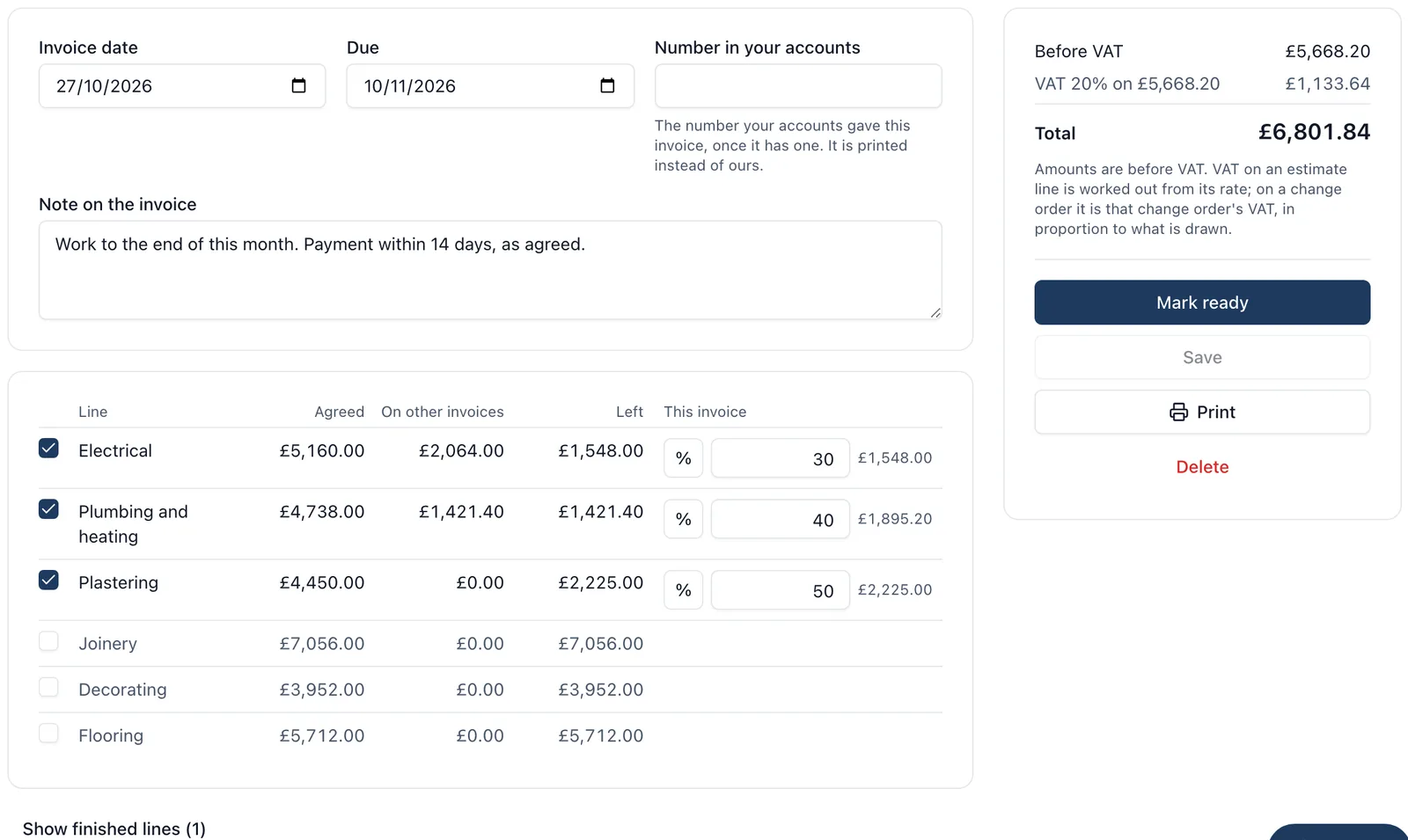
    Tick the lines of the accepted estimate and signed change orders, and draw a percentage or an amount from each. It shows what is agreed, what is on earlier invoices and what is left, so nothing is billed twice.

    An invoice to the client being drawn down: Electrical at 30%, Plumbing and heating at 40% and Plastering at 50%, beside what was agreed, what is on other invoices and what is left, with the total and Mark ready
  6. Also on the money side

    • Labour worked out from time on site and timesheets, at each person’s cost per hour
    • Each cost code’s budget from the estimate, beside what it has cost
    • Change orders the client signs on their phone, adding work or taking it out
    • QuickBooks Online: bills and client invoices sent when you press Send, and payments read back
    • Xero and QuickBooks bill files for anyone not connected
    • The client’s own view of the money, only if you switch it on

Overview

Every live job’s money on one page.

For each job: tasks done and late, the quote, what has been spent, what is still to draw on orders, the forecast margin, what has been invoiced and what the client has paid.

One job on the Overview: Kingsmead Groundworks, 25 of 48 tasks done and 4 late, a quote of £86,400, £31,836 spent, £11,250 still to draw on orders, a forecast margin of £43,314 (50.1%), nothing invoiced yet and £43,200 paid by the client
AI across the whole job 62 tools

SiteBot knows your job, drafts the paperwork and does the reading for you.

It answers from your own drawings, documents, programme and site records, in the web app and on the phone. Before using any of the 18 tools that change something, it reads the change back to you.

Ask it about the job

Questions you would otherwise ring round for

“What’s on today?”
The day in one answer: what is overdue, due and starting, what is not ready, the weather and what would stop work, whose cards are lapsing and who was on site.
“Can the roofers start on Plot 6 on Monday?”
What the work needs done first, and whether it will be there in time.
“Who can drive the telehandler on Thursday?”
Who holds the cards the work needs, whether each is valid or running out, and what they already have on that day.
“If the scaffold slips a week, what moves?”
The whole knock-on chain through the programme.
“What does Approved Document B say about cavity barriers?”
The Building Regulations, every Approved Document, CDM 2015 and health and safety law, searched by meaning.
“What insulation is specified for the loft?”
The specifications pulled out of your own documents.
“Why can’t Dave see the drawings?”
Why an invitation failed or somebody cannot see something, and the fix, set up for you.

It drafts the work

A first draft for you to check, not a blank page

Estimates
Lines worked out from your drawings, priced from your price list and past jobs. Anything it cannot price says Needs a rate rather than a guess.
A programme
Drafted from a description of the job, for you to give dates and check.
Site inductions
Short, plain slides from your company’s wording and the site’s approved RAMS.
Task lists
A whole list in one go, from your job folder or from what you tell it.
The record
Tasks raised, diary entries written, photos filed and comments posted, as you ask.

It does the reading

Working away while you are on site

Supplier invoices
Supplier, number, net, VAT, reverse charge and CIS filled in for you to check.
CSCS and other cards
Photograph a card and its details fill themselves in.
Site photos
Every photo is tagged and described, so you can search by what is in it.
Drawing revisions
When a drawing is reissued, it says what changed.
Documents
Specifications are pulled out of what you upload, ready to search.
Voice notes
Say what happened and it goes in as a task, a snag, a delivery or a diary line.
Photos you send it
Show SiteBot a photo and ask about it.

And if your company already uses Claude, you can connect it to BuildersAI and ask it to do the same, as you.

Connected AI New

Ask your own AI to work on your jobs for you.

If your company uses Claude, connect it to BuildersAI and ask it to read and update your projects for you: the programme, the site, the documents and the money.

It works with any AI app that can add a custom connector (the industry name is MCP), including Claude in the browser, the Claude desktop app and Claude Code. For your company’s owners and admins, once one of them switches it on.

Things you can ask it

  1. 1 “What is overdue on Plot 4?”
  2. 2 “Add a task to chase the scaffolder on Monday”
  3. 3 “Who is on site at the Grain Store today?”
  4. 4 “Draft a purchase order for the scaffold, from the quote in Files”
  5. 5 “Plan next week in the people planner”
  6. 6 “Which invoices are waiting to be checked on Rookery Farm?”

Claude asks you in its own window before it uses a tool, and BuildersAI records every call it makes.

Getting started Set up in a day

Worried about getting your team started? We set it up for you.

Our team, based in Shrewsbury, handles the initial setup for you and supports your whole team with guides, so you are up and running in a day. You speak to the same people who set you up.

1

Request a 30-minute demo

We look at how you run your sites today and show you the app on a job like yours.

2

We set it up for you

Send us your drawings and documents. We set up your first project, upload everything and invite your team.

3

Your team is on site with it

Everyone joins from an email invite, with simple guides for each role. Running the same day, and we are on hand if anyone gets stuck.

Why start today?

Every week without it costs a typical £4M scheme around £2,150.

That is £112,000 over a year on site, lost to time spent looking for information, miscommunication and paperwork.

  • Full access for the whole team for 14 days
  • No card and no contract
  • Set up for you in a day
Pricing + VAT, no per-user fees

Simple pricing, no per-user fees.

One flat monthly rate per organisation, with unlimited sites and everyone on them included.

Starter

£149 /month + VAT

Up to 10 users

Request a demo
Most popular

Professional

£299 /month + VAT

11 to 50 users

Request a demo

Business

£599 /month + VAT

51 to 100 users

Request a demo

For teams over 100 users, request a demo for a tailored quote.

See full pricing details

Our philosophy

Every builder should have access to AI.

AI is only as useful as the information behind it. ChatGPT doesn't know what's happening on your site; BuildersAI does. Because your drawings, documents, photos, tasks and site activity all live in one place, SiteBot answers from your own job, not from the internet. Ask it questions, create tasks by speaking into your phone, and let it take care of the paperwork nobody enjoys.

Meet the team

Daniel Haddon

Daniel Haddon

Chief Technology Officer

Daniel leads engineering. He has spent nearly two decades leading software teams for household names such as Microsoft, JCB, the BBC and Sky. He turns site feedback into shipped features in days rather than months.

William Charlesworth-Jones

William Charlesworth-Jones

Founder & CEO

William grew up in a family that builds houses for a living and has been around construction sites for as long as he can remember. He has seen first hand that eight-figure sites are often run on WhatsApp and spreadsheets, and started BuildersAI to cut the invisible costs that take chunks of margin across a site. His aim is for BuildersAI to be the all-in-one site management platform built in the UK, for UK sites.

Luke Davies

Luke Davies

Construction Director

Luke has worked on construction sites across the globe and sees first-hand how sites operate on a weekly basis. As Construction Director he keeps BuildersAI honest about how sites actually run, shaping the product around real site workflows.

FAQ

Questions we hear.

Quick answers. If yours isn't here, email our team. You get a real reply, the same day.

What does it cost?

Every plan starts with a 14-day free trial, every feature, no card required. Starter £149/month + VAT for up to 10 users. Professional £299/month + VAT for 11 to 50 users. Business £599/month + VAT for 51 to 100 users. No per-user fees. For teams above 100 users, contact us for a tailored quote. One flat monthly fee for your whole organisation, with unlimited sites included. Your plan is set by how many people are on your team. Each person counts once, however many sites they work across.

What happens after I sign up?

You download the app, invite your team and start uploading plans. Most teams are up and running the same afternoon. If anything is unclear, support replies the same day.

Do my workers need to be technical?

No. If they can use the apps already on their phone, they can use BuildersAI. Workers download it, log in and get on with the job.

What about my existing plans, photos and files?

Migration is straightforward. Upload your current plans, photos and certs and the app organises them into the right places. You can keep using existing tools alongside during the transition.

Does it do estimates and invoicing?

Yes. Price a job from your own rates, or have SiteBot draft it from your drawings and past jobs for you to check. The client signs it on their phone and it becomes the quote. Purchase orders, supplier invoices with CIS and month by month invoices to the client follow from it. BuildersAI does not take payments.

Can I use it with Claude or my own AI?

Yes. Your company’s owners and admins can connect Claude, or any AI app that takes a custom connector (MCP), and ask it to read and update your projects. It works as them, and anything that leaves the company waits for them to confirm it.

Does the AI make things up?

SiteBot answers from your own project: your drawings, documents, programme, diary and records, and the Building Regulations and health and safety law it has been given. A drafted estimate marks any line it cannot price as Needs a rate rather than guessing, and before SiteBot changes anything it reads the change back to you.

Does it work offline?

Yes. The app keeps working on site without signal. Photos, tasks and check-ins sync as soon as the phone is back online.

Is my data safe?

All data is encrypted in transit and at rest, stored in EU data centres, and we're registered with the ICO. You own your data and can export it at any time.

Get started

Ready to bring your whole team onto one simple app?

14-day free trial with every feature, no card and no contract, and your team can be set up within a day.