
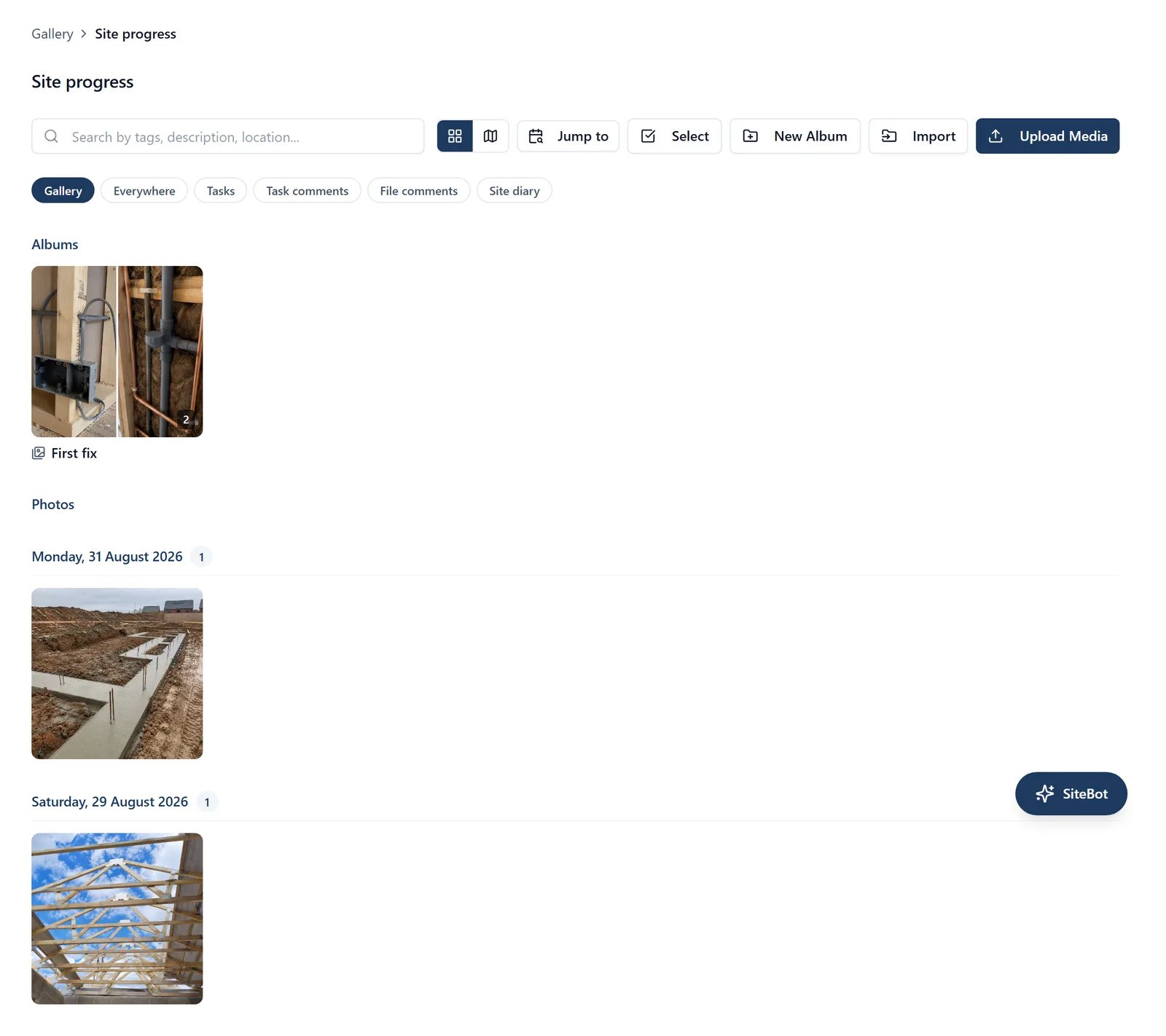
An album is a folder for photos in the project’s Gallery. This topic covers making albums, filing photos into them, and who can see one. Getting to the Gallery, adding photographs and finding them are in the “photos” topic.
What an album is:
- An album is a folder for photos. Albums sit inside each other, so you can have “Plot 5”, with “Kitchen” inside it, and “Snags” inside that
- The main Gallery shows only the photos that are in no album. Filing a photo into an album takes it out of that date list. When somebody says “my photos have gone”, they are nearly always in an album: open it from the Albums row above the photos
- An album card shows up to four of its photos as its cover, with the number it holds in the bottom-right corner
Making one (admins only): In the browser, click New Album in the row of buttons above the photos. On the phone, tap the round + button and choose “New album”. Either way it is made inside whichever album you are looking at, so open the parent first if you want it nested
Opening one: Click or tap an album card. A trail across the top reads “Gallery > Plot 5 > Kitchen”, and every step before the one you are on takes you back
Putting photos in one (admins only): In the browser, click Select above the photos, click the ones you want, then click Add to album. For a single photo, hover over it in the grid and click the picture-with-a-plus icon in its top-right corner. On the phone, press and hold a photo, tap “Select photos”, tap the rest, then tap Add to album (the picture with a plus) at the top. On either, a day’s heading has Select, which takes that whole day in one go. The same picker takes photos back out: choose “Unfiled (no album)” in the browser, or “Remove from album (unfile)” on the phone
Renaming, moving, deleting (admins only): In the browser, hover over an album card and four small round buttons appear in its top-right corner: a padlock (who can see it), a pencil (rename), a folder with an arrow (move) and a bin (delete). On the phone, press and hold the album card for the same list
- Deleting an album never deletes photographs. The album goes, any albums inside it go with it, and every photo they held comes back to the main Gallery unfiled. You cannot lose a picture by tidying up
- Deleting a restricted album does not open its photos up. A photo the album was keeping to Members or Admins keeps that level as its own, so nobody new sees it. To open one up afterwards, an admin sets who can see that photo, one photo at a time
Albums on the map:
- The map is the one view that looks inside the albums. From the top of the Gallery, the map icon pins every photo on the job that has a location, whichever album it is in, so a job with all its photos filed still has a map. In the browser, point at a pin to see which album its photos are in
- Inside an album the map shows the photos filed directly in that album. Photos in the albums inside it are on those albums’ own maps, and on the map at the top of the Gallery
- You only get pins for photos you are allowed to open. An album set to Members or Admins adds nothing to the map of somebody below that level
- A photo with no location cannot be pinned. The line above the map says how many of the photos are on it, and if there are none it says whether that is because there are no photos or because none of them has a location
- Only a photo in the Gallery records where it was taken. So under the Everywhere filter the map is those same photos, counted out of every image on the job, and under Tasks, Task comments, File comments and Site diary there is nothing to pin and the map says so. An image added to a task, a comment or the diary keeps no location of its own
Who can see an album:
- An album’s access level flows down into everything inside it. Set an album to Members or Admins and every album and photo underneath follows, so filing a photo into a restricted album is the quiet way a client stops seeing it. Only an admin can change it. See the “permissions” topic for what the three levels mean
Or just ask me: “How is the gallery split up?” or “File the roof photos into the Roofing album”. If you are an admin I can create, rename, move and delete albums for you, and file photos into them
Who can do what:
- Only admins can create, rename, move or delete an album, file photos into an album, and set who can see an album
- A follower cannot add or change anything in the Gallery, and sees only the photos and albums set to “Everyone”
- If the project’s subscription has lapsed the whole Gallery goes read-only for everybody, albums included. See the “photos” topic