
Business Management
Construction Cost Tracking: Spot Overruns Early
80% of UK construction projects experience cost overruns. Learn how to track costs weekly, spot problems early, and protect your margins on every job.
12 min readBlog / Construction Software
 William Charlesworth-Jones 7 min read
 Quick Answer
The best construction timesheet software for UK SMEs builds the hours automatically from site check-ins. Each person checks in on their own phone when they arrive and checks out when they leave, the timesheet assembles itself across every person and every project, and you export the period for payroll in a format your accountant can import straight into Xero or QuickBooks. No paper, no Friday WhatsApp chase, no retyping. BuildersAI does exactly this, with a 14-day free trial and flat pricing from £149 a month.
Every small building firm in the UK runs the same Friday ritual. The site manager goes round collecting hours: some on paper, some by WhatsApp, some from memory. People who split the week across two or three jobs tot it up in their heads. The office retypes it all into a spreadsheet, the accountant retypes that into payroll, and by Monday somebody is arguing their hours are wrong, with no way to prove anything either way.
None of this is a payroll problem. It is a data collection problem. The hours were real when they happened; they just never got recorded at the time, on the job they belonged to. Construction timesheet software fixes the collection, and everything downstream (payroll, job costing, the Monday argument) gets easier as a result.
This guide covers how digital timesheets work on site, the answer to the question every accountant asks (“can I get this into Xero?”), what geofenced tracking means for the people being tracked, and what the manual version costs a 10-person firm each year. Timesheets are where construction financial management starts: you cannot do proper cost tracking if you do not know who was on which job.
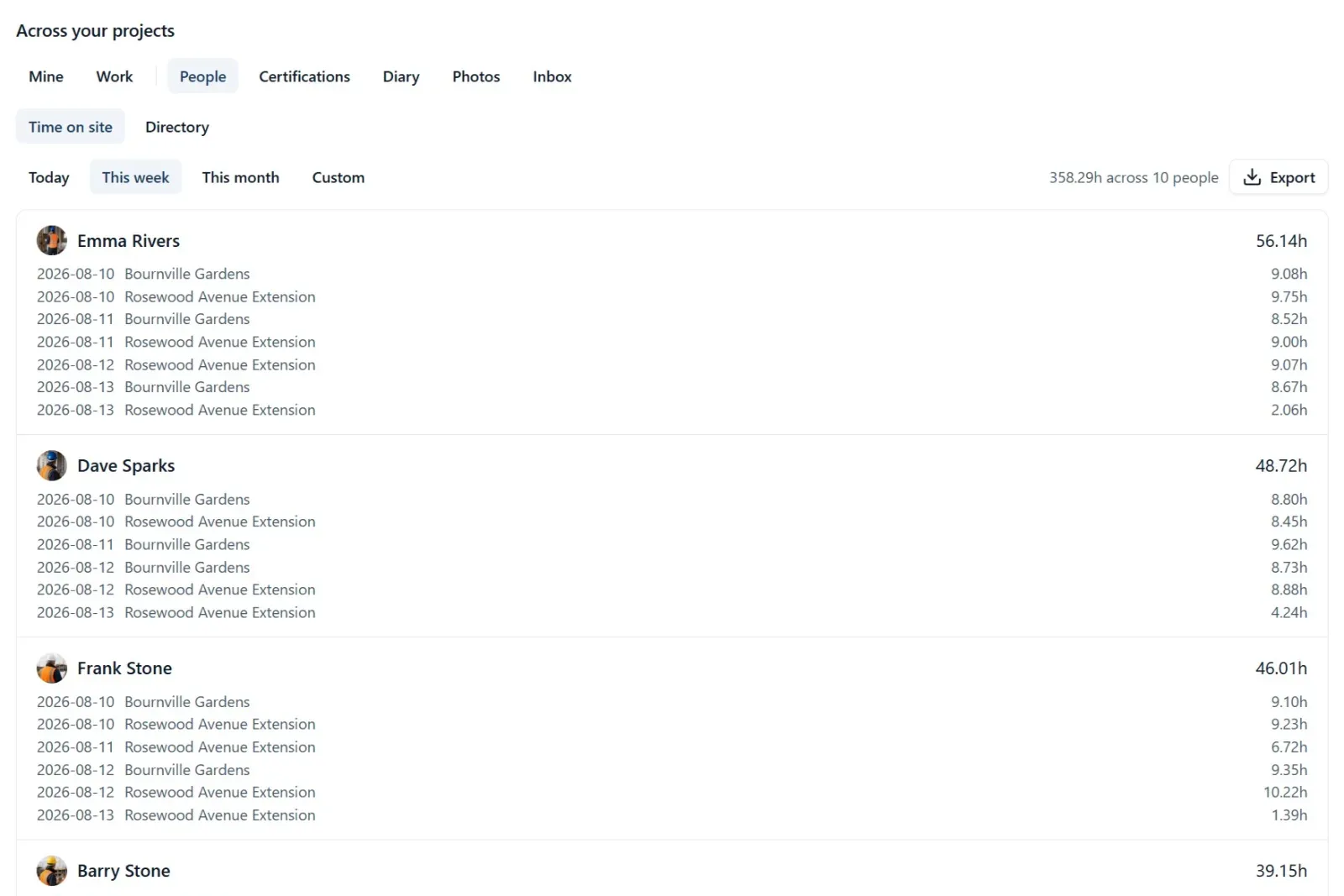
Digital timesheets work by recording time at the source instead of reconstructing it afterwards. Each person checks in on their own phone when they arrive on site and checks out when they leave. That is the entire input. The timesheet is not a form anyone fills in; it is a report the system builds from those check-ins, across every person and every project, automatically.
In BuildersAI it looks like this:
Two practical points matter for construction specifically. First, plenty of UK sites have no signal at the gate, so a check-in made without coverage should sync once signal returns (the offline-first approach we cover in our guide to offline construction apps). Second, it has to handle people moving between jobs, because that is where manual timesheets fall apart: one person on one site is easy on paper, eight people across three sites is a WhatsApp chase.
One more thing to look for: what the software does when somebody forgets to check out. BuildersAI does not guess. A check-in with no check-out counts no time and is flagged for an admin to put right with the time the person actually left, and every correction is logged with who made it and why.
Because check-ins live in the same app as the site diary, drawings, tasks and photos, the time record also tells you who was on site the day something happened, which is occasionally worth more than the payroll saving.
Yes, in the way that actually matters to your accountant: BuildersAI exports the timesheet period as a file formatted to match Xero’s or QuickBooks’ import formats, so the accountant imports it directly instead of retyping anything. Pick the period, pick the format, download, done.
Let’s be precise about what that is and is not, because software marketing is slippery here. This is a formatted export, not a live API connection. BuildersAI does not sync hours into your Xero account in the background. What it removes is the retyping: the step where the accountant takes a spreadsheet (or a photo of a sheet of paper) and keys every line into payroll by hand, introducing errors as they go. The export arrives in the shape the accounting package expects, the import takes minutes, and the numbers that reach payroll are the numbers recorded at the gate.
For most SME builders this is the whole requirement. On demo calls, the question that decides the purchase is rarely about dashboards. It is the office asking: “can my accountant import this straight into Xero?” When the answer is yes, the Friday ritual and the retyping both disappear. We cover what connects to what, and what “integration” claims actually mean, in our guide to construction software and accounting integration.
The export also preserves the project split. Because every hour was recorded against a specific site, you get hours per person per project, not just weekly totals. That is the raw material for job costing: your labour cost per project stops being an estimate and becomes a record.
BuildersAI builds timesheets automatically from site check-ins and exports them formatted for Xero or QuickBooks. See it working with real data in the Bournville Gardens demo project, no setup required.
Geofencing means the phone notices when it crosses a boundary drawn around the site, and records an arrival without a tap. It sounds ideal and works badly: phones decide for themselves when to report where they are, especially indoors, in the background or with battery saving on, so an arrival can be missed, a departure can be recorded late, and a van driving past can look like a visit. That is why BuildersAI does not do it. The tap is the record: each person checks in when they arrive and checks out when they leave, and the check-in reads the phone’s location once, while the app is open, and keeps how far from the site it was made. So the record says where the tap happened as well as when, without the app following anybody around.
The honest conversation to have with your team is about fairness, because “GPS tracking” lands badly if it is introduced carelessly. Two things are worth saying plainly. First, this is site check-in, not surveillance: the record is arrival and departure at a workplace, the same thing a signing-in sheet has always captured, not a live map of anyone’s day. Second, a record made at the time protects the worker at least as much as the employer. Hours totted up from memory get argued about, and in that argument the person on the tools usually loses, because the office holds the spreadsheet. A check-in made at the gate is evidence: the early start the site manager did not see, the Saturday morning that never made it onto the paper sheet, all recorded, all paid. The Monday argument does not get won by either side; it stops existing, because both sides are looking at the same record.
Introduce it that way, saying clearly what is recorded and what is not, and most teams are fine within a week. Introduce it as a monitoring tool and you will deserve the reaction you get.
Be just as clear about whose job the check-in is. It belongs to the person arriving on site, and it is the company’s job to make sure everybody who is expected to check in knows that and knows how. No software can fill in a check-in nobody made.
For a typical 10-person firm, roughly five hours a week, which is worth around £5,000 a year at UK rates. Here is the arithmetic, kept deliberately simple.
Take a 10-person team doing manual timesheets. Each person spends about 15 minutes a week on timesheet admin: writing hours down, remembering which job Thursday morning belonged to, answering the site manager’s Friday chase-up. That is 10 people times 15 minutes, or 2.5 hours a week on site. Then the office side: collecting everything, chasing the gaps, reconciling hours across jobs, and retyping it all for the accountant typically takes 2 to 3 hours a week. Call it 2.5 hours to keep the sums easy.
That is 5 hours a week in total. Over 46 working weeks a year:
Total: about £5,175 a year, for a 10-person firm, spent producing a record that is still wrong often enough to argue about. No studies required; count your own Friday afternoon and check the numbers against your own rates.
Time saved
About 5 hours a week for a typical 10-person firm switching from paper timesheets to phone check-ins
The cash saving is real but the bigger win is that the hours become trustworthy. Labour is the largest cost on most small jobs, and when hours are recorded at the gate against the right project, your cost tracking reflects what actually happened. You find out a job is burning labour in week two instead of at final account.
| Option | Built for | Pricing model | The catch |
|---|---|---|---|
| Paper and spreadsheets | Whatever you make them do | Free | Hours reconstructed from memory, retyped twice, argued about on Monday. |
| BuildersAI | UK site teams, timesheets from check-ins | Flat monthly from £149 | Site coordination with a formatted payroll export, not a full payroll or accounting package. |
| Generic time apps (Clockify and similar) | Office and desk teams | Free tiers, then per user | No site check-in or geofencing; mapping hours to jobs and payroll stays manual. |
| Raken | Daily reporting with time cards | Per user, per month | Strong reports, but priced per user and its defaults lean American. |
For a UK site team the deciding questions are whether it handles people split across sites, works at a gate with no signal, and exports in a format your accountant can import. Generic time apps fail the first two; paper fails all three.
Pick one built for construction rather than generic time tracking: it should handle people split across multiple sites, work offline at the gate, record time against projects, and export in a format your accountant can import into Xero or QuickBooks. BuildersAI does all four, with a 14-day free trial of every feature.
Yes. BuildersAI exports the timesheet period as a file formatted to match Xero’s and QuickBooks’ import formats, so the accountant imports it directly instead of retyping. It is a formatted export rather than a live API sync: hours do not flow into your accounts automatically in the background, but nothing gets keyed in by hand either.
It helps with the record-keeping underneath CIS, stated plainly: accurate hours per subcontractor per project, exported for your accountant. It does not calculate deductions or file CIS returns; that stays with your accountant or CIS software. Reliable hours make their job faster and the numbers defensible. See our guide to CIS compliance software in the UK for the full picture.
Yes, and that is the honest answer for any system. Checking in is a couple of taps on the phone when you arrive, and the time can be set back if you remember late. What BuildersAI adds is a safety net for the gaps: a check-in with no check-out is flagged for an admin to correct with the real time, instead of turning into a guessed number on a Friday.
BuildersAI is flat monthly pricing with no per-user fees within each tier: Starter is £149 a month for up to 10 users, Professional is £299 a month for up to 50, and Business is £599 a month for up to 100. Every plan starts with a 14-day free trial of every feature, no card required. For a 10-person firm, Starter costs less than a third of what manual timesheet admin typically wastes in a year.
See timesheets that build themselves in the Bournville Gardens demo project: check-ins, time on site per person per project, and the payroll export. Then try it on your own site.
14-day free trial. Every feature. No card.
Ready to fix this on your site?
BuildersAI puts drawings, tasks, and updates on every phone on site. 14-day free trial, every feature, no card needed.
William Charlesworth-Jones
Founder, BuildersAI
Founder of BuildersAI with a background in construction and economics. After watching coordination chaos waste hours on every site, he set out to build AI tools that actually work for UK builders.
LinkedInBusiness Management
80% of UK construction projects experience cost overruns. Learn how to track costs weekly, spot problems early, and protect your margins on every job.
12 min readConstruction Software
UK construction firms use an average of 7 different software systems, but 57% report they don't share data. Here's how to fix your accounting integration.
12 min readConstruction Software
CIS compliance doesn't have to mean spreadsheets and stress. The right construction software automates deductions, HMRC verification, and monthly returns, here's how to choose.
8 min readGet started
14-day free trial with every feature, no card and no contract, and your team can be set up within a day.