Construction Scheduling Software UK: Why the Programme Belongs on Every Phone
William Charlesworth-Jones10 min read
Quick Answer
A programme nobody on site can see isn’t really a programme. BuildersAI is the best option for most UK builders and residential developers because it puts the whole thing on every phone, Gantt charts, milestones, dependencies and look-ahead views, next to the tasks, drawings and photos it feeds off. £149 a month for the team, with 14 days free to try it. Asta Powerproject suits professional planners, Microsoft Project is a generic scheduler, and Procore is built and priced for enterprise contractors. Work out who actually needs to read the programme. If that includes the lads doing the work, it has to be on their phones.
Ask a UK builder where the programme is and you usually get one of two answers: an Excel file on someone’s laptop, or a printout pinned to the office wall. Both answers mean the same thing. The people actually doing the work cannot see it.
That is the real scheduling problem on most SME sites. Not that nobody planned, but that the plan lives somewhere the site cannot reach. When a delivery slips or a trade pulls off for three days, the wall chart does not move. The site absorbs the change informally, and the programme quietly becomes fiction.
Construction scheduling software exists to close that gap. This guide covers what it should actually do for a UK team, why dependencies matter more than anything else, and how the main options on the UK market compare.
What Is Construction Scheduling Software?
Construction scheduling software is a tool for building and maintaining the project programme: the sequence of tasks, their durations, their dependencies and their dates, usually shown as a Gantt chart with milestones. It is also called construction programme software in the UK, but the job is the same: turn “we need to be watertight by October” into dated, linked tasks the whole team can see and trust.
The distinction that matters is between scheduling and planning. Planning is the wider discipline of deciding what needs to happen and checking each task is ready before it starts. Scheduling is the dated, sequenced expression of that plan. Good software does both, which is why there is a large overlap with construction planning software more broadly. A tool that only draws the chart is doing half the job.
Is Excel Enough for a Construction Programme?
Excel can draw a programme, but it cannot run one, and the difference shows the first time a date moves. A spreadsheet has no concept of dependencies, so when the groundworks slip a week, nothing downstream moves with them. Someone has to remember every affected trade and shuffle the cells by hand, and on a live project that update happens late or not at all.
Excel programmes fail in three predictable ways:
Nobody on site can see them. The file lives on an office laptop. The version on site, if there is one, is a printout from three weeks ago. Every question about dates becomes a phone call.
Dates do not cascade. Move one task and every linked task stays put. The spreadsheet does not know the plasterer follows the electrician, so it cannot tell either of them anything when the sequence changes.
There is no connection to reality. The spreadsheet cannot see which tasks are done, who checked in today, or what the photos show. It reflects what someone typed, whenever they last typed it.
For a two-week job with one trade, Excel is fine. But the moment a project has multiple trades whose work depends on each other, the programme needs to be a living thing, and a spreadsheet is not one.
The one-sentence test
If a date changes on your programme, does everyone affected find out without a phone call? If the answer is no, you have a drawing of a programme, not a programme.
What Should Construction Scheduling Software Do?
Good construction scheduling software does four things: a Gantt chart with milestones, dependencies so changes cascade, a short-range look-ahead view, and a programme readable on a phone by every person on the job. Everything else is secondary.
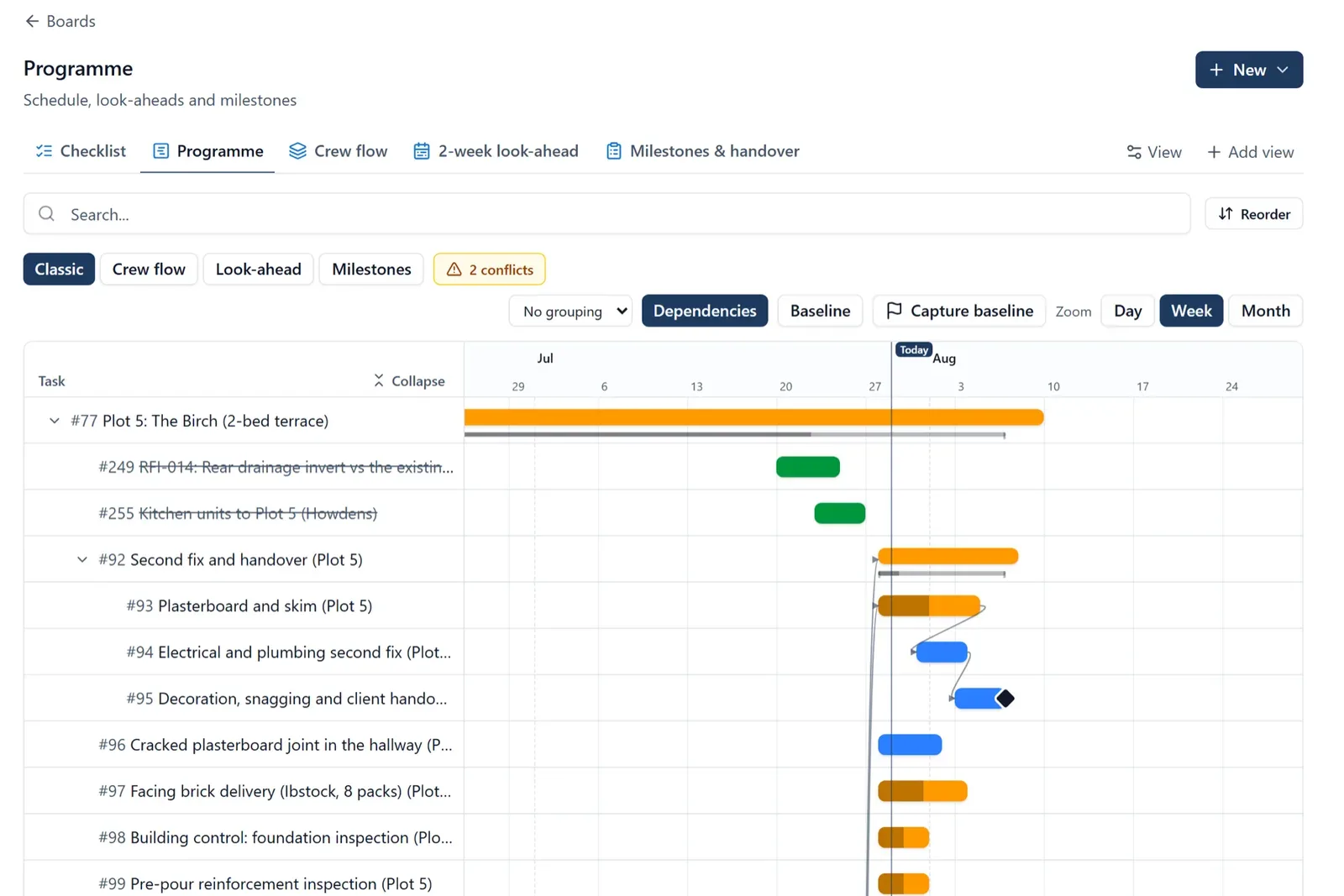
A proper Gantt chart with milestones. The full programme, from groundworks to handover, with the milestones the client and the bank care about. This is the strategic view: it answers “are we on track for October?”
Dependencies between tasks. Tasks linked in sequence, so the software knows the first fix cannot start until the frame is up. This is what makes the programme resilient to change, and it gets its own section below because it is the feature most tools on site are missing.
A look-ahead view. Nobody on the tools reads a six-month Gantt chart. They need the next one to three weeks, filtered to what concerns them. This is where the programme meets short-interval planning, the weekly discipline that decides whether the plan survives contact with the site.
The programme on every phone. This is the one UK SMEs get burned on most. Plenty of software produces a beautiful programme only a planner with a desktop licence can open. If the subbie leading the roofing gang cannot see his dates on his own phone, the programme will be communicated by text message, and it will drift.
Beyond the core four, scheduling works better when it lives next to the rest of the site’s information: tasks and snagging, current drawings, progress photos, and a record of who was on site. That is the argument for handling scheduling inside a wider construction project management platform rather than as a standalone tool.
BuildersAI solution:
BuildersAI puts the full programme, with Gantt charts, milestones, dependencies and look-ahead views, on every phone on site. Flat monthly pricing, 14-day free trial with every feature, no card required.
Which Construction Scheduling Software Is Best for UK Teams?
There is no single best tool: it depends on who maintains the programme. Here is a straight view of the main options a UK builder will come across.
BuildersAI is built for UK SME builders and residential developers. The whole programme, Gantt charts, milestones, dependencies and look-ahead views, on every phone, next to the tasks, drawings, photos and diary it feeds off. It’s one monthly fee, not per head, so putting every trade on the programme costs you nothing extra. It won’t replace a professional planning department and it doesn’t export Powerproject files.
Asta Powerproject is what professional planners use. The scheduling engine is deep and tier-one contractors expect programmes in its format, so if your clients ask for Powerproject files you haven’t really got a choice. The catch is that it assumes somebody whose actual job is planning, and the site only ever sees whatever that person exports.
Microsoft Project is a capable generic scheduler that many builders inherit because the office already has Microsoft licences. It does Gantt charts and dependencies well, but it knows nothing about construction or site life, and the programme lives with whoever owns the licence, not with the site.
Procore is an enterprise construction platform with scheduling as part of a much larger suite. It is genuinely powerful, and genuinely built for large contractors: pricing is sales-led rather than published, and the implementation effort suits businesses with a team to run it.
Fieldwire is a solid field-focused tool with scheduling and task management that site teams can actually use. Its pricing is per user, which is workable for a small crew and adds up quickly on a project with many trades and subcontractors.
Tool
Built for
Pricing model
Programme on site phones?
BuildersAI
UK SME builders and developers
Flat monthly from £149
Yes, every phone, no per-user fees
Asta Powerproject
Professional planners
Per-planner licences
Limited, planner-centric
Microsoft Project
Generic scheduling, any industry
Per-user licences
Not designed for site use
Procore
Enterprise contractors
Sales-led, custom quotes
Yes, within a heavyweight suite
Fieldwire
Field task management
Per user, per month
Yes, task-focused
The fair summary: if you employ a planner and your clients demand Powerproject files, use Powerproject. If you are a large contractor, Procore will suit how you buy software. If your programme currently lives in Excel or on the wall, the biggest single win is getting a dependency-aware programme onto every phone on site, and that is the problem BuildersAI is built around.
Why Do Dependencies Matter So Much?
Dependencies matter because dates on a construction site never fail alone. When the steel arrives a week late, it is not one task that moves: it is the frame, then the roof, then the first fix, then every trade behind them. A programme that understands dependencies moves all of that downstream work the moment you move the first date. A programme that does not, which includes every spreadsheet and wall chart, silently goes wrong in a dozen places at once.
This is the killer feature, and it is worth being concrete about what it changes day to day:
Replanning takes minutes, not an evening. Drag the delayed task and the linked work moves with it. The knock-on effect on the completion date is visible immediately, while there is still time to act.
The trade’s view of the programme updates the moment the date moves. When the electrician’s start date shifts, so does what he sees when he opens the programme. Nobody has to remember to ring him, and he does not turn up to a plot that is not ready.
The programme stays honest. Because updating it is cheap, it actually gets updated. Programmes rot when reflecting one real-world change means an hour of manual shuffling, so it gets deferred, and then deferred again.
Conversations change. “Can we pull the kitchens forward a week?” stops being a guess. You move the task, see what it collides with, and decide with the consequences in front of you.
Professional planning tools have had dependency logic for decades; what has changed is that it no longer requires a planner and a desktop licence. The test for any scheduling tool is simple: move one date and watch what happens to the rest of the programme. If the answer is nothing, keep looking.
How Do Sites Actually Use a Programme Week to Week?
Sites do not run off the master programme; they run off the next two weeks of it. The full Gantt chart gets a serious look at the monthly client meeting, but the working rhythm of a site is the look-ahead: which tasks are due in the window, whether each one is genuinely ready, and what has to be chased now.
The weekly rhythm looks like this. Early in the week, the site manager takes the next one to three weeks of the programme and turns it into specifics: named tasks, assigned trades, and a check that each task has its drawings, materials, labour and access. Slipped work gets moved, and because of dependencies, the downstream effect is visible straight away. Through the week, tasks get ticked off as they finish, and the look-ahead quietly becomes a record of what actually happened.
Two things make this work in software rather than on a whiteboard. The look-ahead must be a view of the real programme, not a separate document, or the two drift apart within a fortnight. And it must be on the phones of the people doing the work, because a look-ahead the trades cannot see is just the site manager’s private to-do list. We cover the routine itself in our guide to look-ahead planning software; the short version is that the master programme sets direction and the look-ahead is the steering.
How BuildersAI Handles Scheduling
BuildersAI treats the programme as something the whole site uses, not a document the office maintains. The scheduling side gives you:
Gantt charts and milestones for the full programme, visible to everyone on the project rather than one licence holder.
Dependencies, so when one job moves, the linked work moves with it and every affected trade sees their new dates without a phone call.
Look-ahead views for the one-to-three-week window sites actually work to, fed directly from the real programme.
The rest of the site’s information in the same app: project boards for tasks, snagging, inspections, RFIs and deliveries; drawings with revision control that work offline; geo-tagged site photos; and a site diary that builds itself from photos, tasks, check-ins and weather, with records kept for seven years.
SiteBot, the AI assistant, which answers programme and project questions from your own tasks, drawings, files and diary, and checks with you before changing anything.
Because the programme sits next to the work itself, it stays current without a weekly admin session. And because pricing is flat, from £149 per month for up to 10 users, adding every subcontractor costs nothing extra.
Construction scheduling software at a glance
BuildersAI Starter plan£149/month, up to 10 users
Professional plan£299/month, up to 50 users
Business plan£599/month, up to 100 users
Free trial14 days, every feature, no card
FAQ
What is the best construction scheduling software in the UK?
For most UK builders, BuildersAI: Gantt charts, dependencies, milestones and look-ahead views on every phone on site, £149 a month for the team, 14 days free to try. Asta Powerproject is what professional planners use and the right answer if clients want programmes in its format. Microsoft Project is a generic scheduler. Procore is built and priced for enterprise contractors. It comes down to who has to read the programme, and if that includes the people doing the work, it has to be on their phones.
What is the difference between construction planning and scheduling software?
Scheduling software builds the dated, sequenced programme: tasks, durations, dependencies and milestones, usually as a Gantt chart. Planning software covers the wider discipline of deciding what work needs to happen and checking each task is ready, including routines like look-ahead planning. The best tools do both, because a schedule nobody checks for readiness and a plan with no dates are each half a system.
How much does construction scheduling software cost UK?
Per-user tools like Fieldwire charge per person per month, so the price grows with your team, and enterprise platforms like Procore quote through a sales process. BuildersAI uses flat monthly pricing: Starter at £149 per month for up to 10 users, Professional at £299 for up to 50, and Business at £599 for up to 100, with a 14-day free trial that includes every feature and needs no card.
Is Excel good enough for a construction programme?
Excel can draw a programme but cannot maintain one on a live project. It has no dependencies, so a slipped date does not move downstream work, it cannot notify trades when dates change, and the file lives in the office rather than on site. For anything with multiple interdependent trades, it goes out of date within weeks.
What are dependencies in a construction programme?
Dependencies are the links between tasks that define their sequence: plastering follows first fix, first fix follows the frame. In software, moving one task automatically moves everything linked to it, so a one-week slip in groundworks reschedules the downstream trades in seconds and everyone sees their new dates. They are the difference between a programme and a picture of one.
Can my subcontractors see the programme without extra licence costs?
With per-user pricing, every subcontractor added costs more, which quietly discourages sharing the programme with the people who need it most. BuildersAI charges a flat monthly rate rather than per user, with role-based permissions to control what each person can see and do, so putting every trade on the programme costs nothing extra.
See a real programme with dependencies and look-ahead views
Explore a demo project, the Bournville Gardens site, with a full programme, linked tasks and look-ahead views already set up, or start a 14-day free trial with every feature and no card required.
Founder of BuildersAI with a background in construction and economics. After watching coordination chaos waste hours on every site, he set out to build AI tools that actually work for UK builders.
The best look-ahead planning tool is the one your trades actually see. Here are six honest options for UK sites, from the whiteboard to enterprise planning suites, and how to choose between them.
The master programme says what should happen this quarter. Short-interval planning is how good sites decide what actually happens this week, and it is the single biggest difference between sites that flow and sites that firefight.
Compare construction planning software for UK builders. Learn the difference between lookahead planning and master scheduling, and which tools trades actually check on site.
10 min read
Get started
Ready to bring your whole team onto
one simple app?
14-day free trial with every feature, no card and no contract, and your team can be set up
within a day.