

Construction Technology
Offline Construction Apps: Why Connectivity Fails
Most mobile-first construction apps fail the moment WiFi drops. True offline construction apps work differently.
14 min readBlog / Health and Safety
 William Charlesworth-Jones 7 min read
 Quick Answer
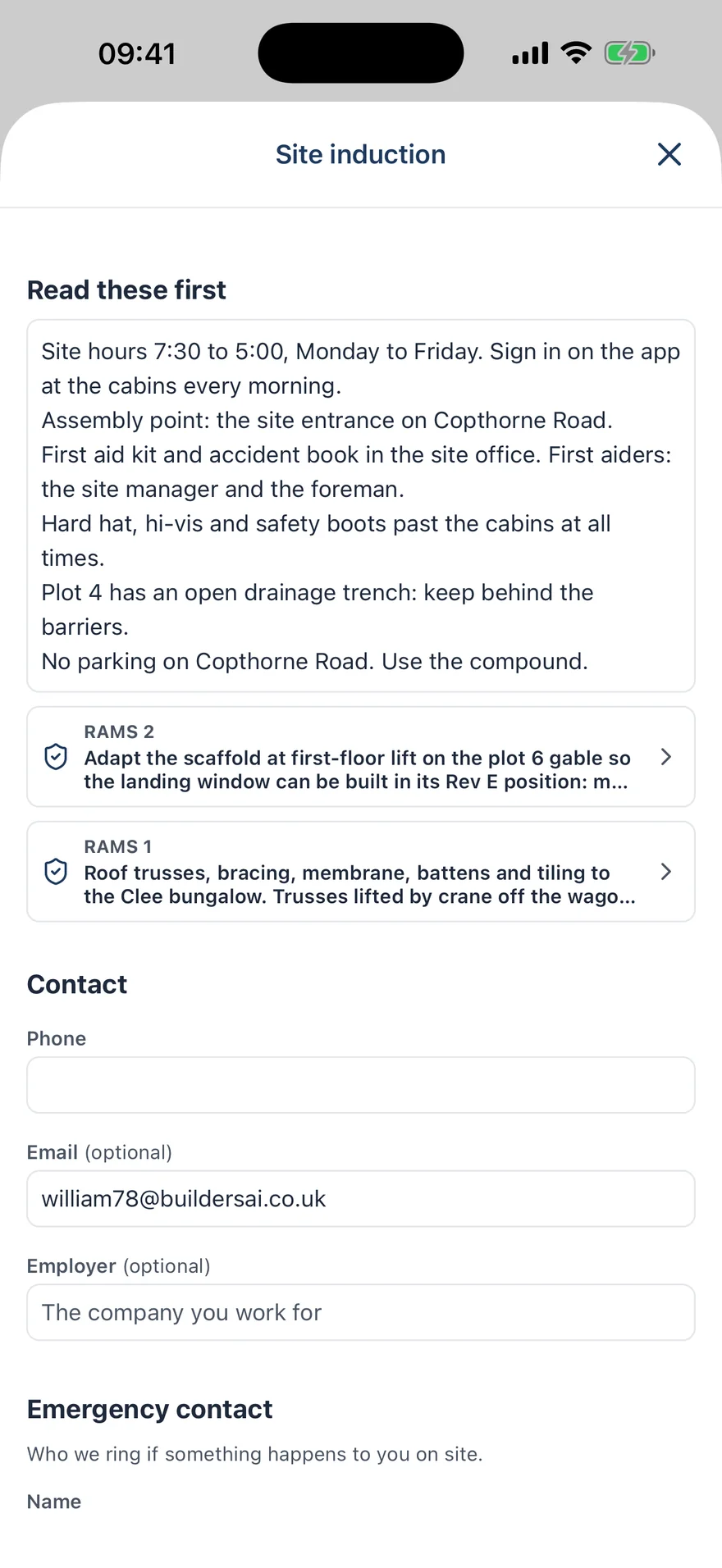
A UK building site needs two records: a signed induction for everybody who works there, and a register of who is on site today, visitors included. The induction covers the site rules, hours, welfare, assembly point, first aid, PPE, current hazards and the RAMS to read, and it collects an emergency contact and the person’s cards and qualifications. A digital site induction is that same form filled in and signed on the person’s own phone, then checked by the site manager. QR sign-in is a poster at the gate that people scan to check in, or that visitors scan to sign themselves in and out without an app.
Most small sites already do inductions. The trouble is where the record ends up: in a folder in the cabin, half filled in, with nobody in the office able to say who has not done one. The visitor book sits next to it, and the delivery driver walked straight past it.
This is practical guidance from a software company, not legal advice. For the wider picture, see our guide to construction site safety in the UK.
A site induction tells somebody what they need to know about this particular site before they start work on it, and it gives you what you need to know about them. Under CDM 2015 the principal contractor has a duty to make sure a suitable site induction is provided. On a job with only one contractor, that contractor is responsible for telling their people about the site.
A normal induction covers:
Then it collects from the person: a phone number, who they work for, an emergency contact, the skills card they hold with its number and expiry date, and the qualifications that matter for their work, such as SSSTS, IPAF or PASMA. It ends with a signature saying they have read both.
Everybody who works on the site, before they start. That means your own new starters and every subbie’s operative, including the one who is only there for a day. A subbie inducted on your last job still needs one for this job, because the hazards and the RAMS are different.
Visitors are a different case. The client walking round, building control and a delivery driver are not there to do construction work, and somebody is usually with them. What a visitor needs is proportionate to that: where to report, the assembly point, what PPE to wear, who is hosting them. So a site runs two things side by side: a full induction for the people working there and a visitor register for everybody else.
You want to be able to answer four questions without going to the cabin:
The first two matter when somebody asks you to show that an induction happened. The third matters on the worst day of the job, when the form is locked in the cabin. The fourth is the roll call at the assembly point, and it has to include the building control officer who arrived twenty minutes ago.
Paper struggles with all four. Forms are half filled in, an induction can be altered or backdated without anybody knowing, and there is no list of the people who have not done one, because a missing form does not show up anywhere. How long to keep the records depends on your own circumstances, so ask your health and safety adviser instead of taking a number from a blog.
A QR code is a web address printed as a pattern. You fix a poster at the gate or on the cabin door, somebody points their phone camera at it, and the phone opens a page. For a member of the crew, that page checks them in to the site. For a visitor, it shows the site’s rules for visitors and a short form to sign in, and they scan the same poster again to sign out when they leave.
It puts the register where people walk past, on the phone they already carry. It also has limits worth knowing before you rely on it:
No signal. Plenty of cabins have no bars. The form should save on the phone and send itself when signal comes back, which we cover in our guide to offline construction apps.
People without the app. Your regular crew will have it. A new starter turning up on Monday will not, so check how they get from the gate to a completed induction, and who decides whether they are let on to the project.
Privacy. An induction holds the person’s phone number and their emergency contact’s. The whole team should not be able to read that. Check who can see an induction and how long visitors’ details are kept.
Whether a signed record can be edited. If anybody can change an induction after it is signed, it proves very little.
BuildersAI is the all-in-one site management app for UK builders. Inductions and the visitor register sit in the same app as the drawings, the tasks and the RAMS.
Checking in is always a deliberate tap by the person themselves. It records how far from the site the check-in was made, not where that person is, and nothing happens in the background. If a poster gets out, an admin withdraws it and it signs nobody new in.
Visitors’ names, companies and phone numbers are removed after 90 days by default, while the record that the visit happened is kept. If there is no signal at the gate, anybody on the job can sign a visitor in from the app, which works offline. The steps are in the Help Centre under site inductions and the visitor register, and the visitor register, site inductions and site poster pages covers the roll call.
Under CDM 2015 the principal contractor has a duty to make sure a suitable site induction is provided to people working on the site. What suits your site depends on the job and its risks, so check the HSE’s guidance or ask your health and safety adviser.
Usually not the same one as the people working there. An escorted visitor needs what is relevant to their visit: where to report, the assembly point, the PPE to wear and who is hosting them. Sign them in and out so they are on the roll call.
Not on its own. A QR code is a web address, and a photograph of the poster can be scanned from anywhere. In BuildersAI a crew check-in records how far from the site it was made, and a poster can be withdrawn.
In BuildersAI inductions and the visitor register are part of the whole app, at a flat price with no per-user fees: Starter is £149 a month for up to 10 users, Professional is £299 a month for 11 to 50 and Business is £599 a month for 51 to 100. Prices exclude VAT, and every plan starts with a 14-day free trial with no card. Visitors do not take up a user seat. See pricing.
See a signed induction, the site poster and the visitor roll call on a demo project, then try it on your own site.
14-day free trial. Every feature. No card.
Ready to fix this on your site?
BuildersAI puts drawings, tasks, and updates on every phone on site. 14-day free trial, every feature, no card needed.
William Charlesworth-Jones
Founder, BuildersAI
William grew up in a family that builds houses for a living and has been around construction sites for as long as he can remember. He has seen first hand that eight-figure sites are often run on WhatsApp and spreadsheets, and started BuildersAI to cut the invisible costs that take chunks of margin across a site. His aim is for BuildersAI to be the all-in-one site management platform built in the UK, for UK sites.
LinkedInConstruction Technology
Most mobile-first construction apps fail the moment WiFi drops. True offline construction apps work differently.
14 min readProject Management
Master multi-trade coordination with practical strategies for UK main contractors. From communication systems and compliance tracking to payment processes and software selection.
12 min readHealth and Safety
Construction remains one of the most dangerous industries in the UK. This guide covers everything site managers need to know about construction site safety, from legal requirements to practical daily implementation.
18 min readGet started
14-day free trial with every feature, no card and no contract, and your team can be set up within a day.


